Loading Design... please wait.।
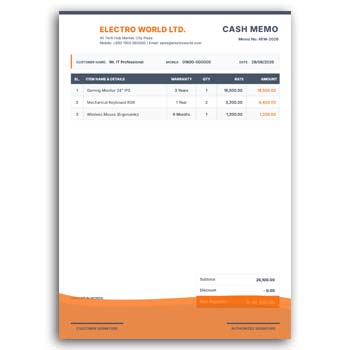
Electronics Items Cash Memo Template Design Editable Free Download
A cash memo is a useful document for recording the sale of products and providing customers with a clear summary of their purchase. For electronics businesses, it can be especially helpful because a single transaction may include different products, models, quantities, prices, and warranty-related information.
The Electronics Items Cash Memo Template Design Editable Free Download provides a ready structure that can be customized for electronics shops, retailers, wholesalers, distributors, and technology businesses. Instead of creating a sales document from scratch, you can update the available fields with your business and transaction details.
Key Features
- ✓ Add electronics product names and model numbers
- ✓ Enter customer and seller information
- ✓ Update quantity and unit price
- ✓ Calculate or display item totals
- ✓ Add company or shop logo
- ✓ Customize available text and colors
- ✓ Include discount and additional charges
- ✓ Add payment and transaction details
- ✓ Mention warranty information when required
- ✓ Reuse the design for regular sales
What Is an Electronics Cash Memo?
An electronics cash memo is a sales document used to record the details of an electronic product transaction. It can show what was purchased, how many units were sold, the price, and the total amount payable or paid.
Depending on the business, the memo may also contain model numbers, serial numbers, warranty information, customer details, and payment references. The exact information can be adjusted according to the seller’s record-keeping needs.
Why Use an Editable Cash Memo?
Preparing a new sales document for every customer can take time when the same business information and layout are used repeatedly. An editable template keeps the basic structure ready for regular transactions.
You only need to update the relevant product and customer information. This makes everyday sales documentation more convenient while keeping the appearance consistent.
Benefits and Limitations
| Benefits | Limitations |
|---|---|
| ✓ Speeds up routine sales documentation | • Product and price information must be entered correctly |
| ✓ Makes electronics transactions easier to organize | • Manual calculations should be checked |
| ✓ Reusable for different customers | • It does not automatically manage inventory |
| ✓ Supports business branding | • Warranty conditions may vary by product |
| ✓ Can include model and product details | • Complex transactions may need additional records |
| ✓ Useful for printed or digital records | • A template does not replace accounting software |
List Electronics Products Clearly
An electronics sale may include several products in one transaction. A structured item table can make the memo easier to understand by separating product names, quantities, prices, and totals.
You can include products such as smartphones, laptops, monitors, printers, routers, cameras, speakers, cables, accessories, or other electronic equipment. The item list can be changed according to your store’s inventory.
Include Model Numbers
Model numbers can be important when selling electronics because similar products may have different specifications or prices. Adding the correct model number gives the customer and seller a clearer transaction reference.
For higher-value equipment, businesses may also maintain serial numbers separately or include them when the format allows. Always verify these details before finalizing the sales document.
Show Quantity and Price
The cash memo should clearly indicate how many units were sold and the applicable price. If multiple products are included, showing each item’s amount separately makes the final calculation easier to review.
Discounts, delivery charges, taxes, or other applicable costs can also be displayed separately. Clear pricing reduces confusion between the seller and customer.
Add Customer Details
Customer information can be useful for electronics purchases, particularly when warranty or after-sales support is involved. Depending on your business process, you may record the customer’s name, phone number, address, or email.
Only collect information that is necessary for your sales and support process. Keep customer records appropriately protected.
Use Your Shop or Company Branding
Adding your business name, logo, contact number, website, and address can make the cash memo immediately recognizable. It also provides customers with useful contact information after the purchase.
Consistent branding across your cash memo, invoice, quotation, and other business documents can create a more professional identity.
Related Invoice Resources
Some electronics businesses use cash memos for everyday retail sales while also maintaining formal invoice records. An Invoice Template Generator can be useful when you need a structured invoice document.
For a traditional document layout, you can explore this Invoice Bill Format Template and adapt it to your business requirements.
Businesses selling through Shopify may also find a Shopify Invoice Creator useful for invoice-related workflows.
Add Warranty Information
Electronics products frequently come with manufacturer or seller warranties. A cash memo can provide a convenient place to mention basic warranty information when it is relevant to the transaction.
If warranty terms differ between products, make the information specific to the applicable item. Avoid making warranty promises that are not supported by the actual seller or manufacturer policy.
Record the Transaction Date
The sale date provides an important reference for both the business and customer. It can help identify when the product was purchased and may be relevant for warranty or return-related processes.
A unique memo or receipt number can also help the business locate a particular transaction later. Keeping these references organized can improve customer support.
Payment Information
A cash memo may indicate the amount received and the payment method, depending on the business’s requirements. For example, a store may record cash, card, bank transfer, mobile payment, or another accepted method.
If the customer has made only a partial payment, the document should clearly reflect the relevant amount and balance where applicable. Accurate payment information helps avoid disputes.
Useful for Electronics Retailers
Electronics shops can use an editable cash memo for daily retail transactions. The same format can be adapted for computers, accessories, networking products, home appliances, mobile devices, and other electronic goods.
Wholesalers and distributors can also customize the structure for larger product orders. The appropriate fields depend on the scale and nature of the business.
Keep Product Information Accurate
A cash memo is a record of a real transaction, so incorrect product information can create problems later. Check product names, model numbers, quantities, prices, discounts, and totals before completing the document.
For products with serial numbers or warranty coverage, verify those details carefully. Accuracy is particularly important when customers may need the document for future service or warranty claims.
Printed and Digital Use
A cash memo can be useful as a printed document at a physical electronics shop. A digital version may also be shared with customers through email or messaging platforms.
Choose the format that works best for your sales process. Before distributing the final document, check that all important information is clearly readable.
Cash Memo vs Invoice
Cash memos and invoices can have overlapping information, but businesses may use them differently depending on their sales and accounting practices. A cash memo is often used as a record or acknowledgment of a sale, while an invoice commonly documents an amount due or payable.
The exact legal and accounting requirements can vary by country and business type. For general information about invoices, you can explore Invoice on Wikipedia.
Design a Clear Sales Document
An effective electronics cash memo should prioritize transaction information over unnecessary decoration. Product names, model numbers, quantities, prices, totals, and customer information should be easy to locate.
Good spacing and readable typography can make the document more practical for both sellers and customers. For additional document design ideas, you can explore Business Document Templates.
Simple Editing Workflow
Start by entering your shop or company information and adding the logo. Then fill in the customer details and replace the sample products with the actual electronics sold.
Enter model numbers, quantities, prices, discounts, warranty information, payment details, and totals as required. Review everything carefully before issuing the final cash memo.
Keep a Master Template
If your electronics business processes many sales, maintaining a master copy can save time. Keep the original template unchanged and create a new copy for each transaction or batch of transactions.
This approach reduces accidental changes to the main design. It also helps maintain a consistent appearance across your sales documents.
Who Can Use This Template?
Electronics retailers, computer shops, mobile stores, technology suppliers, wholesalers, distributors, networking equipment sellers, and accessory shops can adapt this cash memo format.
Small businesses can also use it as a simple way to organize transaction documentation. The editable structure makes it suitable for different types of electronics products.
Final Thoughts
The Electronics Items Cash Memo Template Design Editable Free Download offers a practical foundation for preparing organized sales records for electronic products. It allows businesses to customize product details, model numbers, quantities, prices, customer information, branding, warranty details, and payment information.
A reusable cash memo format can make daily sales documentation faster and more consistent. Always check the product information, calculations, payment details, and warranty information before providing the completed document to a customer.
4 Comments
4 Pingbacks