Loading Design... please wait.।
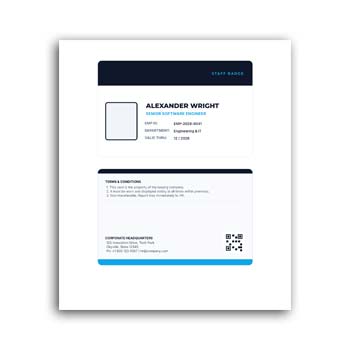
Company ID Card Template Editable Download
A company ID card is an important identification tool for employees working in an organization. It can display essential information such as an employee’s name, designation, department, ID number, photograph, and company details in a compact and professional format.
A Company ID Card Template Editable Download provides a ready-made layout that can be customized for your organization. Instead of designing every employee card from scratch, you can update the required information, add your branding, and prepare a consistent ID card design for your team.
Why This Template Can Be Useful
- ✓ Add employee name and designation
- ✓ Include employee photograph
- ✓ Add employee ID or staff number
- ✓ Enter department and contact details
- ✓ Upload company logo and branding
- ✓ Customize available text and colors
- ✓ Create consistent cards for different employees
- ✓ Reuse the design for new staff members
- ✓ Suitable for professional workplace identification
What Is a Company ID Card?
A company ID card is generally issued to employees or authorized personnel for identification within or around a workplace. It can help colleagues, visitors, security staff, and other authorized individuals recognize members of an organization.
The exact information shown on an ID card depends on the company’s requirements. Some organizations may include only basic identification, while others may add department, employee number, joining date, emergency contact, or access-related information.
Build a Consistent Employee Identity
When every employee has a card following the same visual structure, the organization can maintain a more consistent appearance. The company logo, colors, typography, and information hierarchy can remain similar across all employee cards.
An editable template makes this process easier because the main design does not have to be recreated for every employee. Only the individual information needs to be updated.
Advantages and Limitations
| Advantages | Limitations |
|---|---|
| ✓ Saves time when creating multiple employee cards | • Employee information must be entered accurately |
| ✓ Maintains a consistent company identity | • Physical cards can be lost or damaged |
| ✓ Easy to customize for different employees | • Some workplaces require specialized security features |
| ✓ Can include photos and identification numbers | • Template dimensions may need adjustment |
| ✓ Reusable for future staff members | • Printing quality depends on the selected material |
| ✓ Suitable for office and workplace use | • An ID card alone may not provide secure access control |
Add Employee Information
The employee’s name is usually one of the most visible elements on an ID card. You can also include designation, department, employee ID, phone number, email, or other information that is appropriate for workplace identification.
The amount of information should be carefully considered. Too many details can make a small card crowded and difficult to read.
Include an Employee Photo
A photograph can make an ID card easier to use for visual identification. The photo should be clear and positioned consistently across cards.
When preparing cards for multiple employees, using similar photo dimensions and placement can create a more professional overall result.
Add Company Branding
The company logo is an important part of a corporate ID card. You can add your organization’s logo and, where supported, adjust the design to match your brand colors and visual style.
Consistent branding can help connect the ID card with other company materials. It also gives the card a more recognizable professional appearance.
Different Departments, Same Design
Large organizations may have employees working across several departments. You can include department names while keeping the overall ID card design consistent.
This makes it possible to identify both the employee and their organizational role. If needed, different visual indicators can be used for separate departments without changing the entire design.
Useful for New Employees
Creating ID cards is often part of the onboarding process. A reusable editable template can make it easier to prepare a card whenever a new employee joins the organization.
The master design can remain unchanged while the new employee’s details and photograph are added. This reduces the need to start the design process again.
Related Business Documents
Employee identification is only one part of business administration. Companies also need documents for purchasing and financial activities.
For supplier transactions, a Purchase Order Format can help organize product, quantity, pricing, and delivery information.
When goods are moved or delivered, a Delivery Challan Format can provide a structured record of the items being transported.
For recording certain business transactions, a Voucher Format can be customized with payment, expense, or transaction information.
Add Contact Information Carefully
Some companies include a business phone number, office address, website, or email address on employee ID cards. This can be useful when the card also serves as a basic contact reference.
However, not every employee needs the same information. Include only details that are relevant to the card’s purpose and your organization’s policies.
ID Number and Verification
A unique employee ID can help an organization distinguish one staff member from another. It may also correspond with an internal HR or employee management system.
If the card is used for access control, the organization may require additional features such as a barcode, QR code, RFID, magnetic stripe, or other technology. These features depend on the security system being used.
Make the Card Easy to Read
A company ID card has limited physical space, so readability should remain a priority. The employee’s name and identification information should be visible without requiring close inspection.
Use a clear information hierarchy and avoid unnecessary decorative elements. A professional ID card should look organized while remaining practical for everyday use.
Printing Considerations
Before printing a large batch of employee ID cards, prepare a test version first. Check the dimensions, photograph quality, text readability, logo placement, and overall alignment.
The choice of card material can also affect durability. Organizations that expect employees to use their cards daily may prefer a stronger and more durable printing option.
Digital Employee Identification
Some organizations use digital employee identification alongside physical cards. Digital IDs may be displayed through internal applications, employee portals, or other systems.
An editable design can be useful for preparing the visual identity of such materials, although digital access and verification require appropriate technical systems beyond the card design itself.
Protect Employee Information
Employee ID cards can contain personal information, so organizations should consider what information actually needs to be displayed. Sensitive details should not be included simply because there is space available.
The card should be designed according to the company’s privacy, security, and identification policies. Information should also be reviewed regularly when employee roles or details change.
Company ID Cards and Workplace Identification
ID cards are one of the common tools used to identify employees in professional environments. They can support workplace organization and help distinguish authorized staff from visitors or other individuals.
For general information about identification documents, you can explore Identity Document on Wikipedia.
Design Inspiration for ID Cards
A good company ID card combines branding with practical information. Balanced spacing, readable typography, a clear photo area, and consistent alignment can make the final result more professional.
For additional ideas and layout inspiration, you can explore ID Card Templates and compare different approaches to employee card design.
A Simple Editing Process
Start by adding the company name and logo to the template. Then enter the employee’s name, designation, department, ID number, and other required details.
Insert the employee photograph and make any supported color or layout adjustments. Review the completed card carefully before exporting or sending it for printing.
Reuse the Template for Your Team
Once the company branding has been finalized, keep an original master version of the design. Each new employee card can then be created from a copy of that master file.
This approach can save considerable time when an organization has many employees. It also helps ensure that all staff cards follow the same basic visual standard.
When an Editable Company ID Card Is Ideal
An editable company ID card template is especially useful for businesses, offices, schools, agencies, factories, NGOs, and other organizations that need staff identification.
It can be adapted as the organization grows. New employees can receive cards using the same basic design without requiring a complete redesign.
Final Thoughts
A Company ID Card Template Editable Download offers a convenient way to create professional employee identification cards. It allows you to customize names, photographs, designations, departments, ID numbers, branding, and other relevant information.
For organizations that need cards for multiple employees, a reusable editable template can reduce design work and maintain visual consistency. Always verify employee information before printing and make sure the final card follows your organization’s identification, privacy, and security requirements.
1 Comment
1 Pingback