Loading Design... please wait.।
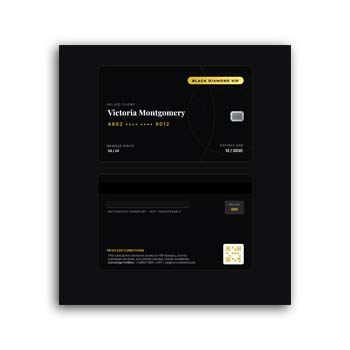
VIP/Client Card Format Editable Download
A VIP or client card can be a useful way for businesses to identify important customers and provide them with a more personalized experience. It can be used by hotels, restaurants, retail stores, clubs, corporate organizations, service providers, and many other businesses.
A VIP/Client Card Format Editable Download gives you a ready-made design that can be customized without creating the entire card from the beginning. You can add client information, membership details, business branding, colors, and other relevant elements according to your requirements.
What You Can Do With the Format
- ✓ Add client or VIP member information
- ✓ Customize names and identification details
- ✓ Add company or brand logo
- ✓ Modify available colors and text
- ✓ Include membership or card numbers
- ✓ Add contact or validity information
- ✓ Create cards for different customer categories
- ✓ Reuse the design for future clients
- ✓ Prepare a consistent professional card layout
Understanding a VIP or Client Card
A VIP or client card is generally used to identify a customer and communicate their relationship with a business. Depending on the organization, it may provide access to special services, customer benefits, priority support, loyalty programs, or exclusive offers.
The actual benefits connected to the card are determined by the business. The card itself mainly serves as a convenient identification and branding tool.
Why Businesses Use Client Cards
A client card can make customer identification easier, particularly when a business has different customer categories. It can also give regular or high-value customers a sense of recognition.
For organizations with loyalty or membership programs, the card may become part of a wider customer management system. The design can be adapted to reflect the brand’s identity and customer experience.
Advantages and Limitations
| Advantages | Limitations |
|---|---|
| ✓ Provides quick customer identification | • Card benefits depend on the business |
| ✓ Creates a more personalized customer experience | • Personal information must be entered accurately |
| ✓ Supports VIP or loyalty programs | • Physical cards can be lost or damaged |
| ✓ Can strengthen brand presentation | • Some businesses may prefer digital membership systems |
| ✓ Easy to customize for different customer groups | • Card design may require changes for specific uses |
| ✓ Reusable for future clients | • Security requirements should be considered for sensitive information |
Add Customer Information
The information included on a client card depends on its purpose. You may add the customer’s name, client ID, membership number, category, issue date, expiry date, or other appropriate details.
Only information that is genuinely necessary should be included. Keeping the card simple can make it easier to read and more comfortable for customers to use.
Create Different VIP Levels
Some businesses have several customer categories. For example, they may offer standard, premium, and VIP memberships with different benefits.
An editable format can be adapted to create separate versions for each category. Different labels or visual elements can help staff identify the appropriate customer level quickly.
Make the Brand Stand Out
A VIP card is also a small piece of brand communication. Your company logo, name, website, contact details, and brand identity can be incorporated into the available design.
Consistent typography and visual elements can make the card look more professional. The goal is to create a design that feels valuable without becoming unnecessarily complicated.
Suitable for Many Industries
VIP and client cards can be used in a wide range of businesses. Hotels may use them for preferred guests, restaurants for loyal customers, clubs for members, and retailers for premium loyalty programs.
Professional service providers can also use client cards as part of their customer relationship strategy. The format can be adjusted depending on the industry and purpose.
Related Business Documents
A business’s daily operations often require several types of professional documents. When employees need to request products or services internally, a Purchase Requisition Form can help organize those requests.
For placing formal orders with suppliers, you can use a Purchase Order Format to structure product, pricing, and delivery information.
When goods are being delivered or transferred, a Delivery Challan Format can help document the items and delivery details.
Add Validity Information
Some client cards remain valid for a specific period. If required, you can include an issue date, expiration date, membership period, or renewal information.
This can help staff determine whether a card is currently active. Businesses should choose validity rules that match their own membership or customer policies.
Make the Card Easy to Verify
A useful client card should allow staff to identify the customer without unnecessary effort. A unique card number or client ID can be useful when the business maintains a separate customer database.
If verification is required, the business may also choose to include a QR code, barcode, or another identification method where appropriate. Any such feature should be tested before the cards are produced in quantity.
Reuse the Editable Design
Once the main design has been customized with your business information, it can be saved as a master template. Future cards can then be created by changing only the client-specific information.
This can be especially helpful when many customers need cards with the same overall design. It reduces repetitive layout work and keeps the cards visually consistent.
Printed or Digital Client Cards
Depending on the business model, client cards can be physical or digital. A printed card can be handed directly to a customer, while a digital version may be stored on a phone or shared through an online platform.
An editable design gives you flexibility to prepare the card for the format that best fits your customer service process.
Protect Customer Information
Client cards may contain personal or identifying information. Businesses should avoid displaying sensitive details unnecessarily and should handle customer data according to applicable privacy and security requirements.
If the card is used only for identification, a name and customer number may be enough. The information should always match the purpose of the card.
Keep the Design Professional
A VIP card should communicate value while remaining easy to understand. Strong visual hierarchy, readable typography, balanced spacing, and appropriate branding can make a noticeable difference.
Avoid overcrowding the card with too many offers or unnecessary details. Important information should remain visible at a glance.
VIP Cards and Customer Loyalty
VIP cards are often connected with loyalty and customer retention programs. Businesses may use them to identify customers who qualify for special pricing, priority service, exclusive events, or other benefits.
For general information about customer loyalty programs, you can explore Loyalty Program on Wikipedia.
Design Inspiration
The visual style of a client card can vary greatly depending on the brand. A luxury business may prefer a minimal premium appearance, while a retail business might choose a brighter and more promotional style.
For additional ideas when designing membership and client cards, you can explore Membership Card Templates for different layout concepts.
A Simple Editing Workflow
Start by adding your business name, logo, contact information, and other branding elements. Then replace the sample customer information with the details required for the individual card.
If necessary, add membership numbers, validity dates, or customer categories. Review the final layout before exporting or preparing the cards for printing.
When an Editable VIP Card Is Useful
An editable client card is particularly useful when a business needs to create multiple cards with the same basic design. The master format can remain unchanged while individual customer information is updated.
It can also be adapted as the business expands its loyalty or VIP program. New customer categories or fields can be introduced when the editing format supports them.
Final Thoughts
A VIP/Client Card Format Editable Download provides a convenient starting point for creating customized customer identification cards. It can help businesses maintain a consistent visual identity while adding client names, membership information, validity details, and other relevant data.
Whether used by hotels, restaurants, clubs, retailers, corporate organizations, or service providers, an editable client card can support a more organized customer experience. Keep the information relevant, protect customer data, and make the final design easy for both customers and staff to use.
Leave a Reply