Loading Design... please wait.।
Payment Voucher Template Free Download Editable
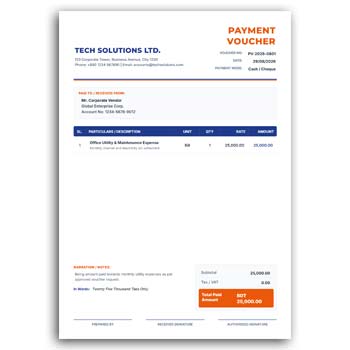
Keeping a record of payments is an important part of everyday business administration. A Payment Voucher Template Free Download Editable can provide a simple and organized way to document money paid to employees, suppliers, service providers, or other recipients.
Rather than preparing a payment document from a blank page each time, an editable template gives you a ready structure to work with. You can enter transaction details, payment amounts, recipient information, company details, and approval information according to your needs.
Quick Highlights
- ✓ Ready-to-use payment voucher structure
- ✓ Edit transaction and recipient information
- ✓ Add payment amount and description
- ✓ Include payment date and reference number
- ✓ Add company name, logo, and contact details
- ✓ Provide space for signatures and approval
- ✓ Reuse the format for regular payments
- ✓ Suitable for digital and printed records
What Is a Payment Voucher?
A payment voucher is a document used to record and support a payment made by a business or organization. It can provide a written reference showing who received the payment, why it was made, how much was paid, and when the transaction occurred.
The information included can vary depending on the organization’s accounting procedures. An editable template allows the format to be adjusted to match those requirements.
A Better Way to Document Payments
Business payments can happen frequently, and keeping every transaction properly documented can become difficult without a consistent process. A structured voucher provides a single place to record the important information.
It can be used for routine office payments as well as payments to vendors, contractors, employees, or service providers. The same basic format can be reused while the transaction details change.
Advantages and Limitations
| Advantages | Limitations |
|---|---|
| ✓ Creates a consistent payment record | • Required fields differ between organizations |
| ✓ Reduces repetitive document preparation | • Incorrect amounts can create accounting issues |
| ✓ Easy to customize for different transactions | • Supporting receipts may still be required |
| ✓ Helps identify payment details quickly | • A template does not replace accounting software |
| ✓ Can be reused for regular payments | • Tax or compliance information may need to be added |
| ✓ Suitable for digital and printed records | • Final documents should be checked before approval |
Record Who Received the Payment
The recipient’s information is one of the key parts of a payment voucher. Depending on the transaction, you may include an individual’s name, supplier name, company name, employee ID, address, or other identifying information.
Accurate recipient information helps prevent confusion when the payment is reviewed later. It also makes the document more useful as a financial reference.
Explain the Purpose of the Payment
A payment record should make the reason for the transaction understandable. You can add a short description explaining whether the payment relates to a purchase, service, reimbursement, salary-related expense, advance, or another business activity.
A clear description can help the accounts team understand the transaction without needing additional clarification. Keep the wording concise but informative.
Add Amount and Payment Details
The amount should be clearly displayed so that it can be checked quickly. Depending on your process, you may record the amount in numbers and words, along with the payment method.
Cash, bank transfer, cheque, mobile payment, or other methods can be identified where necessary. Additional reference numbers can also be included for easier tracking.
Make Approval Easier
Businesses often have different levels of financial authorization. A payment voucher can include areas for preparation, checking, approval, and recipient acknowledgment.
You can customize these sections according to your internal workflow. This allows the same template to work for a small office or a more structured organization.
Add Your Organization’s Identity
An editable voucher can be customized with your business name, logo, address, phone number, email, and other relevant information.
Consistent branding can make financial documents easier to recognize. It can also create a more professional appearance when vouchers are shared with suppliers or other external parties.
Useful for Different Payment Situations
A payment voucher can be adapted for many types of business transactions. Companies may use it for supplier payments, service charges, office expenses, employee-related payments, advances, or miscellaneous approved costs.
The fields can be changed depending on what information needs to be recorded. This flexibility is one of the main benefits of an editable format.
Related Expense and Office Formats
Payment documentation often works alongside other business forms. If you need to record official transportation expenses, this Conveyance Bill Template can be useful for organizing travel-related claims.
For office-based travel documentation, an Office Conveyance Bill provides another editable option.
When employees need to report approved business expenses, an Expense Claim Form can help organize individual reimbursement requests.
Reuse It for Regular Transactions
If your organization makes similar payments frequently, maintaining a reusable master template can save time. You can create a new copy for each transaction and update only the necessary fields.
This approach can also help maintain consistency across financial records. Employees and accounts staff can become familiar with the same basic document structure.
Keep Supporting Documents Together
Some payments may require evidence such as invoices, receipts, purchase orders, contracts, or approval notes. The voucher can include a reference to these documents when necessary.
Keeping related documentation together can make future verification easier. Your organization’s accounting policy should determine which supporting documents need to be retained.
Digital Payment Records
Many businesses now process payments electronically. An editable payment voucher can be completed on a computer and stored as part of a digital financial record.
It can also be shared with authorized employees for review or approval. Digital storage can make older payment records easier to search when proper file organization is maintained.
Printed Payment Vouchers
Physical vouchers may still be used by businesses that maintain paper-based accounting records. After completing the editable format, the document can be printed for signatures and filing.
Before printing, carefully check the recipient name, amount, date, description, and payment method. Financial documents should always be reviewed before they become part of an official record.
What Information Can Be Included?
A payment voucher may include several common fields, such as voucher number, date, recipient, payment purpose, amount, payment method, reference number, and signatures.
Organizations may also add account codes, tax information, approval notes, or supporting-document references. An editable format makes it possible to adjust the structure to suit these needs.
Payment Vouchers and Accounting Records
Payment vouchers can form part of a broader financial documentation system. They provide a record that can support the organization’s internal accounting and transaction review process.
For general information about vouchers and accounting concepts, you can explore Accounting on Wikipedia.
Simple Design Can Be More Effective
Financial forms should be easy to understand at a glance. A clean layout with clearly labeled fields can help employees enter information correctly and allow reviewers to locate important figures quickly.
For additional inspiration for professional business forms and documents, you can explore Business Form Templates and compare different layout ideas.
A Practical Editing Routine
Start by entering the business and recipient information. Add the transaction date, voucher number, payment description, amount, and payment method.
Next, complete the required approval or acknowledgment sections. Review the entire document against the related invoice, receipt, or other supporting information before finalizing it.
Who Can Use a Payment Voucher Template?
Small businesses, corporate offices, NGOs, educational institutions, agencies, shops, and service providers can all benefit from structured payment documentation.
The template can be adjusted to match different financial processes. Whether you prepare a few vouchers each month or handle many transactions every week, a reusable format can reduce repetitive work.
Why an Editable Template Is Convenient
The value of an editable template is not simply its appearance. It gives you a repeatable process for preparing similar documents while allowing each transaction to contain its own information.
As your business changes, you can also modify the template. New fields can be introduced and unnecessary sections can be removed when the format supports editing.
Final Thoughts
A Payment Voucher Template Free Download Editable provides a practical starting point for documenting business payments. It allows you to record recipient details, payment purpose, amounts, dates, references, and approval information in a structured way.
For organizations that handle regular financial transactions, a reusable editable voucher can save administrative time and improve consistency. Always make sure the completed document follows your organization’s accounting procedures and any applicable financial or tax requirements.
1 Comment
1 Pingback