Loading Design... please wait.।
A visiting card is a simple way to introduce yourself or your business to a new customer, client, or professional contact. A clean and editable design can make the process of creating one much easier, especially when you do not want to spend hours working on a layout from the beginning.
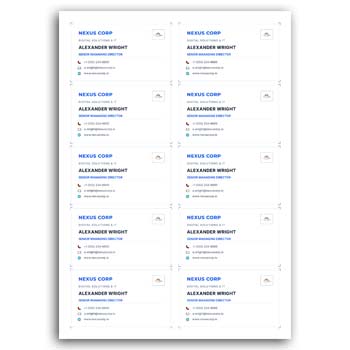
With a Visiting Card Design Editable Simple Design PDF, you can start with a prepared format and personalize the important parts. Change the name, contact information, colors, logo, and other available elements to create a card that fits your own style.
What You Can Do With the Template
- ✓ Replace the sample details with your own information
- ✓ Adjust colors to suit your brand
- ✓ Insert your company or personal logo
- ✓ Modify available text and design elements
- ✓ Prepare a clean and simple card layout
- ✓ Save the finished design as PDF
- ✓ Use the design for printing or digital sharing
- ✓ Make updates whenever your information changes
A Simple Starting Point for Your Design
Designing a visiting card from an empty page can be surprisingly time-consuming. You need to decide where the logo should go, how the contact details should be arranged, and which fonts and colors will work together.
A ready-made editable design removes much of that initial work. You can begin with a balanced layout and concentrate on making it your own.
Change the Text Without Rebuilding Everything
Your visiting card may need your name, profession, company name, phone number, email address, website, or social media information. All of these details can be different from the sample content included in a template.
An editable format allows you to replace the existing information instead of creating another design. This becomes particularly convenient when preparing cards for different people or updating old contact details.
Keep the Look Clean and Professional
Simple designs are often easier to use in professional situations. A card with enough white space, readable text, and a clear information hierarchy can make important details easier to find.
You do not necessarily need many decorative elements to make a card look attractive. A well-organized layout with suitable typography can create a polished result.
Personalize the Colors
Every business has its own visual identity. If your company already uses specific colors, you can adjust the template to create a closer connection with your existing branding.
You might change the background, text, lines, shapes, or other editable elements. Small color adjustments can make a template feel much more personal.
Your Logo, Your Identity
A logo can immediately connect a visiting card with a particular business or personal brand. If the template supports logo editing, you can replace the sample logo with your own file.
You can also resize or reposition it to achieve the appearance you want. For a personal card where no logo is needed, the logo area can be removed if the design permits it.
PDF Makes It Convenient for Printing
Once the design is finished, PDF can be a practical choice for sharing the file with a printing service. It helps keep the page structure and design arrangement together in a single document.
Before printing, check the dimensions, margins, text, and overall alignment. A quick review can help prevent small mistakes from appearing on the final printed cards.
Who Can Use an Editable Visiting Card?
There is no single type of user for this kind of design. Freelancers, entrepreneurs, consultants, sales professionals, photographers, designers, small business owners, and many other professionals can adapt it to their needs.
It can also be useful for teams. A company can maintain the same overall design while changing the employee name, position, phone number, and email address for each card.
More Than Just a Business Card
Professional stationery usually works better when different documents have a consistent visual identity. If you are preparing office documents as well, an Office Supply Quotation can be another useful editable resource.
For situations where you need to prepare a quotation quickly, you can also explore this Quick Quotation Format.
Businesses dealing with technology products may find an Electronics Quotation Format useful for presenting product and supply information to customers.
Make Changes Whenever Necessary
Business information does not always stay the same. A new phone number, updated website, different job title, or change in office address may require your visiting card to be updated.
An editable template makes these small changes much easier. Instead of asking a designer to recreate the complete card, you can modify the relevant information yourself when the format allows editing.
Useful for Digital Networking
Although visiting cards are traditionally printed, the design can also be useful in digital communication. A finished card can be shared through email, messaging platforms, social networks, or other online channels.
This can be particularly useful for freelancers and professionals who communicate with clients from different countries. A clear digital version gives people quick access to your essential contact information.
Think About Information Before Design
A good card begins with the right information. Decide which details are genuinely useful before adding them to the layout.
Your name, professional role, business name, phone number, email address, and website are common choices. Depending on your profession, you may also include a portfolio link, social profile, or QR code.
A Practical Editing Workflow
The customization process does not need to be complicated. Open the editable design, replace the sample content, insert your logo, and adjust the visual elements that you want to personalize.
Take a final look at both the text and the design before exporting the file. This small quality check is especially important when the card will be professionally printed.
Design Ideas and Background Information
If you want to understand the traditional purpose and history of visiting cards, you can read this Visiting Card Information on Wikipedia.
For more ideas about modern card layouts, typography, and visual presentation, Business Card Ideas can provide useful design inspiration.
Why a Simple Editable Design Can Be Useful
The main advantage is flexibility. You get a prepared visual structure but still have room to personalize the parts that matter to you.
This combination is useful when you want a professional-looking result without spending excessive time building the entire layout. It is also easier to reuse when creating several variations of the same card.
Final Thoughts
A Visiting Card Design Editable Simple Design PDF Free Download can be a practical choice for anyone looking for a straightforward way to prepare a professional card. Instead of starting with a blank document, you can work with an existing layout and customize it around your own identity.
Edit the information, introduce your brand colors, add your logo, and make the design feel personal. Once everything is checked, the finished PDF can be prepared for printing or used as a convenient digital business card.
1 Comment
1 Pingback