Loading Design... please wait.।
Best Free Invoice Generator Online
Sending a clear invoice is an important part of running almost any business. Whether you sell products, provide professional services, or work independently, customers need an easy way to understand what they are being charged for.
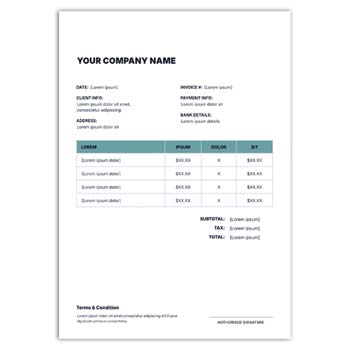
The Best Free Invoice Generator Online can be a practical solution for users who want to create professional invoices without spending hours designing documents. A simple online workflow can help organize business details, customer information, products or services, prices, taxes, discounts, and payment instructions in one place.
Why Users Look for a Free Invoice Generator
- ✓ Create invoices without starting from a blank page
- ✓ Enter business and customer details quickly
- ✓ Add products or services with prices
- ✓ Include quantities and item descriptions
- ✓ Calculate subtotal and total amounts
- ✓ Add discounts, taxes, and other charges
- ✓ Include payment terms and due dates
- ✓ Add a company logo or business identity
- ✓ Prepare invoices for digital sharing
- ✓ Use a clean format for printing and record keeping
What Is an Online Invoice Generator?
An online invoice generator is a web-based tool that helps users prepare structured billing documents. Instead of manually arranging tables and financial information, users can work with predefined sections designed for common invoice requirements.
The features available can vary between tools. Some focus on simple invoice creation, while others may provide calculations, templates, customer records, recurring invoices, or integration with other business systems.
Who Can Benefit From It?
A free invoice generator can be useful for freelancers, startups, small businesses, online sellers, consultants, agencies, contractors, and independent professionals.
It is particularly helpful when a business needs occasional or regular invoices but does not want to spend time creating a new document layout for every transaction.
Essential Invoice Elements
| Invoice Element | Included |
|---|---|
| Business name | ✓ |
| Contact information | ✓ |
| Customer details | ✓ |
| Invoice number | ✓ |
| Issue date | ✓ |
| Due date | ✓ |
| Product/service description | ✓ |
| Quantity | ✓ |
| Unit price | ✓ |
| Subtotal | ✓ |
| Discount | ✓ |
| Tax | ✓ |
| Final amount | ✓ |
| Payment details | ✓ |
| Business logo | ✓ |
Benefits and Limitations
| Benefits | Limitations |
|---|---|
| ✓ Quick invoice preparation | • Features vary between free tools |
| ✓ Reduces manual formatting | • Users must verify entered information |
| ✓ Suitable for many small businesses | • Tax requirements differ by country |
| ✓ Provides a professional structure | • Advanced accounting may need separate software |
| ✓ Convenient for online billing | • Free services may have usage restrictions |
| ✓ Useful for digital and printed invoices | • Templates alone do not guarantee legal compliance |
Enter Your Business Information
The first step is usually adding the information that identifies the seller. This can include the business name, address, phone number, email address, website, and other relevant contact details.
Adding a logo can make the invoice more recognizable. A clean header also helps customers immediately identify who issued the document.
Add Customer Details
Customer information connects the invoice with the correct transaction. Depending on the business, this may include the customer’s name, company, billing address, email, or other required details.
For business customers, accurate company information is particularly important. Check the spelling and billing details before generating the final invoice.
Create an Itemized List
The invoice should clearly show what the customer is paying for. Products or services can be listed individually with descriptions, quantities, unit prices, and line totals.
An itemized format is useful because customers can compare the invoice with their order, quotation, or service agreement. It also makes the calculation easier to review.
Review the Total
The invoice should provide a logical calculation from the individual items to the final amount. Start with the subtotal and then show discounts, taxes, shipping costs, service charges, or other applicable adjustments.
The amount due should be visually prominent. Even when a generator performs calculations automatically, review the final result before sending it.
Related Business Documents
Businesses often use invoices together with quotations and cash memos. For electronics businesses, the Quotation Mockup Supply of Electronics Items can be useful when preparing a price proposal.
For electronics product sales, you can also explore the Electronics Items Cash Memo Template.
For printing and stationery businesses, the Printing & Stationery Item Cash Memo provides another related document format.
Add Payment Instructions
Customers should know how and when to make payment. An invoice can include payment methods, bank information, payment links, due dates, or other instructions relevant to the transaction.
For recurring clients, clear payment terms can make the billing relationship easier to manage. Always make sure the instructions match the actual payment options offered by the business.
Discounts and Promotional Pricing
Discounts can be applied for promotional campaigns, bulk purchases, returning customers, seasonal offers, or negotiated business deals.
Displaying the discount separately helps customers understand the original amount and the reduction applied. It also makes the final calculation more transparent.
Taxes and Other Charges
Depending on the location and type of transaction, an invoice may need to include applicable taxes. Shipping, delivery, handling, or service charges can also be displayed separately when relevant.
Tax requirements are not universal. Businesses should use the rules applicable to their own jurisdiction rather than assuming that a free online generator automatically handles every tax requirement correctly.
Freelancers
Freelancers can use an online invoice generator to bill clients for creative, technical, consulting, writing, marketing, development, or other professional services.
The invoice can show the project name, service description, hours worked, agreed rate, milestone, or fixed project fee. Keeping the description clear can make client approval and payment easier.
Small Businesses
Small businesses often need a simple billing process that does not require complicated software. An online generator can provide a repeatable structure for everyday invoices.
As the business grows, it may eventually need accounting software or an integrated system for inventory, customer management, payments, and financial reporting.
Online Stores
E-commerce businesses can use invoices to document customer orders. Product names, quantities, prices, discounts, shipping fees, taxes, and payment information can be included according to the order.
The invoice should match the actual transaction. Check the order details before issuing the final document, especially when refunds or adjustments are involved.
Service Businesses
Consultants, agencies, contractors, tutors, repair companies, and other service providers can adapt an invoice to their own billing model.
A service invoice may include hourly work, fixed fees, project milestones, travel expenses, or recurring charges. Only relevant information needs to be included.
Digital Invoice Sharing
Online invoices are convenient for remote business transactions. Once the invoice is complete, it can be shared through email or another suitable digital channel.
Before sending it, open the final document and check the layout. Make sure the customer details, invoice number, total amount, and payment instructions are visible and correct.
Printing an Invoice
Some businesses still prefer physical invoices for shops, offices, service counters, or customer records. A simple layout is generally easier to print and read.
Test the design before printing multiple copies. Pay attention to paper size, margins, text clarity, alignment, and logo quality.
Invoice Numbering
A unique invoice number helps businesses identify individual billing documents. A consistent numbering method also makes it easier to locate invoices later.
Businesses can use sequential numbering or another suitable system. Avoid duplicate numbers and keep the numbering process consistent across transactions.
Recurring Billing
Businesses that bill customers regularly can benefit from a reusable invoice format. Monthly services, maintenance contracts, retainers, and subscriptions are common examples.
Even when using a repeated structure, check the billing period, amount, customer information, and due date every time. Never assume that a previous invoice is automatically correct for a new transaction.
Branding Your Invoice
A professional invoice can reflect the identity of the business. Adding a logo and using consistent typography or brand elements can make customer documents look more organized.
Keep the visual design restrained. The invoice should primarily communicate financial information rather than function as a promotional poster.
Invoice Accuracy
Speed should not come at the expense of accuracy. Review the customer’s information, invoice number, dates, item descriptions, prices, discounts, taxes, and final amount before issuing the document.
A short verification step can prevent billing errors and unnecessary customer communication. This is especially important when processing multiple invoices.
Invoice Records
Keeping copies of invoices can help businesses monitor sales and payments. Files can be organized by customer, date, invoice number, project, or another logical category.
Record-retention requirements differ between businesses and countries. Follow the applicable accounting and legal requirements for your location.
Invoice and Quotation Difference
An invoice and a quotation are used at different stages of a business transaction. A quotation generally presents proposed prices and terms before a customer agrees to purchase, while an invoice documents the amount charged after goods or services are supplied or billed.
For example, an electronics supplier may first provide a quotation and later issue an invoice for the completed transaction.
General Invoice Information
Invoices are commonly used to document the sale or supply of goods and services. They can include information about the seller, customer, products or services, prices, taxes, and payment terms.
For a general overview, see Invoice on Wikipedia.
Invoice Design Inspiration
A professional invoice does not have to be complicated. Clear spacing, readable typography, consistent alignment, and a logical information hierarchy can make even a basic layout look polished.
For additional visual ideas, explore Invoice Templates.
Simple Creation Workflow
Start by entering the business and customer information. Add the invoice number and date, followed by the products or services, quantities, and prices.
Then apply any relevant discount, tax, shipping fee, or service charge. Review the final amount and payment details before saving, printing, or sending the invoice.
Keep a Master Format
If your business sends invoices regularly, maintain a clean master version of the preferred layout. This can reduce repetitive formatting work and help maintain a consistent appearance.
Only update the transaction-specific information for each new invoice. Keep the original master copy unchanged so it can be reused safely.
Who Should Use a Free Invoice Generator?
A free online invoice generator can be suitable for freelancers, small companies, independent professionals, retailers, consultants, agencies, contractors, startups, and online sellers.
Businesses with complex accounting, inventory, tax, or multi-user requirements may eventually need a more comprehensive invoicing or accounting system. The right solution depends on the volume and complexity of the business.
Final Thoughts
The Best Free Invoice Generator Online can provide a convenient starting point for creating professional billing documents without spending excessive time on formatting. It can help organize business information, customer details, itemized charges, discounts, taxes, totals, and payment instructions.
For everyday billing, simplicity and accuracy are usually more valuable than an overly complicated design. Choose a workflow that fits your business, review every invoice carefully, and keep your records organized for future reference.
Leave a Reply