Loading Design... please wait.।
Invoice Template Maker Online Free
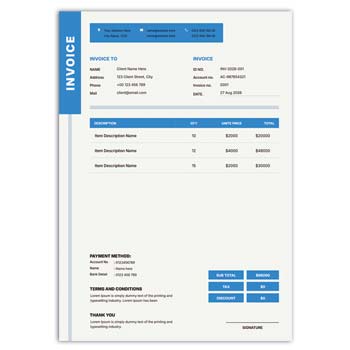
Creating a professional invoice does not always require complicated accounting software or advanced design skills. An Invoice Template Maker Online Free can provide a simple way to organize billing information and prepare a clean invoice for customers.
Whether you are a freelancer, small business owner, online seller, consultant, or service provider, an editable invoice format can save time. You can focus on the transaction details instead of designing the entire document from scratch.
Key Features at a Glance
- ✓ Create a professional invoice from an online template
- ✓ Edit business and customer information easily
- ✓ Add products, services, quantities, and prices
- ✓ Update text directly within the invoice format
- ✓ Add discounts, taxes, and additional charges
- ✓ Include invoice number and payment details
- ✓ Add your business logo and branding
- ✓ Adjust colors and other visual elements when supported
- ✓ Prepare a clean document for digital sharing
- ✓ Download or print the completed invoice according to the available format
How an Invoice Template Maker Works
An online invoice template maker provides a ready-to-use structure for creating billing documents. Instead of manually arranging headings, tables, totals, and customer information, users can work with predefined sections.
The editing process depends on the specific tool or template. Some options focus on basic customization, while others may provide automatic calculations, multiple formats, branding options, or additional business features.
Invoice Elements You Can Organize
| Invoice Requirement | Easy to Organize |
|---|---|
| Business information | ✓ |
| Customer details | ✓ |
| Invoice number | ✓ |
| Invoice date | ✓ |
| Due date | ✓ |
| Product/service details | ✓ |
| Quantity | ✓ |
| Unit price | ✓ |
| Subtotal | ✓ |
| Discount | ✓ |
| Tax | ✓ |
| Additional charges | ✓ |
| Total amount | ✓ |
| Payment information | ✓ |
| Logo and branding | ✓ |
Benefits and Limitations
| Benefits | Limitations |
|---|---|
| ✓ Saves time when preparing invoices | • Features depend on the selected maker |
| ✓ Provides a ready-made structure | • Information still needs to be checked |
| ✓ Suitable for small businesses and freelancers | • Tax rules vary by location |
| ✓ Can make billing documents more consistent | • Advanced accounting may require separate software |
| ✓ Easy to adapt for different transactions | • Some free tools may have restrictions |
| ✓ Useful for digital and printed documents | • A template does not guarantee legal compliance |
Start With Business Details
A professional invoice usually begins with the seller’s information. Add the business name, address, phone number, email address, website, and any other details customers may need.
A logo can also be included to strengthen business identity. Keep the header simple so the important billing information remains easy to find.
Add Customer Information
The customer section identifies who the invoice is intended for. Depending on the transaction, it may include a customer’s name, company name, billing address, email address, or other relevant information.
Accurate customer information is essential for professional billing. Review the details before finalizing the invoice, especially when preparing documents for business clients.
Enter Invoice Information
Every invoice should have a clear reference, such as an invoice number. The issue date and, when applicable, payment due date should also be visible.
A consistent numbering system can make invoices easier to manage later. It can also help customers and business teams refer to a specific transaction.
Add Products or Services
The main section should explain what the customer is being charged for. Each product or service can be listed with a description, quantity, rate, and total.
For larger orders, itemized information makes the document easier to understand. Customers can compare each line with the original order or agreement.
Make Calculations Clear
A good invoice should show how the final amount was reached. The subtotal can be followed by discounts, taxes, delivery fees, service charges, or other applicable adjustments.
The final amount should stand out visually. Even if the online tool calculates the figures automatically, always review the result before sending the invoice.
Related Quotation Formats
Quotations and invoices often work together during a business transaction. Before an invoice is issued, a customer may first receive a price proposal such as this Quick Editable Quotation Format.
For electronics businesses, the Electronics Item Quotation Format can be useful for presenting product prices and related information.
Another related option is the Quotation Mockup for Electronics Items.
Discounts and Extra Charges
Businesses may offer promotional discounts, bulk discounts, negotiated prices, or customer-specific reductions. Showing these adjustments separately can make the invoice easier to understand.
Shipping, delivery, packaging, or service charges can also be displayed as separate lines. This gives customers a clearer picture of the total cost.
Tax Information
Some invoices need to display applicable taxes depending on the business and transaction. Tax amounts should be presented clearly when separate disclosure is required.
Tax regulations can vary significantly between countries and business types. Always use the rules applicable to your business rather than assuming that an online template automatically handles every requirement.
Payment Details
Payment information tells the customer how to complete the transaction. Depending on the business, this may include bank details, payment methods, payment links, due dates, or other instructions.
For regular clients, clear payment terms can make the billing process smoother. The information should match the actual payment arrangements agreed with the customer.
Freelancers and Professionals
Freelancers can use an online invoice template maker to bill clients for design, writing, development, marketing, consulting, photography, and other services.
The invoice can be adapted for hourly work, fixed project fees, milestones, or recurring services. A clear description of the work helps customers understand the charge.
Small Business Billing
Small businesses often need professional documents without a complicated setup. A free online invoice template maker can provide a practical starting point for regular billing.
As transaction volume grows, businesses may choose to connect invoicing with accounting, inventory, customer management, or payment systems.
E-Commerce Invoices
Online sellers can use invoices to document product orders. An invoice may include product names, quantities, prices, shipping costs, discounts, taxes, customer details, and payment status.
Always compare the completed invoice with the actual order before sending it. This is especially important when an order has been partially refunded, changed, or canceled.
Customizing the Design
A reusable invoice format can be adjusted to match the business identity. Depending on the editor, users may be able to change text, colors, logo placement, headings, or other visual elements.
Avoid adding too many decorative elements. An invoice should prioritize readability and make the important financial information immediately visible.
Digital Invoice Use
Digital invoices are convenient for businesses that communicate with customers online. Once completed, an invoice can be shared through email or another suitable digital method.
Check the final document before sending it. Make sure the text is readable, the totals are correct, and no private information has been accidentally included.
Printable Invoice Use
A well-structured invoice can also be prepared for physical printing. This is useful for retail stores, offices, service counters, and businesses that provide paper documentation.
Before printing in bulk, test the layout on the intended paper size. Check the margins, alignment, font size, and logo quality.
Invoice Records
Invoices can help businesses maintain a record of sales, services, and payments. Organizing them by invoice number, customer, date, or project can make future reference easier.
Businesses should follow the accounting and record-retention requirements applicable to their location. Keep important documents securely and avoid unnecessary exposure of customer information.
Invoice vs Quotation
A quotation and an invoice serve different purposes. A quotation generally presents proposed prices and terms before a customer confirms a purchase, while an invoice documents the amount charged for goods or services.
For example, an electronics supplier may prepare a quotation first and then issue an invoice after the transaction reaches the appropriate stage.
General Invoice Information
An invoice is a commercial document commonly used to record goods or services supplied and the amount charged. It can include seller information, buyer details, item descriptions, pricing, taxes, and payment terms.
For a general reference, see Invoice on Wikipedia.
Invoice Design Ideas
A good invoice design does not need to be complicated. Clear spacing, readable typography, organized tables, and a strong information hierarchy can make a simple format look professional.
For additional visual inspiration, explore Invoice Templates.
Simple Creation Process
Start by selecting a suitable invoice structure. Enter your business and customer details, add the invoice number and date, and then list the products or services.
Add prices, quantities, discounts, taxes, and other applicable charges. Review the calculations and payment information carefully before saving, printing, or sharing the final invoice.
Keep a Reusable Format
If you create invoices regularly, keep a clean master template for future transactions. This can reduce repetitive formatting work and help maintain a consistent business appearance.
Only replace the information related to the new transaction. Keeping the original template unchanged makes it easier to reuse without accidentally carrying information from an older invoice.
Who Can Use It?
An online invoice template maker can be useful for freelancers, retailers, wholesalers, consultants, agencies, contractors, online sellers, startups, and many service-based businesses.
The ideal invoice structure depends on the type of business and transaction. Select and customize a format that contains the information your customers and business actually need.
Final Thoughts
An Invoice Template Maker Online Free can make everyday billing easier by providing a structured starting point instead of requiring users to create every invoice manually. With the right format, business information, customer details, itemized charges, discounts, taxes, and payment instructions can be presented clearly.
For small businesses and independent professionals, a simple and reusable invoice workflow can save time while improving the consistency of customer documents. Always verify the final information, calculations, and applicable requirements before issuing an invoice.
Leave a Reply