Loading Design... please wait.।
Invoice Template Generator
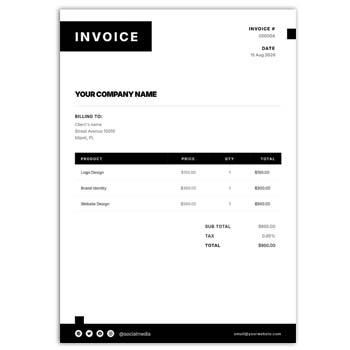
Creating invoices becomes much easier when you have a ready structure to work with. An Invoice Template Generator gives businesses, freelancers, and online sellers a convenient way to prepare clean billing documents without designing every section from the beginning.
Create an Invoice Faster
- ✓ Ready-made invoice structure
- ✓ Easy text and information editing
- ✓ Add products or services in a few steps
- ✓ Enter quantity, price, discount, and tax
- ✓ Add customer and business details
- ✓ Include your company logo
- ✓ Customize the invoice according to your needs
- ✓ Prepare professional-looking documents
- ✓ Suitable for digital and printed use
- ✓ Save time on repetitive billing work
What Is an Invoice Template Generator?
An invoice template generator is an online or digital solution that helps users prepare invoices using a predefined layout. Instead of creating tables, headings, calculations, and information fields manually, you can start with an organized format.
The available editing and download features depend on the particular generator. Some tools provide basic templates, while others may include calculations, customization, branding, and additional invoice options.
Information You Can Add
A useful invoice normally contains several important details. You can include your business name, contact information, customer details, invoice number, date, products or services, pricing, and final payment amount.
Additional sections such as shipping charges, discounts, taxes, payment terms, and notes can also be included when necessary. This keeps the billing information organized in one document.
Invoice Layout Checklist
| Invoice Feature | Available |
|---|---|
| Business information | ✓ |
| Customer information | ✓ |
| Invoice number | ✓ |
| Invoice date | ✓ |
| Product/service details | ✓ |
| Quantity | ✓ |
| Unit price | ✓ |
| Discount | ✓ |
| Tax | ✓ |
| Additional charges | ✓ |
| Total amount | ✓ |
| Payment details | ✓ |
| Logo | ✓ |
Advantages and Limitations
| Advantages | Limitations |
|---|---|
| ✓ Saves invoice preparation time | • Features vary between generators |
| ✓ Provides a structured layout | • Information must be checked manually |
| ✓ Easy for beginners to understand | • Tax requirements differ by country |
| ✓ Useful for small businesses | • Advanced accounting may need separate software |
| ✓ Can support different invoice types | • Some free tools may have restrictions |
| ✓ Helps maintain consistent documents | • Templates do not guarantee legal compliance |
Add Your Business Identity
A professional invoice should clearly identify the business that issued it. You can normally include the company name, address, phone number, email, website, and other important contact information.
A business logo can also be placed in the header. Keeping the branding simple makes the invoice look professional without reducing readability.
Enter Customer Details
Customer information helps connect the invoice with the correct buyer or client. Depending on the transaction, this may include a person’s name, company name, billing address, email address, or other relevant details.
For corporate customers, accurate company information can be particularly important. Always review the spelling and billing details before completing the invoice.
Manage Products and Services
The central part of an invoice is usually the item list. Products or services can be added with their description, quantity, unit price, and total amount.
An itemized format gives customers a clear understanding of what they are paying for. It is especially useful when an order contains several products or services.
Make Pricing Clear
A well-organized invoice should make the price calculation easy to follow. The subtotal can be shown before discounts, taxes, delivery charges, or other applicable costs are added.
The final amount should be easy to locate. Even when an automated tool calculates the total, reviewing the numbers before sending the invoice is important.
Useful Business Documents
Invoices are often used together with other commercial documents. For office purchasing, you can also explore this Office Supply Quotation format.
For a simpler quotation workflow, the Quick Editable Quotation can be another useful reference.
Businesses that issue certificates and recognition documents may also find this Employee Award Certificate design relevant to their stationery collection.
Customize the Invoice
One of the biggest benefits of using a template is the ability to adapt the layout to your business. Depending on the editing system, you may be able to change text, colors, headings, logo placement, and other design elements.
Only keep the fields that are relevant to your business. A simpler invoice is often easier for customers to read than a document filled with unnecessary information.
Payment Information
Payment instructions help customers understand how they should settle the invoice. You can include accepted payment methods, bank details, payment links, due dates, or other instructions where appropriate.
For business clients, the payment terms should match the agreement between both parties. Clear information can reduce confusion and unnecessary follow-up messages.
Digital and Printed Invoices
Digital invoices are convenient for online businesses and remote customers. After completing the document, it can be shared through email or another suitable communication channel.
Printed invoices are still useful for physical shops, offices, service providers, and customers who prefer paper records. Before printing, check the paper size, margins, alignment, and text readability.
Freelancers and Small Businesses
Freelancers can use invoice templates to bill clients for graphic design, web development, writing, marketing, consulting, photography, and many other services.
Small businesses can also use them for product sales and regular customer billing. A reusable format reduces repetitive design work and helps maintain a consistent business appearance.
Online Store Invoices
E-commerce businesses often need invoices containing product information, customer details, shipping costs, discounts, taxes, and payment status. A structured template makes these details easier to present.
Before sending an invoice, compare it with the actual order. This is especially important when an order has been modified, refunded, or partially canceled.
Keep Your Invoice Records Organized
Invoices can become valuable business records for tracking sales and payments. Store them using a consistent system based on invoice number, customer, date, project, or another suitable reference.
Keep important financial documents secure and follow the record-keeping requirements applicable to your business. Customer information should also be handled responsibly.
Invoice Number and Date
A unique invoice number makes each document easier to identify. Businesses can use sequential numbering or another consistent numbering system.
The invoice date should also be clearly displayed. For recurring services, a billing period or due date can be added when necessary.
Taxes and Discounts
Discounts can be shown separately from the original price so customers can understand the actual reduction. Shipping, delivery, service, or handling charges can also be listed individually.
Tax treatment depends on the country, business type, and transaction. Always configure the invoice according to the requirements that apply to your business.
General Invoice Reference
An invoice is generally used to document the supply of goods or services and the amount charged to a customer. It commonly contains seller details, buyer information, item descriptions, prices, taxes, and payment terms.
For a general explanation of the subject, see Invoice on Wikipedia.
Invoice Design Inspiration
A professional invoice does not need to be visually complicated. Good spacing, readable typography, organized tables, and a clear hierarchy can make a simple invoice easy to understand.
For additional visual ideas, explore Invoice Templates.
Final Thoughts
An Invoice Template Generator can simplify everyday billing by providing a ready-made structure for business and customer information. It can reduce repetitive formatting work and help create documents that are easier to read and manage.
Whether you are a freelancer, online seller, retailer, consultant, or small business owner, a suitable invoice format can make your billing workflow more efficient. Always review the information, calculations, payment details, and applicable requirements before issuing the final invoice.
1 Comment
1 Pingback