Loading Design... please wait.।
Free Online Invoice Generator
A professional invoice helps a business present a transaction in a clear and organized way. However, creating every invoice manually can become repetitive when you have several customers or orders to handle.
A Free Online Invoice Generator offers a convenient way to prepare an invoice using a ready-made structure. It can be useful for freelancers, small businesses, online sellers, consultants, agencies, and service providers who want a simple billing solution.
Create Your Invoice With Ease
- ✓ Start with a ready-made invoice layout
- ✓ Add business and customer information
- ✓ Enter products or service details
- ✓ Add quantity and individual pricing
- ✓ Include discounts and applicable taxes
- ✓ Add shipping or service charges
- ✓ Display the final amount clearly
- ✓ Add logo and business branding
- ✓ Include payment terms and instructions
- ✓ Prepare the invoice for digital or printed use
What Does an Online Invoice Generator Do?
An online invoice generator provides a structured environment for preparing billing documents. Instead of designing tables and arranging invoice fields manually, you can enter the required information into an existing format.
Different generators offer different features. A basic tool may focus on simple invoice creation, while a more advanced solution may provide calculations, customization, saved templates, recurring billing, or business integrations.
Important Invoice Information
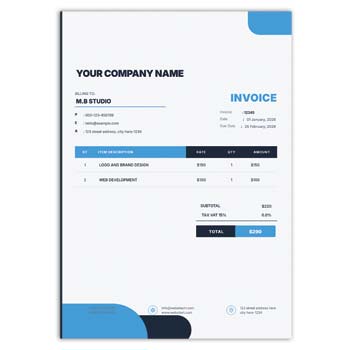
A useful invoice brings several pieces of information together. Business details, customer information, invoice number, transaction date, products or services, prices, taxes, discounts, and payment information can all be organized in separate sections.
The goal is to make the document easy to understand at a glance. Customers should not have to search through the invoice to find the amount they need to pay.
Quick Feature Overview
| Feature | Status |
|---|---|
| Business details | ✓ |
| Customer details | ✓ |
| Invoice number | ✓ |
| Invoice date | ✓ |
| Product/service list | ✓ |
| Quantity | ✓ |
| Unit price | ✓ |
| Subtotal | ✓ |
| Discount | ✓ |
| Tax | ✓ |
| Additional charges | ✓ |
| Total amount | ✓ |
| Payment information | ✓ |
| Logo/branding | ✓ |
Advantages and Limitations
| Advantages | Limitations |
|---|---|
| ✓ Fast invoice preparation | • Features differ between free tools |
| ✓ No need to design from scratch | • Data accuracy depends on the user |
| ✓ Easy for beginners | • Tax rules vary by location |
| ✓ Suitable for small businesses | • Advanced accounting may need separate software |
| ✓ Can be reused for multiple transactions | • Some services may limit free features |
| ✓ Useful for digital and print workflows | • Templates alone do not guarantee compliance |
Begin With Business Details
The top section of an invoice usually identifies the seller. Add the business name, address, phone number, email, website, and other contact information that customers may need.
A company logo can also be added to create a recognizable business identity. The header should remain clean so that the invoice’s financial information remains prominent.
Customer Information
The recipient section identifies the person or organization receiving the invoice. Depending on the transaction, you may need the customer’s name, company name, billing address, email, or other relevant information.
Take a moment to verify these details before issuing the invoice. Small errors in customer information can create unnecessary corrections later.
Add Your Items
The invoice should clearly explain what the customer is paying for. Products or services can be listed individually with descriptions, quantities, rates, and line totals.
For larger orders, an itemized table makes the transaction easier to review. Customers can compare the listed items with their order or service agreement.
Pricing Breakdown
A transparent invoice should show how the final amount was calculated. The subtotal can be followed by discounts, taxes, shipping fees, service charges, or other applicable adjustments.
Place the final amount in a prominent position. If the generator calculates totals automatically, still check the result before sending the invoice.
Related Professional Documents
Businesses often require different documents at different stages of their work. For educational or training organizations, the Course Certificate Format can be useful for creating completion certificates.
For formal training activities, explore the Official Training Program Certificate.
Companies that recognize staff achievements can also use an Employee Award Certificate alongside their regular business documents.
Customize the Layout
A useful invoice format should match the needs of the business. Depending on the generator, you may be able to modify text, colors, sections, logo placement, or other visual elements.
Do not add unnecessary design features simply to make the invoice look attractive. A clear and readable structure is more useful for customers and business records.
Discounts and Other Charges
Discounts can be displayed separately so that customers understand how the original amount was reduced. This is useful for promotional offers, bulk purchases, negotiated prices, and returning customers.
Other costs such as shipping, delivery, packaging, or service fees can also be listed separately. A transparent breakdown helps prevent confusion about the final amount.
Tax Information
Tax requirements depend on the business, product or service, customer location, and applicable local regulations. When taxes need to be displayed, they should be clearly identified on the invoice.
A free invoice generator may provide a tax field, but that does not necessarily mean it is configured for every country’s rules. Businesses should verify the applicable requirements independently.
Payment Instructions
An invoice should tell the customer how payment can be made when payment is still due. This may include bank details, online payment methods, payment links, due dates, or other relevant instructions.
For business clients, payment terms should reflect the agreed arrangement. Clear instructions can make the payment process faster and reduce unnecessary communication.
Freelancers and Independent Workers
Freelancers can use an online invoice generator to bill clients for creative, technical, consulting, marketing, writing, development, or other professional work.
The invoice can be based on an hourly rate, fixed project fee, milestone, or recurring service. A short but specific service description can make the billing easier for the client to understand.
Small Business Applications
Small businesses often need professional invoices without investing immediately in complicated accounting systems. A free online generator can provide a practical starting point for basic billing.
As the business grows, it may become useful to connect invoices with accounting, inventory, payment, or customer-management systems.
E-Commerce Invoices
Online stores can use invoices to document customer purchases. Product names, quantities, prices, shipping costs, discounts, taxes, and payment status can be included according to the order.
Always compare the invoice with the actual transaction before sending it. This is especially important when products have been returned, refunded, exchanged, or removed from an order.
Digital Invoice Sharing
A digital invoice can be convenient when customers and businesses communicate online. Once the document has been completed, it can be shared through email or another appropriate digital channel.
Open the final document before sending it. Check the customer’s information, invoice number, item details, total amount, and payment instructions.
Printable Invoice
A printable invoice remains useful for physical shops, offices, service counters, and businesses that provide paper records. The design should work comfortably with the intended paper size.
Before printing several copies, test one page first. Check margins, alignment, font size, and the quality of any logo or graphical elements.
Invoice Numbering
A unique invoice number makes each billing document easier to identify. Businesses can use sequential numbers or another consistent reference system.
Avoid duplicate invoice numbers. A well-organized numbering system can also make accounting and customer support easier.
Recurring Invoices
Businesses with monthly or regular billing can reuse an established invoice structure. This can be useful for subscriptions, maintenance services, consulting agreements, and retainers.
Even when using a repeated template, update the billing period, amount, due date, and customer information each time. Never assume that the previous invoice details are still accurate.
Keeping Invoice Records
Invoices can serve as useful records of sales, services, and payments. Organizing them by customer, date, invoice number, or project can make future searches much easier.
Keep financial documents securely and follow the record-retention rules applicable to your business. Customer information should also be handled with appropriate care.
Invoice vs Other Business Documents
An invoice is different from a quotation or certificate. A quotation normally presents proposed prices before a customer confirms a purchase, while an invoice records the amount charged for goods or services.
Certificates, on the other hand, are generally used to recognize completion, participation, achievement, or other accomplishments. Each document serves a different business or organizational purpose.
General Invoice Reference
An invoice is commonly used to document a transaction involving goods or services. It can include information about the seller, customer, items, prices, taxes, and payment terms.
For a general explanation of the subject, visit Invoice on Wikipedia.
Invoice Design Inspiration
Good invoice design is mainly about clarity. Readable fonts, balanced spacing, organized tables, and a clear visual hierarchy can make the document easier to scan.
For additional design ideas, explore Invoice Templates.
A Simple Invoice Workflow
First, enter your business and customer information. Then add the invoice number, date, products or services, quantities, and prices.
Apply any discounts, taxes, shipping charges, or service fees that are relevant. Finally, review the calculation and payment information before saving or sending the invoice.
Who Can Use a Free Online Invoice Generator?
A free online invoice generator can be useful for freelancers, retailers, online sellers, consultants, agencies, contractors, startups, wholesalers, and many service-based businesses.
It is most suitable when the business needs straightforward billing without a complicated setup. Businesses with advanced accounting or compliance requirements may need a more comprehensive invoicing system.
Final Thoughts
A Free Online Invoice Generator can make everyday billing more convenient by providing a ready-made structure for creating professional transaction documents. It reduces repetitive formatting work and helps organize essential information in a customer-friendly way.
The best invoice is not necessarily the most decorative one. A clear, accurate, and easy-to-read format is usually more valuable for both the business and the customer.
Leave a Reply