Loading Design... please wait.।
Course Certificate Format Online Free Editable
Completing a course is an achievement worth documenting, especially when the learner has invested time and effort in developing new skills. A well-presented course certificate can provide a formal record of participation or successful completion and can be shared digitally or kept as a printed document.
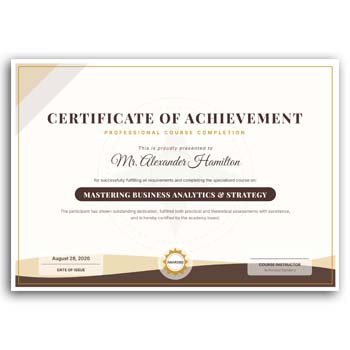
A Course Certificate Format Online Free Editable gives training providers, educational platforms, institutes, and course creators a convenient starting point for certificate preparation. Instead of designing every certificate from a blank page, you can customize the available fields with learner information, course details, organization branding, dates, signatures, and other relevant content.
Quick Feature Overview
- ✓ Edit learner or student name
- ✓ Add course title and completion details
- ✓ Include institute, academy, or company name
- ✓ Upload your organization logo
- ✓ Customize available text and colors
- ✓ Add certificate number or reference
- ✓ Include completion date
- ✓ Add instructor or authorized signatures
- ✓ Reuse the design for multiple learners
- ✓ Prepare certificates for digital or printed use
What Is a Course Certificate?
A course certificate is a document provided by an educational or training organization to recognize a learner’s participation or completion of a particular course. It may identify the course, learner, issuing organization, and date of completion.
The certificate’s meaning depends on the organization and course requirements. A certificate can document completion, but it does not automatically establish professional licensing, accreditation, or a specific qualification unless the issuing body provides such recognition.
Why Use an Editable Certificate Format?
Preparing certificates manually for every learner can become repetitive when a course has many participants. An editable format keeps the main design ready while allowing individual information to be replaced.
This makes the preparation process more manageable. Course creators can focus on accurate learner information and certificate wording instead of repeatedly creating the basic layout.
Advantages and Limitations
| Advantages | Limitations |
|---|---|
| ✓ Reduces repetitive certificate design work | • Learner information must be checked carefully |
| ✓ Easy to personalize for each participant | • Certificate validity depends on the issuing organization |
| ✓ Helps maintain consistent course branding | • Some institutions may require a specific certificate format |
| ✓ Reusable for future course batches | • Printing quality depends on the chosen materials |
| ✓ Can include completion and signature details | • A template does not verify course completion automatically |
| ✓ Suitable for digital and physical certificates | • Additional verification systems may be needed for formal credentials |
Personalize the Learner’s Details
The learner’s full name should be entered exactly as it should appear on the final certificate. Depending on the course, you may also include a student ID, registration number, batch number, or certificate reference.
Careful data entry is important when certificates are used for professional portfolios or academic records. A quick review before finalizing can prevent avoidable errors.
Add the Course Information
The course title should clearly communicate what the learner completed. You can also mention the course duration, training category, completion status, or other information relevant to your program.
Avoid adding claims that the course or organization cannot support. The certificate wording should accurately represent the learner’s actual participation or completion.
Show the Issuing Organization
The certificate should make it clear which organization, institute, academy, or instructor issued it. Adding the official name and logo can provide stronger visual identification.
You can also include a website, email address, or contact information when appropriate. This can help recipients or third parties identify the issuing organization.
Add a Completion Date
The completion date provides a useful record of when the learner finished the course. It can be particularly helpful when learners keep certificates from different training programs.
If your courses run in batches, you may also include a batch or session reference. This depends on how your organization manages its records.
Certificate Number and Verification
A unique certificate number can help an organization maintain an internal record of issued certificates. It may also be useful when someone needs to confirm whether a certificate was issued by the organization.
For advanced verification, organizations can connect certificate numbers with an online database or verification page. A template itself does not provide automatic verification.
Add Instructor or Authorized Signatures
Signatures can give a certificate a formal presentation. Depending on the course, you may include an instructor, trainer, director, principal, coordinator, or other authorized person’s signature.
The appropriate signatory should be selected according to the organization’s own process. Digital signatures can also be used when suitable for the intended purpose.
Related Professional Stationery
Course providers often need branded stationery in addition to certificates. A Stationary Letterhead Layout can be useful for official course correspondence and institutional communication.
If you need a more customized business document, explore this Custom Business Letterhead for creating branded communications.
Another option is an Instant Download Letterhead Layout for organizations that want a reusable document format.
Certificates for Different Course Types
An editable course certificate can be adapted for many types of learning programs. It may be used for professional training, online courses, workshops, seminars, technical classes, skill development programs, or short-term educational activities.
The wording should match the type of learning experience. A participation certificate and a completion certificate should not make the same claims unless they represent the same achievement.
Make the Achievement Visible
The certificate title and learner’s name should receive strong visual attention. Supporting information such as course details, date, and certificate number can then be arranged around these primary elements.
A clear hierarchy helps the recipient understand the document quickly. It also makes the certificate look more organized when viewed digitally or printed.
Create Certificates for an Entire Batch
When a course has many learners, an editable master design can simplify certificate preparation. Keep the original template as a master copy and create separate versions for each learner.
Update the individual information while keeping the organization branding and main layout consistent. This can save time and reduce unnecessary design changes.
Digital Course Certificates
Online education providers frequently distribute certificates digitally. An editable certificate design can be customized and exported into a suitable digital format for email, learner portals, websites, or online profiles.
Before distribution, open the final file and check how the certificate appears. Names, logos, dates, signatures, and other elements should be clearly visible.
Printed Certificate Preparation
Some training providers still present certificates during graduation programs, workshops, award ceremonies, or institutional events. In such cases, the final design can be prepared for professional printing.
Before producing a large quantity, print a test copy. Check the page dimensions, margins, typography, image quality, and overall alignment.
Avoid Misleading Certificate Claims
A course certificate should clearly communicate what the learner actually achieved. If the course was simply completed, the certificate should not imply a government license, university degree, or professional accreditation unless such recognition genuinely exists.
Accurate wording protects both the learner and the issuing organization. It also makes the certificate more credible when presented to others.
Keep Course Records Organized
The certificate is only one part of the course administration process. Training providers should also maintain appropriate records of enrollment, attendance, assessment, completion, and certificate issuance where relevant.
A certificate number can help connect the document with those records. This can make future verification and administrative work easier.
Course Certificates and Credentials
Certificates are commonly used to document learning experiences and achievements. Their significance can vary depending on the issuing organization, course content, assessment process, and recognition attached to the program.
For general information about certificates and credentials, you can explore Certificate on Wikipedia.
Certificate Design Inspiration
A professional course certificate usually benefits from a clean layout and clear information hierarchy. Borders, typography, logos, signatures, and decorative elements should support the achievement rather than make the document difficult to read.
For additional ideas, you can explore Certificate Templates and review different styles suitable for online courses and training programs.
A Simple Editing Workflow
First, add the training provider’s name and logo. Then enter the learner’s name, course title, completion information, certificate number, date, and other required details.
Update the signature area and customize available colors or text elements if needed. Review every field carefully before exporting the final certificate.
Who Can Use This Format?
Online course creators, training institutes, coaching centers, academies, educational organizations, corporate trainers, and independent instructors can adapt an editable course certificate to their programs.
It can be particularly useful when certificates need to be prepared regularly. The same master design can be reused for new learners and future course batches.
Final Thoughts
A Course Certificate Format Online Free Editable provides a convenient foundation for creating customized course completion or participation certificates. It allows course providers to add learner information, course details, organization branding, dates, certificate numbers, and authorized signatures.
A reusable editable format can make certificate preparation faster and more consistent, particularly for courses with many participants. Before issuing a certificate, always verify the learner’s details and ensure that the wording accurately represents the course and achievement.
2 Comments
2 Pingbacks