Loading Design... please wait.।
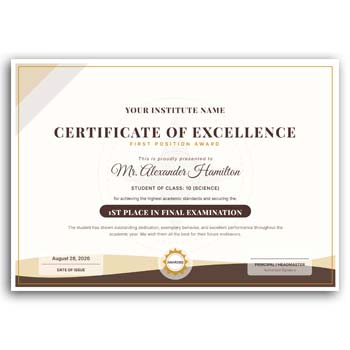
Student Institute School Certificate Fast Position Editable Instant Download
Certificates are often used by schools and educational institutions to recognize a student’s achievement, participation, completion, or position in an academic activity. A well-designed certificate gives students a formal document that can be kept as a personal record or used when presenting their accomplishments.
The Student Institute School Certificate Fast Position Editable Instant Download is designed as a convenient starting point for preparing such documents. Instead of creating a certificate layout from an empty page, you can customize the available fields with student information, institution details, achievement titles, dates, signatures, and other relevant content.
Main Features
- ✓ Add student name and academic information
- ✓ Include school, college, or institute name
- ✓ Add achievement or position title
- ✓ Enter event, competition, or course details
- ✓ Upload the institution logo
- ✓ Customize available text and colors
- ✓ Add date and authorized signatures
- ✓ Reuse the format for multiple students
- ✓ Suitable for academic and institutional recognition
What Is a Student Certificate?
A student certificate is a formal document issued by a school, college, training center, or other educational institution. It can confirm participation, completion, achievement, academic performance, or recognition in a particular activity.
The exact information depends on the purpose of the certificate. A competition certificate may focus on a student’s position, while a course certificate may confirm successful completion of a program.
Designed for Fast Certificate Preparation
Preparing certificates for an entire class or event can require a significant amount of repetitive work. An editable template provides a prepared structure where the main design remains available while individual student information can be changed.
This can make the certificate preparation process more convenient. Teachers, administrative staff, event organizers, and institute managers can focus on entering accurate information rather than rebuilding the design for every student.
Advantages and Limitations
| Advantages | Limitations |
|---|---|
| ✓ Speeds up certificate preparation | • Student information must be entered correctly |
| ✓ Suitable for creating multiple certificates | • Some institutions may require a custom format |
| ✓ Easy to personalize for different achievements | • Printing quality depends on paper and printer |
| ✓ Supports school or institute branding | • Signature and authorization may still be required |
| ✓ Reusable for future academic events | • Template dimensions may need adjustment |
| ✓ Can be adapted for different certificate purposes | • A template does not verify academic results automatically |
Add Student Information
The student’s full name is normally one of the most important parts of an academic certificate. Depending on the purpose, you can also add class, grade, roll number, registration number, course name, or other relevant information.
Make sure names and identification details are checked before finalizing the certificate. Small spelling errors can reduce the usefulness of an otherwise professional document.
Recognize Different Positions
Schools and institutes often organize competitions, examinations, cultural programs, sports events, quizzes, and other activities. Certificates can be prepared for first, second, third, or other recognized positions.
The award title and achievement statement can be edited according to the event. This allows the same basic design to be used for multiple categories.
Add the Institution’s Branding
A certificate should clearly identify the organization that issued it. You can add the school, college, institute, academy, or training center name along with its logo and other appropriate details.
Using consistent branding can make certificates from different events look like part of the same institutional identity.
Include Event or Course Information
The certificate can contain the name of a competition, program, course, seminar, workshop, or academic event. This helps explain exactly what the student has achieved or participated in.
Keep the wording clear and concise. The recipient should be able to understand the purpose of the certificate quickly.
Add Date and Signatures
The issue date provides a useful reference for the student’s record. Signature areas can be added for the principal, director, teacher, coordinator, trainer, or other authorized person.
The number and type of signatures should follow the institution’s own procedures. Review these details before printing a final certificate.
Related Educational and Office Designs
Educational institutions frequently use branded stationery for official communication. For a formal document header, you can explore this Letterhead Design and customize it with institutional information.
Another option is the Letterhead Design Template, which can be adapted for school, college, institute, or office correspondence.
For a reusable stationery layout, you can also check this Stationary Letterhead Layout.
Useful for Schools and Institutes
A certificate template can be adapted for primary schools, secondary schools, colleges, coaching centers, training institutes, academies, and educational organizations.
Different institutions may have different certificate requirements. The editable format allows the wording and available design elements to be adjusted according to the specific event or program.
Create Certificates for Multiple Students
If an event involves many students, a reusable template can save considerable preparation time. Keep one original master design and create individual copies for each recipient.
Only the student-specific information needs to be changed. This helps maintain the same visual style across the entire set of certificates.
Keep the Certificate Easy to Read
A certificate should look formal while remaining easy to understand. The student’s name, achievement, institution name, and certificate title should have clear visual importance.
Avoid filling the page with too many decorative elements. A balanced design can make the final document feel more professional and easier to read.
Add Different Achievement Types
The same certificate format can be adapted for several types of recognition. You might use it for academic excellence, competition positions, sports achievements, cultural activities, attendance, participation, or course completion.
Changing the title and recognition message can create a new version without redesigning the entire document.
Digital Certificate Use
Schools and institutes may also distribute certificates digitally. An editable certificate can be prepared and exported into a suitable digital format for sending to students or storing in institutional records.
Before sharing a digital copy, check the final document carefully. Names, dates, logos, signatures, and other information should appear correctly on the final file.
Printing Considerations
For physical certificates, the choice of paper can affect the overall presentation. A suitable certificate or premium-quality paper can provide a more formal appearance.
Always test-print one certificate before producing a large quantity. Check page size, margins, alignment, text readability, and the placement of logos and signatures.
Avoid Common Certificate Mistakes
Student certificates should be checked carefully before they are issued. Common mistakes can include incorrect student names, wrong positions, inaccurate dates, spelling errors, or missing signatures.
A simple proofreading step can prevent many of these problems. For larger events, it may be useful for a second person to verify the final information.
Educational Certificates and Recognition
Certificates are commonly used in education to recognize student achievement, participation, and completion. They can serve as a formal record of a particular accomplishment or activity.
For general information about academic and educational certificates, you can explore Certificate on Wikipedia.
Certificate Design Inspiration
The visual style of an academic certificate can vary from simple and modern to formal and decorative. Typography, borders, spacing, logos, and award information should be balanced according to the institution and occasion.
For additional visual ideas, you can explore Certificate Templates and compare different approaches to educational certificate design.
A Quick Editing Method
Begin by entering the institution’s name and adding its logo. Next, replace the sample student name and enter the achievement, position, event, course, or other required information.
Update the date and signature details, then make any available color or text adjustments. Review the complete certificate before exporting or printing it.
Useful for Academic Events
This type of editable certificate can be especially useful for school competitions, institute programs, award ceremonies, workshops, training sessions, cultural activities, and sports events.
Because the format can be reused, organizers can prepare certificates for many students while maintaining a consistent design throughout the event.
Final Thoughts
The Student Institute School Certificate Fast Position Editable Instant Download provides a practical starting point for educational certificate preparation. It allows schools and institutes to customize student names, achievements, positions, event information, branding, dates, and signatures.
A reusable editable format can make the process faster when multiple certificates are required. Before issuing the final documents, always verify the student’s information, achievement details, dates, and authorized signatures to ensure the certificate is accurate and professional.
3 Comments
3 Pingbacks