Loading Design... please wait.।
Letterhead Design Template Editable
A professionally designed letterhead can turn an ordinary document into a recognizable piece of business communication. An Editable Letterhead Design Template gives you a structured starting point where the branding and contact information can be adjusted according to your requirements.
Instead of building the page layout from scratch, you can work with an existing design and personalize the important elements. This makes it suitable for companies, offices, agencies, freelancers, institutions, and other professional users.
Main Features at a Glance
- ✓ Ready-made professional page structure
- ✓ Editable company or personal information
- ✓ Logo replacement support
- ✓ Customizable contact details
- ✓ Adjustable colors in supported formats
- ✓ Reusable for different business documents
- ✓ Suitable for formal correspondence
- ✓ Can be prepared for digital documents
- ✓ Useful for professional printing
- ✓ Helps maintain consistent visual branding
What Is an Editable Letterhead Template?
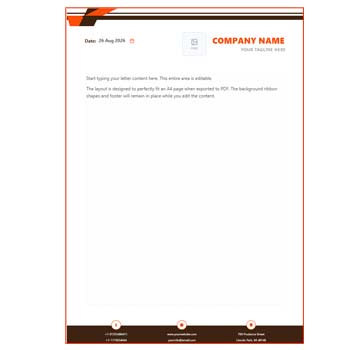
An editable letterhead template is a pre-arranged document design containing areas for branding and business information. The header may include the company name and logo, while the footer can contain contact details, website information, or other relevant elements.
The main body is generally kept available for the actual document content. Depending on the template format, users may be able to edit text, images, colors, shapes, and other design components.
Why Start With a Template?
Creating a professional letterhead from a blank page involves decisions about margins, typography, alignment, logo placement, and visual hierarchy. A template reduces much of this initial work.
You can concentrate on adapting the design to your own identity rather than spending time constructing the basic structure. It is particularly helpful when business stationery is needed quickly.
Customization Options
| Design Element | Customization |
|---|---|
| Company name | ✓ |
| Personal name | ✓ |
| Logo | ✓ |
| Address | ✓ |
| Phone number | ✓ |
| ✓ | |
| Website | ✓ |
| Header | ✓ |
| Footer | ✓ |
| Brand colors | ✓ |
Benefits and Limitations
| Benefits | Limitations |
|---|---|
| ✓ Saves design preparation time | • Editing depends on the template format |
| ✓ Provides a consistent structure | • Some objects may not be editable |
| ✓ Easy to reuse | • Specific software may be required |
| ✓ Helps maintain brand identity | • Template style may not suit every business |
| ✓ Suitable for digital and print documents | • Extensive graphics can affect printing |
| ✓ Useful for both individuals and organizations | • Further customization may sometimes be necessary |
Add Your Own Brand Identity
The template becomes truly useful after you replace the sample information with your own. Add the correct company name, logo, address, phone number, email, and website.
If the design contains placeholder graphics or text, remove anything that does not belong to your business. The final document should look like an intentional part of your stationery collection rather than a generic downloaded template.
Logo and Visual Balance
A logo should be visible without dominating the page. Keep its proportions correct and choose a high-quality image to avoid blurry or distorted branding.
If you change the logo size, check the surrounding spacing as well. Good spacing can make a relatively simple letterhead appear much more professional.
Choosing Colors
Brand colors can help connect the letterhead with your existing visual identity. If the template allows color editing, use colors that already appear in your logo, website, or other marketing materials.
Avoid using excessive colors simply because the template allows them. A restrained palette is usually easier to read and more practical for office printing.
Keep the Body Area Practical
A letterhead is ultimately designed to support written communication. The decorative portion should therefore leave enough room for the main content.
Consider both short letters and longer documents when adjusting the header and footer. A flexible design will be more useful over time.
Where It Can Be Used
An editable letterhead can be used for:
- Official business letters
- Client communication
- Project proposals
- Company notices
- Reports and statements
- Business quotations
- Internal office communication
- Partnership or professional correspondence
The same branded layout can be reused while changing the actual message for each document.
Build a Matching Stationery Set
A letterhead often works better as part of a complete stationery system. A matching business card can reinforce the same visual identity when communicating with clients.
For example, you can explore a Double-Sided A4 Business Card Setup for a related print layout.
Another option is the Business Card A4 Size Setup Editable Format.
You may also consider a Both-Side Editable Business Card PDF Format to create a complementary contact card.
Digital Document Workflow
Many businesses now send letters and proposals digitally. An editable letterhead can provide the branded foundation for these documents, particularly when the final output is exported as PDF.
Always inspect the exported file before sending it. Fonts, alignment, images, and spacing can sometimes appear differently after conversion.
Printing Considerations
If the letterhead is intended for physical printing, confirm the correct paper size and margins. The design should remain inside the printer’s printable area.
A test print is recommended before ordering or producing a large quantity. It can help identify issues with colors, logo quality, alignment, or excessive ink coverage.
Save a Master Version
Once the template has been customized, save a clean master copy. Keep your standard logo, business information, colors, and approved layout in this version.
For future documents, duplicate the master file and edit the copy. This protects the original design and helps keep all company documents consistent.
Useful for Small Businesses and Freelancers
Small businesses may not have a dedicated graphic designer available whenever stationery needs to be updated. An editable template can make routine document preparation easier.
Freelancers and independent professionals can use the same approach to create branded proposals, formal letters, reports, and client communications without maintaining multiple designs.
Useful for Corporate Offices
Corporate organizations can benefit from a standardized letterhead because different employees may need to prepare official documents.
A single approved template can help ensure that the logo, contact details, typography, and general branding remain consistent across departments.
Avoid Overdesigning
Creative elements can make a letterhead attractive, but too many shapes, graphics, or decorative elements may distract from the message.
Keep the visual hierarchy clear. The recipient should be able to identify the organization quickly and then focus on the document content without unnecessary visual interference.
Before Finalizing the Design
Review the following information carefully:
- Company or professional name
- Logo quality and position
- Phone number
- Email address
- Website
- Office address
- Header and footer spacing
- Page margins
- Font consistency
- Export or print quality
A final review can prevent small errors from appearing on official documents.
Letterhead as a Business Stationery Element
Letterhead is commonly used as branded stationery for written business communication. It can identify the organization while providing useful contact information.
For a general reference, visit Letterhead on Wikipedia.
Explore More Design Inspiration
There are many different approaches to letterhead design, from minimalist corporate layouts to colorful creative compositions. The most suitable style depends on your industry and brand personality.
For additional references, explore Letterhead Design Templates.
Final Thoughts
An Editable Letterhead Design Template provides a convenient foundation for creating professional business stationery. By replacing the sample information, adding your own logo, and adjusting supported design elements, you can turn a ready-made layout into a branded document.
Choose a design that balances appearance with usability. A clean header, readable contact information, sufficient writing space, and consistent branding will make the template useful for everyday professional communication.
Leave a Reply