Loading Design... please wait.।
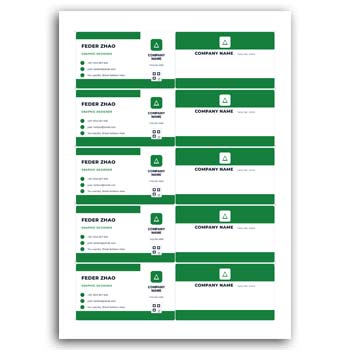
Creating a professional business card does not always require advanced graphic design skills. A double sided A4 setup business card template gives you a practical starting point for creating multiple cards in an organized layout. With an editable template, you can customize the information, colors, logo, and other design elements before preparing the final file for printing.
Key Features at a Glance
- ✓ Double-sided business card layout
- ✓ A4 print-ready setup
- ✓ Easy text editing
- ✓ Quick color customization
- ✓ Add or replace your business logo
- ✓ Change design elements as needed
- ✓ Create multiple cards on one A4 page
- ✓ Download or export the finished design
- ✓ Suitable for business and personal branding
What Is a Double Sided Business Card?
A double sided business card contains useful information on both the front and back sides. One side can focus on your name, logo, and business identity, while the other can include contact details, services, social media information, or additional business information.
An editable template makes this process easier because the basic layout is already prepared. You only need to customize the content and design according to your requirements.
Why Use an A4 Setup?
An A4 setup is useful when you want to arrange multiple business cards on a single printable page. Instead of preparing each card separately, several copies can be placed on one A4 sheet with proper spacing and alignment.
This can make the printing process more organized and convenient. It is particularly useful for businesses that need several cards at the same time.
Easy Text Editing
One of the most useful features of an editable business card template is the ability to change text quickly. You can update the name, position, company name, phone number, email address, website, and other details.
There is no need to recreate the entire design when your information changes. Simply edit the required text and keep the rest of the layout intact.
Change Colors Easily
Brand colors can make a business card more recognizable. An editable template allows you to change colors according to your company identity or personal preference.
You can adjust background colors, text colors, shapes, borders, and other visual elements. This helps you create a more personalized and consistent design.
Add Your Business Logo
A logo is an important part of many business cards. It helps customers and clients identify your brand more easily.
With an editable template, you can replace the sample logo with your own. If you are creating different versions of the card, you can also change the logo or remove the logo element when necessary.
Customize Both Sides
The main advantage of a double sided card is the extra design space. Instead of trying to fit every detail on one side, you can organize the information across both sides.
For example, the front can display your logo, name, and business identity. The back can contain contact information, services, website details, QR codes, or social media profiles.
Create Multiple Cards on One A4 Sheet
An A4 business card setup can help you prepare multiple copies in one document. Once the card design is finalized, the same layout can be repeated across the page.
This approach can save preparation time and make it easier to create a print-ready sheet. Proper alignment and spacing are important to achieve a clean final result.
Download and Print Easily
After completing the design, you can export the final file in a suitable format. PDF is generally useful for printing because it can preserve the document layout and dimensions.
JPG can also be useful when you need a digital preview or want to share the design online. Always check the final size and print settings before sending the file to a printer.
Useful for Different Businesses
A double sided business card can work for many industries and professions. Retail businesses, agencies, freelancers, consultants, real estate professionals, designers, photographers, and service providers can customize the layout for their needs.
The same template can also be adapted for different employees or departments. This makes it a flexible option for small and large businesses.
Simple for Online Design Users
People who enjoy creating designs online often prefer editable templates because they provide a ready-made structure. You can focus on customization instead of spending time creating every element from scratch.
This makes the process more accessible for beginners while still giving experienced designers the flexibility to modify the layout.
Related Editable Stationery Designs
Business stationery often includes more than just visiting cards. If you need another useful business document, you can explore this Online Cash Memo design for different business requirements.
For clothing and fashion businesses, a Garments Cash Memo can be useful for preparing customized sales documentation.
You may also find a Corporate Writing Pad helpful when creating professional office stationery that matches your business identity.
Keep the Design Professional
A business card should be easy to read and visually balanced. Avoid placing too much information in a small space, especially when the card is designed for standard printing.
Use clear typography and maintain enough spacing between different sections. A simple layout can often create a stronger professional impression than a design with too many decorative elements.
A Useful Tool for Branding
Business cards are often used during meetings, networking events, conferences, exhibitions, and client discussions. A well-designed card can make it easier for people to remember your business and contact you later.
Using the same logo, colors, and visual style across your business materials can also help create a consistent brand identity.
Design and Print Considerations
Before printing, check the card dimensions, margins, alignment, and text placement carefully. If the design includes important information near the edges, make sure it is positioned safely within the printable area.
For general information about business cards, you can also read this Business Card Overview on Wikipedia. For additional design inspiration and business card creation ideas, you can explore Business Card Design.
How the Editable Template Works
The basic workflow is straightforward. Start with the A4 template, customize the front and back sides, replace the sample information, add your logo, and adjust the colors.
Once everything looks correct, review the complete A4 layout and export the finished design. You can then use the file for printing or share it digitally when needed.
Why Choose a Double Sided A4 Template?
A double sided A4 template combines flexibility with convenience. It gives you more space for business information while allowing multiple cards to be arranged within a single printable document.
For users who want a quick and editable solution, this type of template can reduce design time and make the preparation process much easier. You can customize the design whenever your business information or branding changes.
Final Thoughts
A Double Sided A4 Setup Business Card Template Format Editable is a practical choice for anyone who wants to prepare professional business cards without designing everything from scratch. You can edit the text, change colors, add your logo, customize both sides, and arrange multiple cards on an A4 sheet.
Whether you are a business owner, freelancer, professional, or online design enthusiast, an editable template can help you create a polished business card more efficiently. With a well-organized layout and simple customization options, the design can be prepared for both digital use and professional printing.
1 Comment
1 Pingback