Loading Design... please wait.।
Cash Memo Format Online
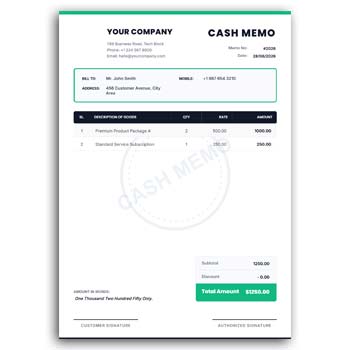
A cash memo is a simple but important document for recording a sale and showing a customer what they have purchased. It usually contains product names, quantities, prices, discounts, and the final amount of the transaction.
A Cash Memo Format Online can make this process more convenient by giving businesses a ready structure that can be customized when needed. Instead of designing a sales document from the beginning, you can update the available information and prepare a clean cash memo for your customers.
Why Choose an Online Cash Memo Format?
- ✓ Edit business information quickly
- ✓ Add product or service names
- ✓ Change quantities and prices
- ✓ Include customer information
- ✓ Upload a company or shop logo
- ✓ Customize available text and colors
- ✓ Add discounts and additional charges
- ✓ Include payment information
- ✓ Reuse the format for regular sales
- ✓ Prepare documents for digital sharing or printing
What Does a Cash Memo Contain?
A typical cash memo includes information about the seller, buyer, products, quantities, prices, and total amount. Depending on the type of business, additional information such as invoice numbers, payment methods, discounts, taxes, or delivery details can also be included.
The format does not have to be complicated. The goal is to present the transaction in a way that both the seller and customer can understand easily.
How an Online Format Can Help
An online format is useful when you want to prepare business documents without repeatedly creating the layout from scratch. The main design can remain unchanged while the transaction-specific information is updated.
This can be particularly helpful for small businesses that need a simple sales document but do not want to invest time in designing one for every transaction.
Advantages and Limitations
| Advantages | Limitations |
|---|---|
| ✓ Faster than designing from scratch | • Information still needs to be checked |
| ✓ Easy to reuse for different sales | • It may not include advanced accounting features |
| ✓ Can support business branding | • Manual calculations require attention |
| ✓ Suitable for various businesses | • Inventory may not update automatically |
| ✓ Useful for printed and digital documents | • Complex billing may require specialized software |
| ✓ Keeps transaction details organized | • Features depend on the selected format |
Add Your Business Details
Start by adding the name of your shop or company. You can also include the business address, phone number, email address, website, and other contact information that customers may need.
Keeping these details consistent helps make every cash memo recognizable as an official business document.
Enter Product Information
The product section should clearly identify what the customer purchased. Depending on your business, this may include retail products, stationery, electronics, food items, tools, clothing, or other goods.
If the products have model numbers, item codes, sizes, or other important identifiers, those details can be added where appropriate.
Show Quantity and Price
A clear quantity and pricing section helps customers understand the transaction without having to calculate everything themselves. Each item can have its own quantity, unit price, and total amount.
For multiple products, an organized table is particularly useful. Always check the calculations before providing the completed cash memo.
Add Customer Information
Not every retail transaction requires detailed customer information. However, customer details can be helpful for business orders, bulk purchases, deliveries, returns, or warranty-related services.
You can include the customer’s name, phone number, address, or company information when required by your sales process.
Customize Your Logo and Design
An editable cash memo can be customized with your business logo and other branding elements. You can also change available text and colors to match your existing business identity.
A consistent visual style across your cash memo, quotation, invoice, letterhead, and other stationery can make your business communication look more professional.
Related Design Resources
Businesses that regularly create stationery may also need different types of writing and professional document designs. You can explore the Creative Art Romantic Writing Pad Design Generator for a different stationery concept.
For healthcare-related stationery, the Doctor Prescription Pad Design Generator provides another type of editable document format.
You can also explore the Doctor Writing Pad Editable Online option when looking for a professional writing pad design.
Add Discounts and Charges
Businesses may provide discounts for bulk purchases, promotional offers, regular customers, or special campaigns. A cash memo can show the discount separately so the customer can see how the final amount was calculated.
Other applicable charges can also be displayed separately. Keeping each amount visible makes the transaction easier to review.
Payment Details
The payment section can identify how the customer completed the transaction. Depending on the business, this may include cash, card, bank transfer, mobile payment, or another method.
If an amount remains unpaid, the balance should be clearly distinguished from the amount already received. This can make future payment follow-up easier.
Useful for Different Businesses
A general cash memo format can be adapted for many types of businesses. Retail stores, stationery shops, restaurants, electronics stores, clothing shops, hardware businesses, printing shops, and service providers may all require some form of sales documentation.
The item fields can be changed according to the products or services being sold. This flexibility makes a general format useful for both small and growing businesses.
Cash Memo for Small Businesses
Small businesses often need practical documents without complicated systems. An editable cash memo can provide a simple way to record transactions while maintaining a professional appearance.
It can be especially useful for businesses that do not need a full point-of-sale or accounting system for every sale. However, businesses with more advanced requirements may benefit from dedicated software.
Online, Digital, and Printed Use
A digital cash memo can be shared with customers through email, messaging applications, or other online channels. Printed copies can be handed to customers at a physical store or retained for internal records.
Before sharing or printing, review the final document to make sure the text, prices, logo, and totals are clearly visible.
Keep the Format Easy to Read
A cash memo should prioritize clarity. Customers should be able to find the product name, quantity, price, discount, and final amount without searching through unnecessary design elements.
Simple typography and organized spacing can improve the overall reading experience. A clean design is often more useful than a heavily decorated layout.
Update Prices Regularly
Product prices can change because of supplier costs, market conditions, promotions, or business decisions. The information used in a cash memo should therefore reflect the current selling price.
If you maintain a master template, review the pricing fields whenever your business changes its product or service rates.
Cash Memo and Invoice
A cash memo and an invoice can contain similar transaction information, but they may serve different purposes depending on the business. A cash memo is commonly used to record or acknowledge a sale, while an invoice is generally associated with an amount payable for goods or services.
The exact requirements can vary according to the business and local regulations. For general information, you can read Invoice on Wikipedia.
Design Inspiration
A professional business document should make important information easy to locate. Balanced spacing, readable typography, clear tables, and consistent branding can improve the usability of a cash memo.
For additional business document ideas, you can explore Business Document Templates and compare different professional layouts.
Simple Editing Workflow
First, replace the sample business information with your own company or shop details. Add your logo and update any available colors or text that need to match your branding.
Then enter the customer information, product names, quantities, prices, discounts, charges, and payment details. Finally, review the complete transaction and prepare the document for sharing or printing.
Keep a Reusable Master Copy
If you prepare cash memos regularly, keep one original version as your master design. Create a new copy for every transaction instead of changing the original file.
This makes the process safer and helps preserve a consistent document layout. It can also save time when several cash memos need to be prepared in a short period.
Who Can Use a Cash Memo Format?
Retailers, wholesalers, stationery stores, printing businesses, restaurants, electronics shops, hardware stores, clothing businesses, small offices, and many other commercial organizations can adapt a cash memo format.
The design can be modified around the products or services being sold. This makes it suitable for a wide range of everyday business transactions.
Final Thoughts
A Cash Memo Format Online provides a convenient starting point for businesses that need a simple and reusable sales document. You can customize the business details, logo, products, quantities, pricing, discounts, payment information, and other relevant fields.
Using an editable format can reduce repetitive design work and make daily sales documentation more organized. Before issuing the final cash memo, always verify the product details, prices, calculations, customer information, and payment status.
1 Comment
1 Pingback