Loading Design... please wait.।
Create Invoice Online Free PDF
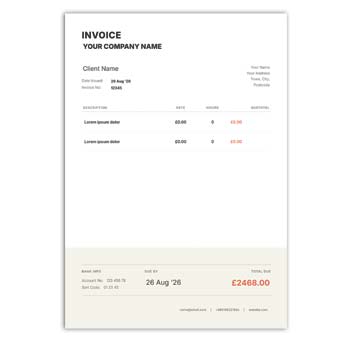
Preparing a professional invoice should not require complicated design software or advanced technical skills. When you need a quick billing document, an online invoice solution can help you organize transaction details and prepare a clean PDF for sharing or printing.
Create Invoice Online Free PDF is a useful option for freelancers, small businesses, online sellers, consultants, agencies, and service providers. A simple invoice can bring customer information, product or service details, pricing, taxes, discounts, and payment instructions together in one easy-to-read document.
Highlighted Features
- ✓ Create an invoice directly online
- ✓ Use a ready-made professional layout
- ✓ Edit business and customer information
- ✓ Add products or services quickly
- ✓ Enter quantity, price, and total
- ✓ Include discounts and applicable taxes
- ✓ Add shipping or service charges
- ✓ Add your business logo and contact details
- ✓ Show payment information and due dates
- ✓ Prepare a PDF suitable for sharing or printing
How Online Invoice Creation Works
An online invoice creator normally provides a predefined structure with separate fields for billing information. You enter the required details, arrange the items, review the calculation, and generate the final document.
The exact features depend on the tool you choose. Some platforms offer basic templates, while others may provide automatic calculations, customization, PDF generation, saved templates, or additional business features.
Invoice Essentials
| Invoice Details | Status |
|---|---|
| Business information | ✓ |
| Customer information | ✓ |
| Invoice number | ✓ |
| Invoice date | ✓ |
| Product/service details | ✓ |
| Quantity | ✓ |
| Unit price | ✓ |
| Subtotal | ✓ |
| Discount | ✓ |
| Tax | ✓ |
| Additional charges | ✓ |
| Final amount | ✓ |
| Payment information | ✓ |
| Logo | ✓ |
Advantages and Limitations
| Advantages | Limitations |
|---|---|
| ✓ Quick document creation | • Free features may vary |
| ✓ No need to design from scratch | • Information must be entered accurately |
| ✓ Convenient for small businesses | • Tax rules differ between countries |
| ✓ Easy to share digitally | • Advanced accounting may require other software |
| ✓ Suitable for PDF workflows | • Some tools may include usage limits |
| ✓ Can be reused for future billing | • A template does not guarantee legal compliance |
Add Business Information First
Start by identifying the business that is issuing the invoice. The header can contain the company name, address, phone number, email address, website, and other useful contact information.
A logo can make the document look more consistent with your business identity. Keep the design simple so customers can quickly find the important billing information.
Enter Customer Details
The invoice should clearly identify the person or organization being billed. Depending on the transaction, this may include the customer’s name, company name, billing address, email, or other relevant information.
Always check these details before generating the final PDF. Correct customer information is particularly important when invoices are used for business transactions.
Add Products or Services
The item section explains what the customer is paying for. Add each product or service with an understandable description, quantity, unit price, and corresponding amount.
An itemized structure is especially helpful for larger orders. It allows the customer to compare the invoice with the original order or service agreement.
Build the Price Summary
After entering the items, organize the financial calculation. Show the subtotal and then include any discount, tax, shipping cost, service fee, or other applicable adjustment.
The final amount should be clearly visible. Even when the online system calculates the total automatically, review the figures before issuing the invoice.
Related Professional Templates
Businesses often need different documents alongside their invoices. For organizations that issue recognition documents, the Professional Award Certificate Format can be useful for acknowledging employee or professional achievements.
Educational institutions may need a Student Institute School Certificate for students and academic activities.
For training and learning programs, you can also explore the Course Certificate Format.
Customize the Invoice
An invoice can be adapted to match the type of business and transaction. Depending on the editing platform, users may be able to change text, colors, sections, logo placement, and other design elements.
Avoid unnecessary visual decoration. A professional invoice should make financial information easier to understand rather than distracting the customer.
Discounts and Additional Costs
Discounts can be displayed separately from the original price. This makes promotional offers, bulk discounts, and negotiated pricing easier for customers to understand.
Delivery charges, shipping fees, packaging costs, or service charges can also be listed individually. A transparent calculation reduces confusion about the final amount.
Tax Details
Some businesses are required to show applicable taxes on their invoices. When tax information is required, it should be presented clearly and calculated according to the applicable rules.
Tax requirements can differ significantly by country and business type. An online invoice generator should therefore be configured according to the regulations relevant to the transaction.
Payment Information
An invoice can provide instructions about how the customer should make payment. Bank information, payment methods, payment links, due dates, and other relevant instructions can be included when appropriate.
For business customers, payment terms should match the agreement between the seller and buyer. Clear instructions can make the payment process more straightforward.
Generate a PDF
PDF is commonly useful when an invoice needs to be shared without changing its layout. It helps preserve the document’s structure across different devices and makes it suitable for digital communication or printing.
Before sending the PDF, open the final file and review it carefully. Make sure all text, totals, dates, and customer details appear correctly.
Digital Invoice Sharing
Online businesses can send invoices to customers without printing physical copies. A completed PDF can be shared through email or another appropriate digital communication channel.
Digital delivery can be especially convenient for freelancers and remote businesses. However, sensitive customer information should always be handled responsibly.
Printable Invoice
A PDF invoice can also be printed when a physical record is required. This can be useful for retail stores, offices, service businesses, and customers who prefer paper documentation.
Test the document on the intended paper size before printing several copies. Check margins, text clarity, alignment, and logo quality.
Freelancers and Service Providers
Freelancers can create invoices for graphic design, web development, writing, photography, marketing, consulting, and other professional services.
The invoice can use hourly billing, fixed project fees, milestones, or recurring service charges. A short and specific description of the work can help clients understand the payment request.
Small Business Use
Small businesses often need a simple billing process that does not require complicated software. An online invoice creator can provide a practical solution for preparing regular customer documents.
As the business grows, invoices can later be connected with accounting, payment, inventory, or customer management systems where necessary.
E-Commerce Invoices
Online stores can use invoices to document customer purchases. Product names, quantities, prices, discounts, shipping costs, taxes, and payment status can be included according to the order.
Always compare the invoice with the actual transaction. This is particularly important when an order has been changed, refunded, canceled, or partially fulfilled.
Invoice Numbering
A unique invoice number makes each document easier to identify. Businesses can use sequential numbering or another consistent reference system.
Keeping invoice numbers organized can simplify accounting and customer support. Avoid accidentally reusing the same number for different transactions.
Invoice Records
Invoices can be useful records of business sales and services. Saving them by customer, invoice number, date, or project can make future reference easier.
Keep financial records securely and follow the document-retention requirements applicable to your business. Customer information should not be unnecessarily exposed.
Invoice and Certificate Documents
Invoices and certificates have completely different purposes. An invoice records a financial transaction, while a certificate generally recognizes completion, participation, achievement, training, or another accomplishment.
For example, a business may issue an invoice to a client while separately providing an award certificate to recognize an employee.
General Invoice Reference
An invoice is generally used to document goods or services supplied and the amount charged to a customer. It can include seller details, buyer information, item descriptions, prices, taxes, and payment terms.
For more general information about invoices, see Invoice on Wikipedia.
Invoice Design Inspiration
An effective invoice should be easy to scan rather than overloaded with decoration. Clear headings, organized tables, readable typography, and sufficient spacing can make the document much more practical.
For additional visual inspiration, explore Invoice Templates.
Simple Creation Steps
Choose a suitable invoice layout and enter the business and customer information. Add the invoice number, date, products or services, quantities, and prices.
Apply relevant discounts, taxes, shipping charges, or service fees. Review the final calculation, generate the PDF, and check the completed document before sharing or printing it.
Who Can Create Invoices Online?
Online invoice creation can be useful for freelancers, retailers, wholesalers, consultants, agencies, contractors, startups, online sellers, and service providers.
It is particularly helpful when you need a straightforward way to produce professional billing documents. Businesses with complex tax, accounting, inventory, or multi-user requirements may eventually need dedicated business software.
Final Thoughts
The ability to Create Invoice Online Free PDF can make everyday billing faster and more convenient. A structured online workflow allows users to organize customer details, products or services, pricing, discounts, taxes, and payment information in a professional format.
For occasional billing or small business requirements, an online invoice creator can be a practical starting point. Always review the completed invoice carefully and make sure its information and calculations meet the requirements of your business and location.
3 Comments
3 Pingbacks