Loading Design... please wait.।
Quick Invoice Generator Online
Preparing an invoice should be a simple part of running a business, not a time-consuming design task. A Quick Invoice Generator Online can help users create a structured invoice without starting from a blank page. It is useful when you need a professional billing document quickly for a customer, client, or business transaction.
Main Features
- ✓ Create invoices quickly with a ready-made format
- ✓ Edit customer and business information easily
- ✓ Add products, services, quantity, and pricing
- ✓ Calculate the invoice total in an organized way
- ✓ Include discounts, taxes, and additional charges
- ✓ Add company branding and logo
- ✓ Enter payment terms and important notes
- ✓ Prepare invoices for digital sharing
- ✓ Create documents suitable for printing
- ✓ Reuse a similar format for future invoices
How Does a Quick Invoice Generator Work?
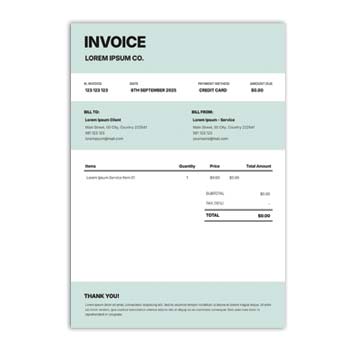
A quick invoice generator normally provides a predefined layout with separate areas for business information, customer details, products, pricing, and payment information. Instead of designing these sections manually, users can enter their information into the available fields.
The exact editing and download options depend on the platform. Some generators are designed for simple invoice creation, while others may offer automatic calculations, customization, PDF output, saved templates, or additional business features.
What Can You Put on an Invoice?
A professional invoice usually contains enough information to clearly explain a transaction. This can include the seller’s details, customer’s information, invoice number, date, item description, quantity, price, total amount, and payment instructions.
Additional information can be added when relevant. Discounts, taxes, shipping charges, service fees, due dates, and business notes can help provide a more complete billing record.
Invoice Setup at a Glance
| Invoice Element | Easy to Add |
|---|---|
| Business name and contact | ✓ |
| Customer information | ✓ |
| Invoice number | ✓ |
| Issue date | ✓ |
| Product or service description | ✓ |
| Quantity and rate | ✓ |
| Subtotal | ✓ |
| Discount | ✓ |
| Tax | ✓ |
| Delivery or service charge | ✓ |
| Final amount | ✓ |
| Payment instructions | ✓ |
| Logo and branding | ✓ |
Benefits and Possible Limitations
| Benefits | Possible Limitations |
|---|---|
| ✓ Reduces manual formatting work | • Available features vary |
| ✓ Useful for urgent billing | • User input must be accurate |
| ✓ Easy for beginners | • Tax requirements differ by location |
| ✓ Can support repeated invoices | • Advanced accounting may need separate tools |
| ✓ Helps create consistent documents | • Some free services may have restrictions |
| ✓ Convenient for online businesses | • Templates do not automatically ensure legal compliance |
Start With the Customer
When preparing an invoice, the customer information should be easy to identify. Depending on the type of transaction, you can include the person’s name, company name, billing address, email address, or other necessary information.
Correct customer details make the invoice more useful as a business record. Before finalizing the document, check spelling and contact information carefully.
Organize Your Products or Services
The main invoice table should explain what the customer is being charged for. Each item can include a short description, quantity, unit price, and line total.
For service-based businesses, the item description can explain the type of work performed. For product businesses, it can identify the products supplied and their quantities.
Make the Total Easy to Find
Customers should be able to identify the final amount without searching through the entire document. A clear subtotal followed by discounts, taxes, and additional charges can make the calculation easier to understand.
If the generator performs automatic calculations, review the result before sending the invoice. A small numerical mistake can create unnecessary problems during payment.
Related Business Templates
Businesses often use invoices together with other professional documents. A membership-based organization may also need a Membership Card Format to provide identification or access information to members.
Companies can complement their document collection with an Employee ID Card Format for staff identification.
For recognizing employee or professional achievements, an Award Certificate Format can also be useful.
Add Your Branding
A business invoice can include the company logo, brand name, contact details, and other visual elements. Consistent branding can make customer documents look more professional and recognizable.
Keep the visual design balanced. The main purpose of an invoice is to communicate financial information clearly, so branding should support the content rather than make it difficult to read.
Discounts and Additional Charges
Discounts can be displayed separately from the original item price. This is useful for promotional offers, negotiated prices, bulk orders, or returning customers.
Additional costs such as delivery, shipping, packaging, or service charges can also be shown as separate lines. This provides a clearer explanation of how the final amount was calculated.
Payment Details
Payment instructions are an important part of many invoices. Depending on the business, you can include bank information, accepted payment methods, online payment details, payment links, or a due date.
For business-to-business transactions, payment terms should match the agreement between the parties. Clear instructions can help customers understand when and how the payment should be completed.
PDF and Digital Use
Many businesses prefer digital invoices because they can be shared quickly with customers. A PDF can help preserve the document layout when it is opened on different devices.
Before sending the final file, review the entire invoice. Make sure the customer information, item details, prices, total, dates, and payment instructions are correct.
Printing the Invoice
A professionally structured invoice can also be printed when a physical document is required. This can be useful for retail shops, offices, service counters, wholesalers, and other businesses.
Check the page size and margins before printing multiple copies. A quick test print can help identify alignment or readability problems.
Useful for Freelancers
Freelancers often need invoices for project-based work, hourly services, consulting, design, development, writing, marketing, photography, and other professional activities.
A quick generator can make repeated billing easier. You can use a consistent structure while updating the client, project description, amount, and payment terms for each new transaction.
Helpful for Small Businesses
Small businesses may not need a complicated invoicing system for every situation. A simple online generator can provide a convenient way to prepare basic invoices without spending time creating a new layout.
As the business expands, additional tools for accounting, inventory, payments, customer management, and reporting may become useful. The invoice generator can still serve as a quick document creation option where appropriate.
E-Commerce and Online Sales
Online sellers can use invoices to document purchases and provide customers with transaction details. Product names, quantities, prices, shipping charges, discounts, taxes, and payment status can be included when required.
Always compare the completed invoice with the actual order. This is particularly important when an order has been modified, canceled, refunded, or partially fulfilled.
Invoice Numbering
A unique invoice number makes it easier to identify individual transactions. Businesses can use sequential numbering or another consistent system that suits their workflow.
Good invoice numbering can simplify record keeping and make it easier to respond to customer questions. Avoid using the same invoice number for multiple transactions.
Keep Your Records Organized
Invoices can become useful records for tracking sales, services, and payments. Saving them by invoice number, customer name, date, or project can make future retrieval much easier.
Keep financial documents in a secure location. Businesses should also follow the applicable record-keeping requirements and protect customer information from unnecessary exposure.
Invoice vs Other Documents
An invoice is primarily used to document an amount charged for goods or services. Other business documents have different purposes and should not be treated as interchangeable.
For example, an ID card identifies a person, a membership card represents membership, and an award certificate recognizes an achievement. An invoice focuses specifically on a commercial transaction and its payment details.
General Invoice Information
An invoice is a commercial document commonly used to record goods or services supplied to a customer and the amount charged. It may contain information about the seller, buyer, items, pricing, taxes, and payment terms.
For a general overview, you can visit Invoice on Wikipedia.
Invoice Design Inspiration
An effective invoice does not need an overly complex appearance. Clear typography, sufficient spacing, organized tables, and a visible total amount are often enough to create a professional document.
For additional invoice design ideas, you can explore Invoice Templates.
A Fast Invoice Workflow
Choose a suitable invoice structure and enter your business information first. Add the customer’s details, invoice number, date, and the products or services being billed.
Review the quantity and pricing before adding discounts, taxes, or additional charges. Once everything is correct, generate the final document and share or print it according to your business needs.
Who Can Use a Quick Invoice Generator?
A Quick Invoice Generator Online can be useful for freelancers, retailers, wholesalers, consultants, agencies, contractors, startups, online sellers, and service providers.
It is particularly helpful when you need a straightforward billing document without spending unnecessary time on formatting. Businesses with complex accounting, tax, inventory, or multi-user requirements may eventually benefit from a more comprehensive invoicing system.
Final Thoughts
A Quick Invoice Generator Online can turn a repetitive billing task into a much simpler process. With a ready structure and organized fields, users can prepare invoices containing customer information, products or services, pricing, adjustments, and payment details.
The most useful invoice is one that is accurate, readable, and easy for the customer to understand. Always review the completed document before sending it and make sure the invoice follows the requirements that apply to your business and location.
1 Comment
1 Pingback