Loading Design... please wait.।
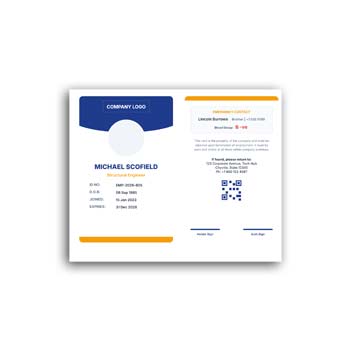
Employee ID Card Format Editable Instant Download
An employee ID card is more than a simple identification card. It can help a company identify its staff, present a professional image, and provide essential employee information in a compact format.
With an Employee ID Card Format Editable Instant Download, businesses can start with a prepared design and customize it for their employees. Names, photographs, job titles, departments, employee numbers, company details, and other available information can be changed without creating every card from the beginning.
Important Features
- ✓ Add employee name and photograph
- ✓ Enter employee ID or staff number
- ✓ Include job title and department
- ✓ Add company logo and contact information
- ✓ Customize available text and colors
- ✓ Add joining date or validity information
- ✓ Create cards for multiple employees
- ✓ Reuse the same design for new staff
- ✓ Suitable for professional workplace identification
What Is an Employee ID Card?
An employee ID card is generally issued by an organization to identify its staff members. It may show the employee’s name, photograph, designation, department, identification number, and company information.
The exact details depend on the organization’s needs. Some companies may use the card only for identification, while others may connect it with workplace access or internal employee systems.
Why Companies Use Employee ID Cards
A visible ID card can make it easier to recognize employees in an office, factory, institution, or other workplace. It can be particularly useful when staff members regularly interact with customers, visitors, suppliers, or security personnel.
A consistent card design can also contribute to a professional company image. When all employees use cards based on the same format, the organization can maintain a unified visual identity.
Advantages and Limitations
| Advantages | Limitations |
|---|---|
| ✓ Makes employee identification easier | • Employee information must be accurate |
| ✓ Creates a consistent corporate appearance | • Physical cards can be lost or damaged |
| ✓ Saves time when creating multiple cards | • Some workplaces need advanced security features |
| ✓ Easy to update for new employees | • Printing quality affects durability |
| ✓ Can include photo and employee number | • A basic ID card does not automatically control access |
| ✓ Reusable for future staff members | • Sensitive information should be handled carefully |
Add the Employee Photograph
A clear employee photograph can make visual identification much easier. The image should be placed consistently across all cards and should be large enough to recognize the employee.
When preparing cards for a whole team, using photographs with similar dimensions and positioning can create a cleaner professional result.
Include the Right Employee Details
The employee’s name and designation are usually among the most important details. You can also add the department, employee ID, company email, phone number, or other information required by your organization.
It is better to include only useful information. A card with too many details may become crowded and difficult to read.
Customize Company Branding
Your employee ID card can follow the same visual identity as your other corporate materials. Add the company logo, business name, brand colors, website, or contact details where appropriate.
This can help employees present a consistent company image when interacting with customers and external contacts.
Create Cards for Different Departments
Companies may have employees working in sales, accounts, administration, technical support, production, marketing, and many other departments. The department name can be added to the ID card while keeping the overall design consistent.
If necessary, different visual indicators can be used to distinguish departments or employee categories. The main company branding can remain unchanged.
Useful for Different Workplaces
Employee ID cards can be used by offices, factories, schools, hospitals, agencies, NGOs, retail businesses, restaurants, and other organizations.
The information and design can be adapted to the workplace. A simple office card may require only basic details, while a large organization may need additional identification or verification features.
Related Corporate and Business Designs
Employee identification is often part of a larger set of business stationery. For everyday office communication, a Corporate Writing Pad can provide a consistent branded document format.
Businesses that sell products or services may also need a Colourful Cash Memo for recording customer transactions.
For a simpler printable option, you can explore this Editable Cash Memo and customize it according to your business requirements.
Employee ID and Internal Identification
A unique employee number can help organizations distinguish one staff member from another. This number may also correspond to an internal HR, payroll, attendance, or employee management system.
If the card is connected to another system, the ID number should be entered carefully. A simple typing error can create confusion during verification.
Add Validity Information
Some organizations issue ID cards for a specific period. In that case, the card can include an issue date, expiration date, or other validity information.
This can be useful when employees change roles or when temporary staff members are issued identification. The validity rules should follow the organization’s internal policy.
Consider Security Features
A basic employee ID card is primarily an identification tool. Organizations that require access control may need additional technologies such as QR codes, barcodes, RFID, magnetic stripes, or smart-card systems.
These features require an appropriate technical system behind them. Simply adding a code to a design does not automatically create a secure access-control solution.
Keep the Layout Readable
An ID card has limited space, so the design should focus on clarity. Employee names, photographs, job titles, and identification numbers should be easy to find.
Good spacing and a clear information hierarchy can make the card more practical. Avoid adding decorative elements that reduce the visibility of important details.
Prepare Multiple Cards Faster
Creating every employee card individually can take unnecessary time. Once the company information and basic design are ready, the same editable format can be reused.
You only need to replace the employee-specific details and photograph. This approach is especially helpful for organizations that regularly hire new employees.
Printing Before Final Production
Before printing a large batch, create a test copy. Check the physical dimensions, photograph quality, text size, logo placement, alignment, and overall appearance.
The card material is also important. Employees who carry their cards every day may need a stronger material or protective finish for longer-lasting use.
Digital Employee Identification
Some organizations use digital employee identification in addition to physical cards. Digital IDs may appear inside employee portals, mobile applications, or internal systems.
An editable design can help establish the visual appearance of such identification materials. However, digital verification requires an appropriate software or access-control system.
Protect Employee Information
An employee ID card may contain personal or organizational information. Businesses should carefully decide which details need to appear on the physical card.
Avoid displaying sensitive information unnecessarily. Employee data should also be handled according to the organization’s privacy and security practices.
Employee Identification in the Workplace
ID cards are commonly used as a visual method of identifying people within an organization. They can help distinguish employees from visitors and provide a quick reference for basic staff information.
For general information about identification documents, you can explore Identity Document on Wikipedia.
Design Inspiration for Employee ID Cards
A professional employee card usually combines a clear information hierarchy with consistent branding. Photo placement, typography, spacing, and company colors should work together rather than compete for attention.
For additional design ideas, you can explore Employee ID Card Templates and compare different approaches to workplace identification.
A Simple Editing Process
Begin by adding your company name and logo to the template. Then replace the sample employee information with the person’s name, photograph, designation, department, and ID number.
Make any available color or text adjustments and check the complete card carefully. Once the information is verified, prepare the final version for printing or digital use.
When an Editable Employee ID Card Is Useful
An editable format is particularly convenient for organizations that need several employee cards with a consistent design. The master template can be kept unchanged while individual staff information is updated.
It is also useful when new employees join the company. Instead of designing a new card from scratch, the existing format can be duplicated and updated.
Final Thoughts
An Employee ID Card Format Editable Instant Download provides a practical starting point for creating professional workplace identification cards. It allows businesses to customize employee names, photographs, designations, departments, ID numbers, company branding, and other relevant information.
Whether you manage a small office or a larger organization, a reusable editable ID card format can save design time and maintain consistency across your team. Always verify employee information before production and make sure the final design follows your organization’s privacy and security requirements.
3 Comments
3 Pingbacks