Loading Design... please wait.।
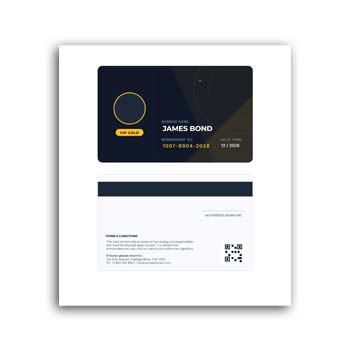
Membership Card Format Editable Instant Download
A membership card is a simple way to identify members and connect them with a club, organization, community, business, or loyalty program. A well-prepared card can display essential membership information while also giving the organization a consistent and professional identity.
With a Membership Card Format Editable Instant Download, you can begin with a ready-made design and customize it for your own membership program. Names, membership numbers, validity dates, organization details, logos, colors, and other available elements can be changed to fit your requirements.
Highlights of the Editable Format
- ✓ Add member names and identification details
- ✓ Include membership or card numbers
- ✓ Add issue and expiry dates
- ✓ Upload an organization or company logo
- ✓ Customize available text and colors
- ✓ Create cards for different membership levels
- ✓ Reuse the design for new members
- ✓ Suitable for printed or digital membership cards
- ✓ Maintain a consistent look across member cards
What Is a Membership Card?
A membership card is generally provided to people who belong to a particular organization, club, association, loyalty program, or membership-based business. It can help identify the member and may be used to access services, benefits, facilities, or special offers.
The actual benefits depend on the organization issuing the card. The card itself mainly works as a convenient identification and membership reference.
Make Member Identification Simple
When an organization has many members, identifying each person quickly can become important. A card containing the member’s name and unique number provides a straightforward way to distinguish one member from another.
Additional details can be included when necessary. However, keeping the information focused usually makes the card easier to read and more practical.
Advantages and Limitations
| Advantages | Limitations |
|---|---|
| ✓ Makes member identification easier | • Physical cards can be lost or damaged |
| ✓ Supports organized membership programs | • Member information must be kept accurate |
| ✓ Can create a professional organization identity | • Some organizations may prefer digital membership systems |
| ✓ Easy to customize for different member levels | • Template dimensions may need adjustment |
| ✓ Reusable for future members | • Security features may require additional technology |
| ✓ Suitable for different types of organizations | • A card alone does not manage membership records |
Add the Right Member Information
A membership card can include the member’s name, membership ID, category, issue date, expiry date, organization name, or other relevant information.
The information should be selected according to the purpose of the card. Avoid displaying unnecessary personal details, especially when the card is intended to be carried or shown publicly.
Create Different Membership Levels
Some organizations provide multiple membership categories, such as regular, premium, professional, student, or VIP membership. An editable format can be adapted to create separate versions for these categories.
Different labels, colors, or visual indicators can help staff recognize the membership level. The main branding can remain consistent across all versions.
Add Your Organization’s Branding
A membership card is also a representation of the organization. Adding a logo, organization name, website, contact information, and suitable brand elements can make the card more recognizable.
An editable format allows you to adjust available colors and text while maintaining the basic design structure. This can help create a consistent identity across multiple cards.
Useful for Clubs and Organizations
Membership cards are commonly useful for clubs, associations, gyms, educational organizations, professional groups, communities, and loyalty programs.
Each organization can customize the card according to how its membership system works. The same template can therefore serve different purposes with relatively simple changes.
Related Editable Documents
Membership management often involves other administrative documents. A Voucher Format can be useful for documenting payments, receipts, expenses, or other business transactions.
For events and professional gatherings, a Name Card / Name Tag can help identify participants, staff, speakers, or guests.
Organizations that need to document payments can also explore this Payment Voucher Template for recording relevant transaction information.
Include Validity Information
Memberships are sometimes active for a specific period. If required, the card can include the membership start date and expiration date.
This can help staff determine whether a member’s benefits or access are currently valid. The validity system should match the organization’s own membership rules.
Add a Unique Membership Number
A unique membership number can make record keeping easier. It can connect the physical or digital card with the organization’s internal member database.
If the membership system requires digital verification, the card may also include a QR code or barcode where appropriate. These features should be connected to a suitable verification system rather than being used only as decoration.
Make the Card Easy to Verify
The important information should be visible without making the design crowded. A member’s name, membership number, and status can receive stronger visual emphasis than secondary information.
This is particularly useful when staff members need to check cards quickly. A simple hierarchy can improve both appearance and practical use.
Printed Membership Cards
Many organizations continue to use physical membership cards. Before printing a large batch, it is useful to create a test copy and check the dimensions, text, logo, colors, and overall readability.
The card material should also be suitable for the expected level of use. Frequent handling may require a more durable printing option.
Digital Membership Options
Some modern organizations provide digital membership cards through websites, mobile apps, or other online platforms. A digital card can reduce the need for members to carry a physical card.
An editable design can still be useful for creating the visual identity of the digital version. However, digital membership management requires an appropriate technical system for registration and verification.
Reuse the Design for New Members
Once the main membership card has been customized with your organization details, it can be saved as a master template. New member cards can then be created by replacing the individual information.
This can be particularly convenient for organizations that add members regularly. It also helps keep all cards visually consistent.
Protect Member Information
Membership cards may contain personal information, so organizations should carefully consider what needs to be displayed. Sensitive information should generally not be placed on the card unless there is a clear reason to do so.
Member records should also be managed according to the organization’s privacy and data-handling practices. The card should contain only information appropriate for its intended use.
Membership Cards and Loyalty Programs
Membership cards are often connected with loyalty programs and customer benefits. They may be used to identify customers who qualify for discounts, rewards, priority services, or exclusive offers.
For general information about loyalty programs, you can explore Loyalty Program on Wikipedia.
Design Inspiration for Membership Cards
An effective membership card does not need a complicated design. Good typography, balanced spacing, clear identification information, and consistent branding can make the card both attractive and practical.
For additional layout ideas, you can explore Membership Card Templates and compare different design approaches.
A Simple Editing Workflow
Start by entering your organization’s name, logo, contact details, and other branding information. Then replace the sample member information with the actual name, membership number, category, and validity details.
Make any available color or text adjustments and review the entire card before finalizing it. If the cards will be printed in bulk, test one version first.
When an Editable Membership Card Is Useful
An editable membership card format is especially helpful for organizations that need to create multiple cards with a common design. The master layout can remain unchanged while individual member details are updated.
It can also be adapted as the membership program grows. New categories, fields, or visual indicators can be added when the editing format supports those changes.
Final Thoughts
A Membership Card Format Editable Instant Download provides a convenient starting point for creating professional member identification cards. It allows organizations to customize member names, numbers, membership levels, validity dates, branding, and other relevant information.
Whether used by clubs, associations, gyms, educational institutions, professional groups, or loyalty programs, a reusable editable membership card can make member identification more organized. Keep the design clear, protect member information, and ensure the final details are accurate before distribution.
3 Comments
3 Pingbacks