Loading Design... please wait.।
Restaurant Invoice Generator
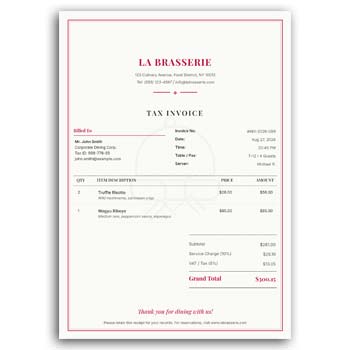
Restaurants handle many customer transactions every day, so a clear and organized invoice can make billing much easier. A well-prepared restaurant invoice can show ordered items, quantities, prices, taxes, discounts, service charges, and the final amount in a simple format.
A Restaurant Invoice Generator provides a convenient way to prepare professional invoices for restaurants, cafés, food shops, catering businesses, and other food-service operations. Instead of creating every invoice layout manually, businesses can use a structured format and customize the information according to each transaction.
Key Features
- ✓ Create restaurant invoices quickly
- ✓ Add restaurant name and contact details
- ✓ Enter customer information
- ✓ List food and beverage items
- ✓ Add quantity and individual prices
- ✓ Include taxes and service charges
- ✓ Apply discounts when required
- ✓ Calculate the final payable amount
- ✓ Add a restaurant logo or branding
- ✓ Prepare invoices for digital or printed use
What Is a Restaurant Invoice?
A restaurant invoice is a billing document that records the food, beverages, services, or other items supplied to a customer. It can provide a detailed breakdown of the transaction and show the amount that needs to be paid.
Depending on the type of restaurant, the document may include table numbers, order references, service charges, taxes, discounts, and payment information. The exact format can be adapted to the business workflow.
How Does It Help?
Manually preparing restaurant bills can become repetitive during busy operating hours. A structured invoice generator can simplify the process by providing predefined areas for the information that is normally required.
Staff can enter the relevant order details and review the calculated amount before providing the invoice to the customer. This can make the overall billing process more organized.
Invoice Checklist
| Information | Included |
|---|---|
| Restaurant name | ✓ |
| Address and contact details | ✓ |
| Customer information | ✓ |
| Invoice or bill number | ✓ |
| Order date | ✓ |
| Food and beverage items | ✓ |
| Quantity | ✓ |
| Unit price | ✓ |
| Tax/service charge | ✓ |
| Discount | ✓ |
| Final total | ✓ |
| Payment status | ✓ |
Benefits and Limitations
| Benefits | Limitations |
|---|---|
| ✓ Makes restaurant billing more organized | • Features vary between generators |
| ✓ Saves time during invoice preparation | • Staff must enter order information correctly |
| ✓ Presents food items clearly | • Tax rules differ by location |
| ✓ Supports professional branding | • A template alone does not manage restaurant inventory |
| ✓ Can be used for digital or printed invoices | • Advanced POS functions may require dedicated software |
| ✓ Helps maintain transaction records | • Incorrect entries can still produce incorrect totals |
Add Restaurant Information
The top section of an invoice should clearly identify the restaurant or food business. This can include the restaurant name, address, phone number, email, website, and other relevant details.
A logo can also be added to create a recognizable visual identity. Keep the branding visible but make sure it does not distract from the billing information.
Record the Customer or Order
Depending on the restaurant’s workflow, the invoice may include the customer’s name, table number, order number, takeaway reference, or delivery information.
Not every restaurant needs all of these fields. Only include information that is useful for the actual billing process.
List Food Items Clearly
The main invoice section should show each ordered item separately. Food and beverage names can be accompanied by quantities and prices so the customer can easily understand the bill.
For larger orders, itemized information is particularly useful. It allows the customer and restaurant staff to verify the order before completing payment.
Calculate the Total
A restaurant bill may contain multiple components. The invoice can show the subtotal first, followed by discounts, taxes, service charges, delivery fees, or other applicable adjustments.
The final payable amount should be visually clear. Always review the calculation before issuing the invoice.
Restaurant Branding
Consistent branding can make restaurant documents look more professional. The same logo, typography, and visual identity can be used across invoices, menus, receipts, letterheads, and other customer-facing materials.
Keep the design practical for fast billing. A restaurant invoice should be easy for staff to prepare and easy for customers to understand.
Taxes and Service Charges
Restaurants may need to apply taxes or service charges depending on the location and type of business. These amounts should be displayed separately when appropriate.
Do not rely on a generic template to determine the correct tax treatment. Businesses should use the rates and rules applicable to their specific location and transaction.
Discounts and Offers
Restaurants often provide discounts, promotional offers, membership benefits, or special pricing. If a discount applies, showing it clearly on the invoice can make the final calculation easier to understand.
The original amount and discounted amount can be displayed separately when necessary. This provides greater transparency for the customer.
Related Invoice Tools
If you need a general billing format, you can explore Create Invoice Online Free PDF as another invoice-related option.
For a broader solution, the Free Online Invoice Generator can be useful for preparing different types of business invoices.
You can also explore the Invoice Template Generator for another approach to creating structured billing documents.
Dine-In Billing
For dine-in restaurants, the invoice may need to include a table number, order reference, number of guests, or server information. These details can help staff identify the transaction quickly.
The main food and beverage list should remain easy to read. Customers should be able to confirm their order without difficulty.
Takeaway Orders
Takeaway businesses may use a simpler invoice layout. The document can include the customer’s name, order number, selected items, quantity, total price, and payment status.
If the restaurant handles both dine-in and takeaway orders, the same basic template can sometimes be adapted for both workflows.
Delivery Orders
Food delivery invoices may require additional information such as delivery address, customer phone number, delivery fee, and payment method.
Only include information necessary for the business process and handle customer information responsibly. The invoice should clearly distinguish food charges from delivery-related charges when applicable.
Catering Invoices
Catering businesses often handle larger orders than standard restaurant transactions. Their invoices may include event details, guest quantities, menu packages, advance payments, and remaining balances.
A more detailed invoice can help both the catering business and client understand the agreed services. The format should reflect the actual contract or quotation.
Café and Food Shop Billing
Cafés, bakeries, fast-food shops, dessert stores, and similar businesses can also adapt restaurant invoice formats. Their billing requirements may be simpler, with fewer items and fewer additional charges.
A compact design can be particularly useful where staff need to prepare bills quickly. The most important information should remain prominent.
Digital Invoice Delivery
Digital invoices can be convenient for online orders, delivery services, and business customers. They can be shared through email or another appropriate communication channel.
Before sending an invoice digitally, verify the customer’s information and make sure the final document opens correctly. Keep a copy according to the business’s record-keeping process.
Printed Invoice Use
Printed invoices remain useful in restaurants where customers receive physical bills after dining. The design should be optimized for the paper size used by the business.
Before printing in bulk, test the layout and verify that small text, totals, and branding remain readable. Good contrast is especially important for printed documents.
Payment Information
A restaurant invoice can show whether payment was made by cash, card, bank transfer, mobile payment, or another accepted method. This can help staff and customers confirm the transaction status.
For larger orders, the invoice may also indicate an advance amount and remaining balance. The payment information should match the actual transaction.
Invoice Numbering
A unique invoice or bill number can make restaurant transactions easier to track. Businesses can use a consistent numbering sequence to organize their records.
Avoid duplicate numbers where possible. A clear numbering system becomes increasingly useful as the number of daily transactions grows.
Mobile-Friendly Workflow
Many restaurant operations depend on quick data entry. A billing workflow that is easy to use on a computer, tablet, or other suitable device can help staff work more efficiently.
However, the design should not sacrifice accuracy for speed. Important order and payment details should always be reviewed before the bill is finalized.
Restaurant Invoice vs Receipt
An invoice and a receipt can serve different purposes. An invoice generally requests or records payment for supplied goods or services, while a receipt commonly confirms that payment has been received.
Some restaurants use a combined bill-and-receipt workflow. The appropriate document depends on the business process and applicable requirements.
Keep Customer Information Safe
Restaurant invoices may contain names, phone numbers, addresses, or other customer information, particularly for delivery and catering orders. Such information should be handled responsibly.
Do not expose unnecessary personal details on documents that are publicly visible. Businesses should follow applicable privacy and data-handling requirements.
Invoice and Food-Service Operations
Billing is only one part of restaurant management. Restaurants may also need systems for inventory, purchasing, table management, staff scheduling, accounting, and customer orders.
An invoice generator can assist with document creation, but it should not be considered a complete restaurant management system unless those functions are specifically supported.
General Invoice Information
Invoices are widely used in commercial transactions to document goods or services supplied and the amount charged. They can contain information about sellers, buyers, products, pricing, taxes, and payment terms.
For general information about invoices, see Invoice on Wikipedia.
Design Inspiration
A good restaurant invoice should be attractive enough to represent the business while remaining practical for fast billing. Clear spacing, readable typography, and an organized item list are more important than excessive decoration.
For additional visual inspiration, you can explore Restaurant Invoice Templates.
Simple Creation Process
Start by entering the restaurant’s business information and adding the customer or order details. List the food and beverage items with their quantities and prices.
Then apply any discounts, taxes, service charges, or delivery fees that are relevant. Review the final amount and payment information before providing the invoice to the customer.
Maintain Organized Records
Keep copies of issued invoices according to the restaurant’s accounting and business requirements. Organizing documents by date, invoice number, or transaction type can make later searches easier.
For restaurants with a high transaction volume, integrating billing with an appropriate accounting or POS workflow may provide additional efficiency.
Who Can Use It?
Restaurants, cafés, bakeries, fast-food businesses, catering companies, food delivery services, dessert shops, and other food-service businesses can use a restaurant invoice format.
The design can be adjusted according to the size and operating style of the business. A small café may need a simple invoice, while a catering company may require a more detailed document.
Final Thoughts
A Restaurant Invoice Generator can make everyday billing more structured and easier to manage. By organizing food items, quantities, prices, taxes, discounts, service charges, and payment information, it provides customers with a clear record of their transaction.
The best restaurant invoice is not necessarily the most decorative one. It should be accurate, easy to read, quick to prepare, and suitable for the restaurant’s actual workflow.
Leave a Reply