Loading Design... please wait.।
QuickBooks Invoice Generator
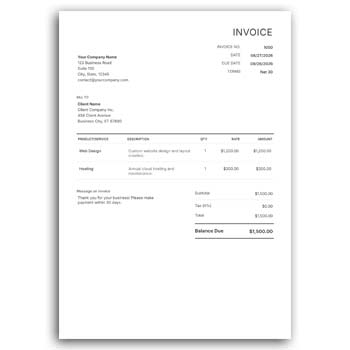
Creating invoices regularly is an important part of running a business. A well-prepared invoice gives customers a clear breakdown of products or services, pricing, taxes, discounts, payment information, and the total amount due.
A QuickBooks Invoice Generator is commonly associated with creating and managing professional invoices for business transactions. It can be useful for businesses that want a structured billing process and a consistent way to present financial information to customers.
What You Can Prepare
- ✓ Create professional-looking invoices
- ✓ Add business and customer information
- ✓ List products or services
- ✓ Enter quantities and unit prices
- ✓ Calculate subtotal and total amounts
- ✓ Include discounts or applicable taxes
- ✓ Add payment terms and due dates
- ✓ Include business branding and logo
- ✓ Keep invoice information organized
- ✓ Prepare invoices for digital sharing or printing
Understanding an Invoice Generator
An invoice generator is a tool or workflow that helps users prepare invoices without manually building every section of a billing document. It typically provides fields for business information, customer details, products or services, prices, and payment information.
The exact features vary between platforms. Some generators focus on simple invoice creation, while accounting platforms can connect invoicing with broader financial and business-management functions.
Why Businesses Use Invoice Generators
Preparing invoices manually can become repetitive when a business handles many customers. A structured generator can make the process more consistent and reduce the need to recreate the same document layout repeatedly.
It can also help organize essential transaction information in one place. Businesses should still review every invoice before sending it to a customer.
Invoice Elements at a Glance
| Invoice Element | Purpose |
|---|---|
| Business details | Identifies the seller |
| Customer details | Identifies the buyer |
| Invoice number | Helps track the document |
| Invoice date | Records when it was issued |
| Product/service list | Describes what was sold |
| Quantity | Shows units or hours |
| Unit price | Displays individual pricing |
| Tax/discount | Shows adjustments |
| Total amount | Displays the final figure |
| Payment terms | Explains how and when to pay |
Benefits and Limitations
| Benefits | Limitations |
|---|---|
| ✓ Makes invoice preparation more organized | • Features depend on the software or tool |
| ✓ Reduces repetitive formatting work | • Data still needs to be checked |
| ✓ Supports consistent business documentation | • Some advanced features may require a paid plan |
| ✓ Helps present transaction details clearly | • It is not a replacement for professional accounting advice |
| ✓ Useful for digital invoice sharing | • Tax requirements vary by location |
| ✓ Can support business branding | • Incorrect entries can still result in billing errors |
Add Your Business Information
A professional invoice should clearly identify the business issuing it. This may include the company name, address, phone number, email, website, and other relevant information.
If the business has a logo, it can be included as part of the invoice branding. Accurate contact information also makes it easier for customers to communicate about the transaction.
Enter Customer Details
Customer information allows an invoice to be connected to the correct buyer. Depending on the transaction, this may include an individual’s name, company name, billing address, email, or other relevant details.
For business customers, using the correct company information is particularly important. Review the details before sending the invoice.
Add Products or Services
The main body of an invoice should clearly describe what the customer is being charged for. Products or services can be listed separately with their relevant quantities and prices.
For service businesses, descriptions can explain the type of work performed. For product businesses, item names, codes, quantities, and unit prices may be more appropriate.
Manage Pricing Clearly
A good invoice should make the calculation understandable. Showing quantity, unit price, and line total allows customers to see how the amount was determined.
Where applicable, subtotal, discount, tax, delivery charge, or other adjustments can be displayed separately. This avoids confusion about the final amount.
Payment Terms
Businesses may specify when payment is expected. Depending on the agreement, an invoice can indicate immediate payment, a specific due date, or another agreed payment term.
Payment instructions can also be included. Make sure the information matches the actual payment methods accepted by the business.
Professional Branding
Invoices are business documents, but they can also contribute to a company’s visual identity. Consistent use of logos, typography, and brand colors can make different customer-facing documents feel connected.
However, branding should not interfere with the financial information. The amounts, dates, descriptions, and payment details should remain the most important elements.
Related Stationery Designs
Invoices are often used alongside other business stationery. A Corporate Letterhead Format Editable can help maintain a consistent professional identity for formal business communication.
For a more colorful visual approach, explore the Color Background Letterhead Design.
Businesses in creative industries can also consider a Fashion Letterhead Design Editable for industry-specific branding.
Invoice Numbers Matter
An invoice number provides a reference for identifying individual invoices. Businesses can use a consistent numbering system so that invoices are easier to find later.
Avoid accidentally assigning the same number to multiple invoices. A systematic numbering process becomes increasingly important as the number of transactions grows.
Digital Invoices
Digital invoices are convenient for businesses that communicate with customers online. They can be sent through email, business platforms, or other digital channels.
Before sending a digital invoice, open the final document and confirm that the formatting is correct. Make sure the customer can clearly see the amount due and payment instructions.
Printed Invoices
Some businesses still provide printed invoices, particularly in retail, wholesale, service, and local business environments. A printed invoice should remain readable and professional on paper.
Check page dimensions, margins, logo quality, and small text before printing a large batch. A test copy can help identify layout problems.
Invoice for Service Businesses
Freelancers, consultants, agencies, repair professionals, designers, and other service providers can use invoices to document completed work. The service description should clearly explain what the customer is being charged for.
Depending on the agreement, the invoice may include hourly rates, project fees, milestones, or additional expenses. The information should match the terms agreed with the customer.
Invoice for Product Businesses
Retailers, wholesalers, distributors, and online sellers may need invoices containing multiple products. Item codes, quantities, unit prices, and totals can make the document easier to review.
For larger orders, a detailed itemized invoice can help both the seller and buyer verify the transaction. This can also be useful for internal record keeping.
Taxes and Discounts
Tax treatment depends on the business, location, products or services, and applicable laws. If taxes are included, display them clearly and use the correct rates required for the transaction.
Discounts should also be shown transparently. Do not assume that a generic invoice template automatically calculates taxes correctly for every jurisdiction.
Review Before Sending
An invoice should be checked before it reaches the customer. Confirm the invoice number, customer name, product or service details, prices, discounts, taxes, total amount, and payment instructions.
A final review can catch simple mistakes that could otherwise cause delays in payment. This is especially important when invoices are prepared quickly.
Invoice and Accounting
An invoice is part of a broader business record-keeping process. Accounting software can connect invoices with payments, expenses, customers, and other financial information depending on the platform.
For small businesses, a generator may be sufficient for basic invoice creation. Larger organizations may need an integrated accounting workflow.
General Invoice Information
An invoice generally records goods or services supplied and the amount charged to a customer. It can contain information about the seller, buyer, transaction, prices, and payment terms.
For general background, see Invoice on Wikipedia.
Design Inspiration
A professional invoice should prioritize clarity over decoration. The customer should be able to identify the seller, purchased items, amount due, and payment information quickly.
For additional business stationery ideas, Business Letterhead Templates can provide useful design inspiration.
Simple Invoice Workflow
Start by entering the business and customer information. Add the invoice number and date, then list the relevant products or services with quantities and prices.
Apply any applicable discounts or taxes and review the final total. Finally, check the payment terms and save or share the completed invoice using the appropriate format.
Keep Your Records Organized
Save copies of issued invoices in an organized location. Using a consistent naming system based on invoice number, customer, or date can make later retrieval easier.
Businesses should also maintain records according to their accounting and legal requirements. An invoice generator can assist with preparation, but record management remains an important part of the overall process.
Who Can Use an Invoice Generator?
Freelancers, small businesses, retailers, wholesalers, consultants, agencies, online sellers, contractors, and professional service providers can benefit from structured invoice creation.
The appropriate invoice format depends on the type of transaction and the requirements of the business. Always make sure the final invoice contains the information required for the relevant customer and jurisdiction.
Final Thoughts
A QuickBooks Invoice Generator can be part of an efficient approach to preparing professional business invoices. A structured invoice makes it easier to present products or services, pricing, adjustments, totals, customer information, and payment terms in a clear format.
Whether invoices are created for services, products, or online sales, accuracy should remain the priority. Review every completed invoice carefully and keep appropriate records for future reference.
Leave a Reply