Loading Design... please wait.।
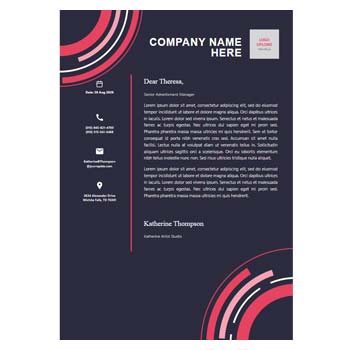
Color Background Letterhead Design
A colorful letterhead can give business communication a more distinctive visual identity. Instead of using a plain white header, a Color Background Letterhead Design can combine branded colors, typography, logo placement, and decorative elements to create a stronger first impression.
An editable design is especially useful when you want to personalize the template without rebuilding everything from the beginning. You can update the company information, replace the logo, modify colors, and adjust the content according to your needs.
Standout Features
- ✓ Edit the letterhead content easily
- ✓ Customize company and contact information
- ✓ Add or replace your business logo
- ✓ Change background colors when supported
- ✓ Modify text and headings
- ✓ Adjust branding elements
- ✓ Create different versions for business needs
- ✓ Maintain a consistent visual identity
- ✓ Use the design for digital documents
- ✓ Prepare a professional layout for printing
What Is a Color Background Letterhead?
A color background letterhead is a business stationery design that uses a colored area as part of the header, footer, or overall page composition. It can make a document visually different from a standard plain letterhead.
This style is commonly useful for creative businesses, agencies, fashion brands, marketing companies, studios, and modern corporate offices. The amount of color can be adjusted according to the desired professional or creative appearance.
Why Use an Editable Template?
Starting with an editable template saves time when creating branded stationery. You do not have to arrange every graphic element, heading, and contact section manually.
Once customized, the same design can be reused for multiple documents. This makes regular business communication faster while keeping the visual style consistent.
Customization at a Glance
| Design Element | Customizable |
|---|---|
| Company name | ✓ |
| Logo | ✓ |
| Background color | ✓ |
| Text content | ✓ |
| Contact details | ✓ |
| Website information | ✓ |
| Footer details | ✓ |
| Headings | ✓ |
| Brand colors | ✓ |
| Decorative elements | ✓ |
Advantages and Limitations
| Advantages | Limitations |
|---|---|
| ✓ Creates a stronger visual impression | • Heavy backgrounds can reduce readability |
| ✓ Supports brand recognition | • Color printing may cost more |
| ✓ Useful for creative businesses | • Some colors may appear differently in print |
| ✓ Can be reused for different documents | • Editing depends on the template format |
| ✓ Makes ordinary stationery more distinctive | • Large graphic elements can increase file size |
| ✓ Suitable for digital communication | • Too many colors can make the layout look busy |
Choose the Right Background
The background color should support the company’s identity rather than compete with the document content. A subtle color area can provide a professional appearance while still leaving enough space for the main text.
For formal corporate communication, restrained colors often work better. Creative brands can experiment with stronger tones as long as the information remains easy to read.
Add Your Business Logo
A logo is an important part of branded stationery. If the template supports image editing, you can replace the sample logo with your own business or organization logo.
Position the logo where it remains visible without making the header overcrowded. Consistent logo placement across documents can also strengthen brand recognition.
Edit the Text
Editable letterhead designs allow you to replace sample content with your own information. This may include the company name, address, phone number, email, website, and social media details.
The main body area can remain open for letters, proposals, notices, or other business messages. This separation keeps the branding and document content organized.
Where Can You Use It?
A color background letterhead can be used for official letters, business proposals, company notices, client communication, quotations, reports, presentations, and other professional documents.
It can work particularly well for agencies, creative studios, retailers, fashion companies, event businesses, and modern service providers. The design can be adjusted to match the tone of the organization.
Related Business Formats
Professional stationery often includes several types of business documents. For transaction-related documentation, you can explore this Voucher Format Design.
For personal identification or customer-facing stationery, a Name Card / Name Tag Format can be useful.
For payment records, the Payment Voucher Template can complement your business document collection.
Color and Readability
Using color does not mean every part of the page needs to be filled with strong graphics. A balanced combination of colored areas and white space can make the document more comfortable to read.
Always check the contrast between the background and text. Information such as phone numbers, addresses, and headings should remain clearly visible.
Digital Document Use
Colorful letterheads can work well for digital business communication. The customized design can be used when preparing electronic letters, proposals, company announcements, and other documents.
Before sharing the final file, review it on a computer and mobile device if possible. This can help identify text, spacing, or layout issues that may not be obvious during editing.
Printing Considerations
A colored background may use more ink or toner than a simple white letterhead. For regular office printing, consider using color strategically rather than covering the entire page.
Perform a test print before producing multiple copies. Check the colors, margins, logo quality, and readability of the complete document.
Maintain Brand Consistency
The same colors used in the letterhead can be applied across other business stationery. Matching colors and typography can make different documents appear to belong to the same brand.
This consistency can be useful when preparing vouchers, name cards, invoices, certificates, business cards, and other company materials.
Create Different Versions
Some businesses may need more than one letterhead style. For example, a formal corporate version can be used for official correspondence, while a more creative version can be used for marketing or client presentations.
An editable master template makes it easier to create these variations. Keep the original version unchanged so you can return to the standard design whenever necessary.
Professional Layout Tips
The best colorful letterheads still prioritize usability. Keep the company identity visible, leave enough room for the main message, and avoid placing decorative elements over important text.
Use a consistent hierarchy for the company name, contact details, headings, and body content. This makes the document easier to scan and gives it a more organized appearance.
Simple Editing Process
Open the template in its compatible editing software and replace the existing company information. Add your own logo and update the contact details.
If the design allows color editing, select colors that match your brand identity. Review the entire page before exporting or printing the finished letterhead.
Letterhead and Business Stationery
Letterhead is a common form of business stationery that identifies the organization behind a written document. It typically combines branding with essential contact information.
For a general reference, visit Letterhead on Wikipedia.
Design Inspiration
A good color background should enhance the page without making it difficult to read. Simple shapes, subtle color blocks, and carefully selected typography can produce an attractive result.
For more visual ideas, explore Letterhead Templates.
Who Can Use This Design?
This type of editable letterhead can be useful for companies, agencies, fashion businesses, marketing teams, creative studios, consultants, retailers, startups, and independent professionals.
It is particularly suitable for anyone who wants business documents to look more distinctive while maintaining a consistent brand identity.
Final Thoughts
A Color Background Letterhead Design can give ordinary business communication a more memorable appearance. With editable text, branding, logo, and color elements, the format can be personalized for different professional requirements.
The key is to balance visual style with readability. Choose colors that represent your brand, keep important information clear, and maintain enough white space for the actual business message.
Leave a Reply