Loading Design... please wait.।
Invoice Template Generator
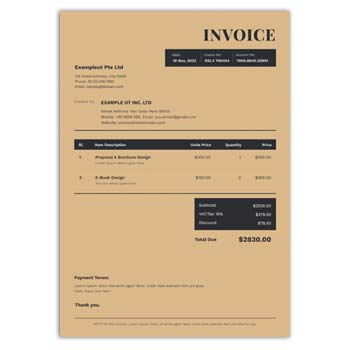
Preparing an invoice from a blank document can take unnecessary time, especially when a business needs to send bills regularly. A ready-made invoice structure gives you a practical starting point where important transaction information can be arranged in a clear and professional way.
An Invoice Template Generator can help users create billing documents without building the entire layout manually. It can be useful for freelancers, retailers, agencies, online sellers, consultants, contractors, and small businesses that need a straightforward invoicing workflow.
Start With the Essential Information
- ✓ Add your business name and contact information
- ✓ Include customer or client details
- ✓ Create an invoice number
- ✓ Set the invoice and due dates
- ✓ Add products or services
- ✓ Enter quantities and prices
- ✓ Apply discounts or additional charges
- ✓ Add applicable taxes
- ✓ Display the final amount clearly
- ✓ Include payment instructions and business branding
How an Invoice Template Generator Works
An invoice template generator normally provides predefined areas for common billing information. Instead of spending time arranging tables, headings, totals, and contact details from scratch, the user can focus on entering the actual transaction data.
The final layout depends on the particular generator or template being used. Some tools provide only basic document creation, while others may offer customization, calculations, downloads, or integration with business systems.
A Better Way to Organize Billing
A consistent invoice structure can make business communication easier. Customers can quickly identify who issued the invoice, what they are being charged for, how the amount was calculated, and what payment is expected.
For businesses that issue invoices frequently, using a reusable format can also reduce repetitive formatting work. It can help maintain a similar appearance across different customer transactions.
Invoice Structure at a Glance
| Invoice Element | Included |
|---|---|
| Business details | ✓ |
| Logo | ✓ |
| Customer details | ✓ |
| Invoice number | ✓ |
| Issue date | ✓ |
| Due date | ✓ |
| Product/service description | ✓ |
| Quantity | ✓ |
| Unit price | ✓ |
| Subtotal | ✓ |
| Discount | ✓ |
| Tax | ✓ |
| Final amount | ✓ |
| Payment instructions | ✓ |
Advantages and Limitations
| Advantages | Limitations |
|---|---|
| ✓ Reduces manual formatting work | • Available features differ between tools |
| ✓ Provides a consistent invoice layout | • Data entry still requires attention |
| ✓ Useful for small and growing businesses | • Tax requirements vary by jurisdiction |
| ✓ Makes transaction details easier to read | • Advanced accounting may require separate software |
| ✓ Can support digital and printed documents | • Templates do not automatically ensure legal compliance |
| ✓ Easy to adapt to different services or products | • Calculations should be checked before sending |
Build a Professional Header
The header is usually the first part of an invoice a customer sees. It can contain the business name, logo, address, phone number, email, website, and other relevant contact details.
Keep the header visually balanced. The branding should establish business identity without taking attention away from the invoice number and financial information.
Identify the Customer
Customer information connects the document to the correct transaction. Depending on the business, this may include a person’s name, company name, billing address, email address, or other relevant details.
For business clients, accurate company information can be especially important. Verify the details before issuing the invoice.
Assign an Invoice Number
A unique invoice number makes individual billing documents easier to identify. Businesses can use a sequential numbering system or another consistent reference method.
A clear numbering system can be helpful when searching through older invoices. It can also simplify communication between customers and accounts teams.
Add Products or Services
The main body of the invoice should explain what the customer is paying for. Products or services can be listed separately with descriptions, quantities, rates, and line totals.
Use descriptions that are specific enough for the customer to understand the charge. Avoid unnecessary information that makes the item list harder to scan.
Calculate the Amount
The invoice can present the subtotal before showing additional adjustments. Discounts, taxes, shipping fees, service charges, or other costs can then be displayed separately when applicable.
The final payable amount should be visually prominent. Always verify the arithmetic before sending the document.
Related Cash Memo Formats
Some businesses use invoices alongside cash memos for different types of sales documentation. For printing and stationery businesses, the Printing & Stationery Item Cash Memo is a relevant option.
For businesses selling tools and accessories, explore the Accessories & Tools Cash Memo.
Restaurants and food businesses can also use a specialized Restaurant Cash Memo Design.
Include Payment Terms
Payment terms explain how and when the customer should pay. Depending on the business arrangement, an invoice can include a due date, accepted payment methods, bank information, payment links, or other instructions.
For recurring business relationships, clear payment terms can reduce misunderstandings. The terms should match any agreement made with the customer.
Add Discounts
Discounts are common in retail, wholesale, online sales, and professional services. Showing the discount as a separate line can make the calculation easier for customers to understand.
If multiple discounts are applied, confirm that the invoice reflects the actual transaction. Avoid manually changing totals without checking the underlying calculation.
Handle Taxes Carefully
Tax information may need to be included depending on the transaction and local regulations. The applicable tax can be shown separately where disclosure is required.
Tax rules vary by country, business type, product, and customer location. Businesses should configure their invoicing process according to the rules that apply to them.
Freelancers and Independent Professionals
Freelancers can use invoice templates for graphic design, web development, writing, consulting, photography, marketing, and many other services. A simple format can clearly show the project, agreed fee, and payment terms.
Hourly work can be listed by hours and rate, while fixed-price work can be represented as a single service line. Milestones can also be separated when a project is billed in stages.
Small Business Use
Small businesses often need a practical way to document sales without adopting complicated systems immediately. A template generator can provide a useful starting point for regular billing.
As transaction volume increases, businesses may choose to connect invoicing with accounting, inventory, customer management, or payment platforms.
E-Commerce Businesses
Online sellers can use invoices to document product orders. Product names, quantities, prices, shipping fees, discounts, taxes, and customer information can be included as appropriate.
The invoice should match the actual order details. Checking the final document against the order can help prevent incorrect totals or customer information.
Service-Based Businesses
Consultants, agencies, contractors, repair professionals, tutors, and other service providers can customize an invoice template according to their billing model.
The document can include project names, service periods, hourly rates, fixed fees, expenses, or milestone payments. Only information relevant to the transaction needs to be included.
Digital Invoice Delivery
Digital invoices make remote billing convenient. A finished invoice can be shared through email or another suitable digital communication method.
Before sending the document, check its layout and content. Make sure the customer can clearly read the total amount, invoice number, payment instructions, and other important details.
Printable Invoice Formats
Businesses that work with physical customers may prefer printed invoices. The template should be designed with the intended paper size and printer in mind.
Create a test print before producing multiple copies. Check margins, alignment, text size, and logo clarity to ensure the document remains professional on paper.
Logo and Brand Identity
Adding a business logo can make invoices more recognizable. Brand colors and typography can also be used carefully to maintain consistency with the company’s other materials.
The visual identity should remain subtle. An invoice is primarily a financial document, so readability should always come before decoration.
Recurring Billing
Businesses that charge customers on a regular schedule can benefit from a reusable invoice structure. Monthly services, subscriptions, maintenance agreements, and retainers are common examples.
Even when using the same format, review the customer details, billing period, amount, and due date each time. A reusable template should not mean automatically reusing outdated information.
Invoice Records
Invoices can help businesses maintain transaction records and track payments. Saving documents using a consistent naming or filing system can make future searches easier.
Records may be organized by invoice number, customer, project, or date. Follow the accounting and record-retention requirements applicable to your business.
Invoice and Cash Memo
An invoice and a cash memo can both document commercial transactions, but their purpose and usage can differ. An invoice is commonly used to document goods or services supplied and the amount charged, while a cash memo is often associated with a completed cash sale.
The terminology can vary between regions and industries. Businesses should use the document type that fits their actual transaction and applicable requirements.
General Invoice Information
Invoices are widely used in commercial transactions to document products or services supplied and the amount charged to a customer. They commonly include seller details, buyer details, item information, pricing, taxes, and payment terms.
For a general explanation of invoices, see Invoice on Wikipedia.
Invoice Design Inspiration
A well-designed invoice does not need excessive graphics. Proper spacing, clear headings, readable typography, and consistent alignment can make a simple billing document look professional.
For additional design ideas, you can explore Invoice Templates.
A Practical Creation Process
Begin with the business and customer information, then assign an invoice number and date. Add the products or services with their quantities and prices.
After that, include discounts, taxes, shipping costs, or other applicable adjustments. Review the final calculation and payment details before saving, printing, or sending the invoice.
Make It Reusable
Once you have a suitable invoice layout, keep a clean master version for future transactions. This avoids rebuilding the same document every time a new customer needs a bill.
Only change the information relevant to the new transaction. Keeping the basic design consistent can also make your business documents look more organized.
Who Can Use an Invoice Template Generator?
Freelancers, retailers, wholesalers, consultants, agencies, contractors, online sellers, startups, manufacturers, and service providers can all benefit from a structured invoice creation process.
The right format depends on the business model and transaction type. Customize the fields so the document contains the information that your customers and business actually need.
Final Thoughts
An Invoice Template Generator can simplify the process of preparing clear and professional billing documents. By using a structured layout, businesses can organize customer information, products or services, prices, taxes, discounts, and payment details without repeatedly designing an invoice from scratch.
A good invoice should be accurate, readable, and appropriate for the transaction. Whether you run an online store, provide professional services, or manage a physical business, a consistent invoicing process can make everyday billing more efficient.
2 Comments
2 Pingbacks