Loading Design... please wait.।
Accessories & Tools Cash Memo Editable Online Instant Download
Selling accessories and tools often involves many different products in a single transaction. A clear cash memo helps a shop or supplier record what was sold, how many items were purchased, and how much the customer paid.
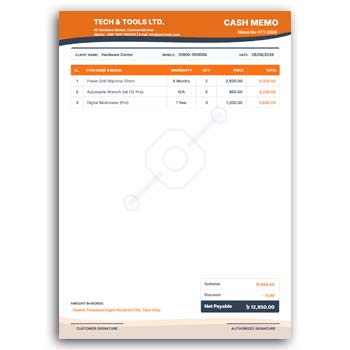
The Accessories & Tools Cash Memo Editable Online Instant Download provides a convenient format for preparing customized sales records. It can be adapted for hardware shops, tool stores, accessory retailers, repair businesses, workshops, distributors, and other businesses that sell small equipment or related products.
Quick Highlights
- ✓ Add tools and accessory product names
- ✓ Enter item quantity and unit price
- ✓ Add customer or buyer information
- ✓ Include shop or company details
- ✓ Upload your business logo
- ✓ Edit available text and colors
- ✓ Add discounts or additional charges
- ✓ Include payment information
- ✓ Mention warranty details when applicable
- ✓ Reuse the format for daily transactions
What Is an Accessories & Tools Cash Memo?
A cash memo for accessories and tools is a sales document used to record products sold to a customer. It can be used for hand tools, power tool accessories, hardware items, electrical accessories, workshop supplies, and many other related products.
The document provides a simple reference for the transaction. Depending on the business, it can contain product descriptions, quantities, prices, customer information, and payment details.
Why an Editable Cash Memo Is Useful
Retail shops may prepare many sales documents during a normal business day. Starting from a blank page for every transaction can make a simple task unnecessarily slow.
With an editable format, the basic layout remains ready. You can replace the product and transaction details while keeping the overall appearance of the cash memo consistent.
Benefits and Limitations
| Benefits | Limitations |
|---|---|
| ✓ Makes daily sales documentation faster | • Item details need to be entered accurately |
| ✓ Suitable for different tools and accessories | • Calculations should be verified manually |
| ✓ Reusable for regular customers | • It does not automatically update inventory |
| ✓ Supports shop and company branding | • Warranty conditions can differ by product |
| ✓ Helps organize multiple items in one sale | • Large business operations may need accounting software |
| ✓ Convenient for digital or printed records | • A template does not replace official business records |
Add Tool and Accessory Details
A tools or accessories shop can sell a wide range of products. The cash memo can be customized for screwdrivers, drill bits, pliers, measuring tools, cutting accessories, electrical fittings, fasteners, safety equipment, and other items.
A short product description can be added when the product name alone is not enough. Keep descriptions specific enough for the customer to identify the purchased item.
Record Quantity and Unit Price
Customers may purchase several units of the same accessory or tool. Showing the quantity and unit price separately makes the calculation easier to understand.
The total for each line item can then be displayed before calculating the complete transaction amount. Always review the figures before issuing the final memo.
Include Product Codes
Businesses that use SKU numbers, item codes, or internal product references can add them to the cash memo. This can be especially helpful when a shop carries many similar accessories.
Product codes can also help employees locate items in their own records. Make sure the code corresponds to the actual product being sold.
Add Customer Information
For simple retail sales, the customer’s name may not always be necessary. However, customer details can become useful for bulk orders, corporate customers, workshop clients, or warranty-related transactions.
You can include the information required by your own sales process. Avoid collecting unnecessary personal information.
Use Your Business Identity
Adding your shop name, logo, address, phone number, website, and other contact details can make the cash memo look more professional.
Consistent branding across sales documents can also help customers recognize your business. Keep the design aligned with your other stationery whenever possible.
Related Invoice Tools
Some businesses use a cash memo for retail transactions and an invoice for formal billing. An Easy Invoice Maker Generator can be useful when a simple invoice document is needed.
Businesses working in food service or related industries may also explore a Restaurant Invoice Generator for industry-specific invoice requirements.
For businesses using accounting-oriented workflows, a QuickBooks Invoice Generator can provide another invoice-related option.
Add Warranty Information
Certain tools, equipment, and accessories may come with manufacturer or seller warranty. When relevant, the cash memo can include a short warranty reference.
Warranty information should always match the actual terms offered with the product. If different products have different warranty periods, avoid using a single statement that could cause confusion.
Mention Payment Details
The cash memo can show the amount received and payment method when required. Common methods may include cash, card, bank transfer, or mobile payment.
If the transaction includes a partial payment or outstanding balance, the document should clearly distinguish the amount paid from the remaining amount. This can help both parties maintain accurate records.
Useful for Hardware and Tool Shops
Hardware stores and tool suppliers often sell many small items in a single purchase. A structured cash memo can make these transactions easier to record.
It can be adapted for professional tools, workshop accessories, construction-related tools, electrical accessories, mechanical parts, and general hardware products.
Handle Bulk Orders
Contractors, workshops, factories, maintenance teams, and businesses may purchase tools and accessories in larger quantities. A detailed cash memo can present these products in an organized list.
For larger transactions, consider including product codes, quantities, unit prices, and totals for every item. This gives the customer a clearer record of the purchase.
Keep Pricing Transparent
Prices should be easy for customers to understand. Separate item prices, quantities, discounts, taxes, and additional charges whenever these details apply.
If prices vary according to quantity or customer category, make the applicable pricing clear. This reduces misunderstandings during payment or future discussions.
Make the Layout Practical
A cash memo is primarily a working document, so usability should come before decoration. Product information and transaction totals should be easy to find.
A clean table with sufficient spacing can make the document comfortable to read at a shop counter. Consistent typography also helps improve readability.
Digital and Printed Use
A digital cash memo can be shared with customers through email or messaging platforms. Printed copies can be handed over at the point of sale or kept for business records.
Choose the format that best fits your workflow. Before sharing a digital version, check that the text and totals remain clear on different screen sizes.
Cash Memo and Invoice
A cash memo may be used as a record or acknowledgment of a sale, while an invoice is generally used to document an amount payable for goods or services.
Businesses may use these documents differently depending on their accounting and sales procedures. For general information about invoices, you can read Invoice on Wikipedia.
Design Inspiration
A professional sales document should make the important information immediately visible. Product names, quantities, prices, totals, and business information should have a clear hierarchy.
For more business document ideas, you can explore Business Document Templates and compare different layouts.
Easy Editing Process
Begin with your business name, contact details, and logo. Add the customer information if needed and replace the sample products with the actual accessories or tools sold.
Enter quantities, prices, discounts, taxes, payment information, and warranty details as required. Review the complete transaction before providing the final cash memo.
Maintain a Master Design
For regular use, keep one untouched master version of the cash memo. Create a new copy whenever you need to prepare a transaction document.
This prevents accidental changes to the original layout. It also makes the preparation process quicker for employees handling daily sales.
Who Can Use This Format?
Hardware shops, tool retailers, electrical accessory stores, workshop suppliers, repair centers, industrial distributors, construction suppliers, and general accessory businesses can adapt this format.
It can work for both small retail transactions and larger product orders. The editable structure allows businesses to adjust the item list according to their specific product range.
Final Thoughts
The Accessories & Tools Cash Memo Editable Online Instant Download provides a practical foundation for recording sales of tools, accessories, hardware products, and related items. It can be customized with product details, quantities, pricing, customer information, branding, payment details, and warranty references.
A reusable cash memo design can reduce repetitive preparation and create a more consistent sales-document workflow. Before issuing the final document, carefully check the item details, quantities, prices, totals, and payment information.
Leave a Reply