Loading Design... please wait.।
Invoice Bill Format Template
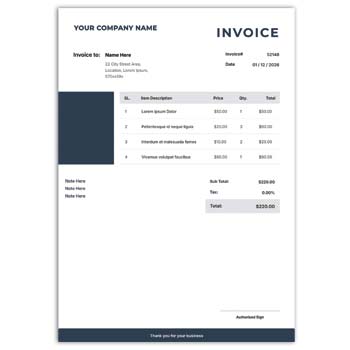
An invoice bill is one of the most useful documents for recording a business transaction. It gives customers a clear breakdown of products or services, prices, quantities, taxes, discounts, and the final amount payable. A well-organized Invoice Bill Format Template can make everyday billing easier while keeping business documents consistent and professional.
What You Can Include
- ✓ Business name, logo, address, and contact details
- ✓ Customer or client information
- ✓ Invoice number and issue date
- ✓ Product or service descriptions
- ✓ Quantity, unit price, and total price
- ✓ Tax, discount, shipping, or service charges
- ✓ Final payable amount
- ✓ Payment method and payment terms
- ✓ Notes, terms, or additional instructions
- ✓ A clean layout suitable for digital or printed invoices
Understanding an Invoice Bill Format
An invoice bill format is a structured document used to present transaction details between a seller and a customer. It organizes all important billing information into clearly separated sections so that the recipient can understand the charges without difficulty.
The format can be adapted for retail shops, online businesses, freelancers, wholesalers, agencies, restaurants, and service providers. The exact fields should depend on the type of transaction and the requirements of the business.
Why a Proper Format Matters
A professionally arranged invoice can make billing communication much clearer. Customers can quickly identify what they purchased, how the amount was calculated, and what payment is expected.
For businesses, a consistent format can also make transaction records easier to organize. It provides a reusable structure instead of creating a new document from the beginning for every sale.
Invoice Format Checklist
| Invoice Section | Included |
|---|---|
| Business information | ✓ |
| Customer information | ✓ |
| Invoice number | ✓ |
| Date | ✓ |
| Product/service list | ✓ |
| Quantity | ✓ |
| Unit price | ✓ |
| Subtotal | ✓ |
| Discount | ✓ |
| Tax | ✓ |
| Final total | ✓ |
| Payment information | ✓ |
| Notes/terms | ✓ |
Benefits and Limitations
| Benefits | Limitations |
|---|---|
| ✓ Creates a consistent billing structure | • Information must be entered correctly |
| ✓ Makes charges easier to understand | • Tax rules differ by location |
| ✓ Saves time when using a reusable format | • A template may not include advanced accounting features |
| ✓ Suitable for different types of businesses | • Complex businesses may need integrated software |
| ✓ Can be adapted to brand requirements | • Final calculations should be checked |
| ✓ Useful for digital and printed records | • Legal requirements may vary by business and country |
Business Information
The header of an invoice normally identifies the seller or service provider. This section can contain the business name, address, phone number, email address, website, and other relevant contact information.
A logo can be added to make the invoice visually consistent with other business stationery. Keep the branding professional and avoid allowing decorative elements to hide important billing information.
Customer Details
The customer section provides information about the person or organization receiving the invoice. Depending on the transaction, it may include a name, company name, billing address, email, or other necessary information.
For business clients, accurate company information can be particularly important. Always compare the entered details with the original order or agreement before issuing the final document.
Invoice Number and Date
An invoice number gives each billing document a unique reference. A consistent numbering system can make invoices easier to search, organize, and discuss with customers.
The issue date should also be clearly visible. For services or recurring billing, the relevant service period can be included separately when necessary.
Product and Service Details
The central part of an invoice should explain what the customer is being charged for. Each product or service can be listed with a clear description, quantity, rate, and corresponding amount.
An itemized layout is particularly useful for larger transactions. It allows the customer to compare the invoice with the original order or agreement.
Pricing and Calculation
A clear pricing structure helps customers understand the final amount. The invoice can show the subtotal before adding discounts, taxes, shipping costs, or other applicable charges.
The final payable amount should be easy to locate. Before sending an invoice, check every calculation rather than relying on visual formatting alone.
Related Cash Memo Designs
Businesses sometimes use both invoices and cash memos depending on the nature of their transactions. For restaurant-related billing, you can explore this Restaurant Cash Memo Design.
For a general transaction document, the Cash Memo Format Online provides another relevant format.
Garment businesses can also use a specialized Garments Cash Memo Design for recording product sales.
Discounts and Additional Charges
Discounts should be displayed separately when they affect the original selling price. This allows customers to see the difference between the standard amount and the amount actually charged.
Other costs such as delivery, shipping, packaging, or service charges can also be listed separately. A transparent breakdown makes the invoice easier to verify.
Tax Information
Depending on the country and business type, invoices may need to include applicable taxes. Tax amounts should be clearly identified rather than hidden inside the total price when separate disclosure is required.
Businesses should use the tax rules applicable to their own transactions. A generic invoice template should not be treated as a substitute for professional tax or accounting guidance.
Payment Terms
Payment terms explain when and how the customer should pay. An invoice can mention accepted payment methods, due dates, bank information, online payment instructions, or other relevant conditions.
Clear payment information can reduce unnecessary questions after an invoice is issued. For business clients, agreed payment terms should match the original contract or quotation.
Logo and Branding
A branded invoice can provide a more consistent customer experience. The company logo, brand colors, and typography can be used to connect the invoice with the business identity.
However, branding should remain secondary to readability. Customers should be able to find the invoice number, item details, and final amount immediately.
Invoice for Retail Businesses
Retail stores often need invoices for products sold directly to customers or other businesses. The document can list individual products, quantities, prices, discounts, taxes, and payment information.
For high-volume retail operations, invoicing may work alongside POS and inventory systems. A simple template is useful for basic documentation, while larger businesses may need automated solutions.
Invoice for Service Providers
Freelancers, consultants, designers, developers, agencies, and contractors can adapt an invoice format to describe their services. The invoice may use fixed project fees, hourly rates, milestone charges, or recurring payments.
A clear service description helps the customer understand what the payment represents. Where appropriate, the invoice can also reference a project or quotation number.
Invoice for Online Businesses
E-commerce businesses can use invoices to document online orders. Product details, customer information, shipping charges, discounts, taxes, and payment status can be included according to the business workflow.
Before sending an online invoice, compare it with the actual order. This helps prevent differences between the amount paid by the customer and the amount displayed on the document.
Digital Invoice
Digital invoices are convenient for businesses that communicate with customers online. They can be saved as a suitable document and shared through email or another appropriate channel.
Always check the final file before sending it. Make sure the text, totals, customer details, and payment instructions are readable and correct.
Printed Invoice
Printed invoices remain useful for physical stores, offices, service businesses, and customers who prefer paper records. A clean format should work well with the paper size and printer being used.
Before printing in bulk, create a test copy. Check margins, alignment, text size, logo quality, and the visibility of the final amount.
Invoice Record Keeping
Invoices can become important business records for tracking sales and payments. Keeping them organized by date, customer, invoice number, or project can make future reference easier.
Businesses should follow their applicable accounting and record-retention requirements. The exact period for keeping financial documents can vary by jurisdiction and business structure.
Invoice and Cash Memo Difference
Invoices and cash memos can both document sales, but their practical use can differ. An invoice commonly provides a detailed record or request for payment, while a cash memo is often associated with recording a completed cash sale.
The terminology and requirements can vary between countries and industries. Businesses should select the document type that matches their transaction and accounting process.
Simple Customization
A reusable invoice format can be customized according to the business. Unnecessary fields can be removed, while additional information such as purchase order numbers, delivery details, or payment references can be added when needed.
Keeping only relevant information can make the document easier to read. A simple layout is often more effective than an invoice overloaded with unnecessary design elements.
General Invoice Information
An invoice is commonly used to document the sale or supply of goods and services. It can contain details about the seller, buyer, items supplied, prices, taxes, and payment terms.
For a general overview of invoices, see Invoice on Wikipedia.
Invoice Design Inspiration
A professional invoice does not have to use a complicated visual style. Proper spacing, readable fonts, consistent alignment, and a clear hierarchy can make even a basic format look polished.
For additional design ideas, you can explore Invoice Templates.
Creating an Invoice Step by Step
Start by entering the business and customer information. Add the invoice number and date, then list the products or services with their quantities and prices.
Next, add discounts, taxes, shipping charges, or other applicable costs. Review the subtotal and final amount carefully before saving, printing, or sending the invoice.
Who Can Use an Invoice Bill Template?
Retailers, wholesalers, freelancers, agencies, consultants, contractors, online sellers, manufacturers, restaurants, and service providers can adapt an invoice bill format to their needs.
The ideal structure depends on the type of business and transaction. Customize the document so it contains the information required by your customers and applicable local rules.
Final Thoughts
A well-structured Invoice Bill Format Template can simplify everyday billing while presenting transaction information in a clear and professional way. It brings products or services, pricing, discounts, taxes, customer details, and payment information together in one organized document.
Whether you operate a small shop, provide professional services, or sell products online, a consistent invoice format can save time and improve customer communication. Always review the final invoice carefully to ensure that the transaction details and calculations are accurate.
Leave a Reply