Loading Design... please wait.।
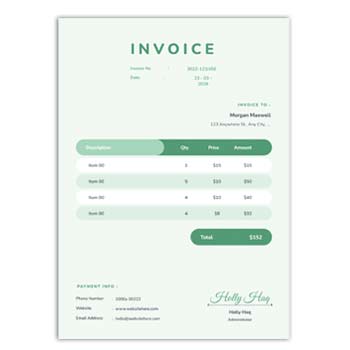
Easy Invoice Maker Generator Free – Simple Design
Creating a professional invoice does not always require complicated accounting software or advanced design skills. For freelancers, small businesses, online sellers, and service providers, a simple invoice can be enough to present products, services, prices, and payment details clearly.
The Easy Invoice Maker Generator Free – Simple Design is a practical option for users who want to prepare a clean invoice without spending too much time on formatting. A straightforward layout can make billing easier while keeping the important transaction information easy for customers to understand.
Main Features
- ✓ Create a clean and simple invoice
- ✓ Add business and customer information
- ✓ Enter products or service details
- ✓ Add quantity and individual prices
- ✓ Include discounts and applicable taxes
- ✓ Show subtotal and final amount
- ✓ Add payment terms and due dates
- ✓ Include a business logo
- ✓ Customize basic invoice information
- ✓ Prepare invoices for digital or printed use
What Is an Easy Invoice Maker?
An invoice maker is a tool or template-based system that helps users prepare billing documents. Instead of designing an invoice from a blank page, users can work with predefined sections and enter the information required for a particular transaction.
A simple invoice maker is especially useful when the priority is speed and clarity. It can help users create a professional-looking document without unnecessary design elements.
Simple Design for Everyday Billing
Not every business needs a complicated invoice layout. A simple design can often communicate the necessary information more effectively, particularly when customers need to understand the bill quickly.
The basic structure can include the seller’s information, customer details, invoice number, date, itemized charges, adjustments, total amount, and payment instructions.
Quick Feature Check
| Invoice Requirement | Available |
|---|---|
| Business information | ✓ |
| Customer details | ✓ |
| Invoice number | ✓ |
| Invoice date | ✓ |
| Product/service list | ✓ |
| Quantity and price | ✓ |
| Discount | ✓ |
| Tax information | ✓ |
| Final total | ✓ |
| Payment details | ✓ |
| Logo/branding | ✓ |
Advantages and Limitations
| Advantages | Limitations |
|---|---|
| ✓ Easy to understand | • Advanced accounting features may not be included |
| ✓ Saves formatting time | • Users must enter information accurately |
| ✓ Suitable for small businesses | • Tax requirements vary by location |
| ✓ Clean appearance | • Complex invoices may require more detailed software |
| ✓ Convenient for quick billing | • A template does not automatically guarantee legal compliance |
| ✓ Easy to customize basic details | • Final calculations should always be reviewed |
Start With Business Details
The first part of an invoice should identify the business that is providing the product or service. It can include the company name, address, phone number, email, website, and other relevant information.
A business logo can also be added to strengthen brand recognition. Keep the header organized so customers can identify the seller immediately.
Enter Customer Information
Customer details help connect the invoice with the correct transaction. Depending on the type of business, this may include the customer’s name, company, billing address, email, or other relevant information.
For business-to-business transactions, check the company name and billing information carefully. Small errors in customer details can create problems when invoices are used for accounting.
Add Items or Services
The central section should clearly describe what the customer is paying for. Products, services, consultation hours, project work, or other charges can be listed as separate line items.
A short but meaningful description is usually better than unnecessary text. Customers should be able to understand what each charge represents.
Show Prices Clearly
Each item can include its quantity, unit price, and line total. This gives customers a simple breakdown of how the final amount was calculated.
If several items are included, an itemized format can make the invoice much easier to verify. The subtotal should be clearly separated from additional charges or adjustments.
Discounts and Taxes
A business may need to apply a discount, tax, shipping fee, service charge, or other adjustment. These amounts should be shown separately when applicable.
The correct tax treatment depends on the business and jurisdiction. Always use the appropriate rates and requirements rather than relying solely on a generic template.
Payment Information
An invoice can include payment methods, bank details, payment links, or other instructions when appropriate. The information should be accurate and easy for the customer to find.
A due date or payment term can also be displayed. Clear payment instructions can reduce unnecessary communication after an invoice has been issued.
Related Invoice Resources
For another invoice creation option, you can explore the Invoice Template Generator.
If you are looking for a more traditional billing layout, the Invoice Bill Format Template can provide another useful format.
Online store owners can also explore the Shopify Invoice Creator for invoice-related requirements connected with Shopify businesses.
Why Keep the Design Simple?
A simple invoice puts attention on the information that matters most. Customers can quickly find the invoice number, date, items, total amount, and payment instructions without navigating a complicated visual layout.
Minimal design can also reduce printing costs and make documents easier to reproduce. The goal should be professional clarity rather than excessive decoration.
Useful for Freelancers
Freelancers often invoice clients for design, writing, development, consulting, marketing, photography, and other services. A simple invoice can provide a professional way to document completed work.
Service descriptions can be customized according to the project. Hourly work, fixed-price projects, milestones, or additional expenses can all be presented in an organized way.
Suitable for Small Businesses
Small businesses may not need a highly complex billing system for every transaction. A straightforward invoice maker can be useful for routine customer billing.
As transaction volume grows, businesses may eventually benefit from integrating invoicing with accounting, inventory, or customer-management systems.
Helpful for Online Sellers
Online sellers can use invoices to document orders and provide customers with transaction details. Product names, quantities, prices, shipping charges, discounts, and taxes can be included when appropriate.
For e-commerce businesses, invoice information should match the actual order. Check the customer’s details and final amount before sending the document.
Service-Based Businesses
Consultants, agencies, contractors, repair professionals, tutors, and other service providers can adapt a simple invoice format to their workflow.
A service invoice does not necessarily need many visual elements. Clear descriptions, agreed rates, dates, and payment terms are often more important.
Digital Invoice Workflow
Digital invoices are convenient for businesses that work with customers remotely. A completed invoice can be saved and shared through email or another suitable digital channel.
Before sending it, open the final file and check the layout. Make sure the customer can clearly see the amount due and the payment information.
Printed Invoice Workflow
Printed invoices remain useful for shops, offices, local service businesses, and face-to-face transactions. A simple design can work particularly well on standard office paper.
Always test the document before printing in large quantities. Check the margins, text size, logo quality, and alignment.
Invoice Numbering
Every invoice should have a clear reference number or identifier. A consistent numbering system makes it easier to locate individual transactions later.
Businesses can use sequential numbers or another organized system appropriate for their workflow. Avoid accidental duplication of invoice numbers.
Keep a Clear Layout
A good invoice uses visual hierarchy to separate different types of information. Business details can appear at the top, transaction details in the middle, and totals and payment instructions toward the bottom.
Adequate spacing also improves readability. Avoid overcrowding the page with unnecessary graphics or information.
Logo and Branding
A logo can make an invoice immediately recognizable. Businesses can use their established brand colors and typography to create consistency across invoices and other documents.
However, branding should remain secondary to the transaction information. The total amount and other important financial details should always be easy to identify.
Invoice Accuracy
Even the simplest invoice needs careful review. Check the customer name, invoice number, date, item descriptions, quantities, prices, discounts, taxes, and final total before sending it.
A short review can prevent avoidable billing disputes. This is especially important when invoices are created quickly or in large numbers.
Invoice and Business Records
Invoices can become important business records. Keeping organized copies can help businesses review sales, track outstanding payments, and prepare financial information.
The appropriate retention period and accounting treatment may vary depending on the country and business structure. Follow the relevant local requirements.
General Invoice Information
An invoice is generally used to document goods or services supplied and the amount charged to a customer. It can include seller and buyer information, transaction details, pricing, taxes, and payment terms.
For general information about invoices, see Invoice on Wikipedia.
Design Inspiration
Simple invoices can still have a polished appearance. Good spacing, readable typography, consistent alignment, and a clear information hierarchy can make a basic layout look professional.
For additional visual ideas, you can explore Invoice Templates.
Easy Creation Process
Begin by entering the business information and customer details. Add the invoice number and date, then enter the products or services with their relevant quantities and prices.
Next, include any applicable discounts, taxes, delivery fees, or other adjustments. Review the calculated total and payment information before saving or sharing the finished invoice.
Save a Reusable Version
If the same invoice structure is used regularly, keep a master version for future transactions. Duplicate the file or template instead of changing the original every time.
This can make recurring billing faster and reduce the risk of accidentally deleting important design elements. Businesses can also maintain consistent branding across different invoices.
Who Can Use This Invoice Maker?
Freelancers, startups, small businesses, consultants, agencies, retailers, online sellers, contractors, and service providers can use a simple invoice format for routine billing.
The ideal structure depends on the type of transaction. Businesses should customize the document to include the information required for their customers, industry, and applicable regulations.
Final Thoughts
The Easy Invoice Maker Generator Free – Simple Design is useful for anyone who wants a straightforward approach to creating professional invoices. It focuses on essential billing information while avoiding unnecessary visual complexity.
Whether you are billing for a service, selling products online, or handling regular business transactions, a clean invoice can make communication with customers easier. Always review the final document carefully to ensure that every financial and customer detail is correct.
1 Comment
1 Pingback