Loading Design... please wait.।
Shopify Invoice Creator
Running an online store involves more than listing products and accepting orders. Customers may also need a clear document showing what they purchased, how much they paid, shipping charges, discounts, taxes, and other transaction details.
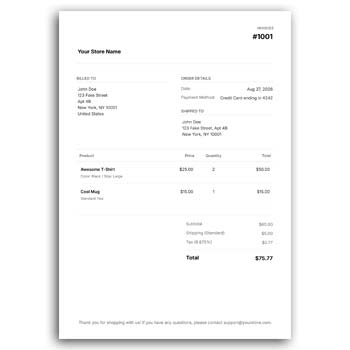
A Shopify Invoice Creator can be useful for preparing professional invoices for e-commerce transactions. It can help store owners organize customer and order information into a clear document that is suitable for digital sharing, printing, or business record keeping.
Key Features
- ✓ Create invoices for online store orders
- ✓ Add store and customer information
- ✓ Display ordered products clearly
- ✓ Show quantities and individual prices
- ✓ Include discounts and shipping charges
- ✓ Display applicable taxes
- ✓ Show the final payable amount
- ✓ Add store logo and branding
- ✓ Include payment information
- ✓ Prepare invoices for digital or printed use
What Is a Shopify Invoice Creator?
A Shopify invoice creator is a tool or workflow designed to help online merchants prepare invoice documents for their store transactions. It can organize information from an order into a structured billing format.
Depending on the specific tool or Shopify setup, features can range from simple invoice generation to more advanced customization and automated workflows. Store owners should choose an approach that matches their actual business requirements.
Why Online Stores Need Invoices
An online order can contain several pieces of information that customers need to review. Product names, quantities, prices, shipping costs, discounts, taxes, and payment details can become difficult to communicate clearly without an organized document.
An invoice provides a single reference for these details. It can also be useful when customers need documentation for their own records.
Invoice Feature Checklist
| Requirement | Status |
|---|---|
| Store information | ✓ |
| Customer information | ✓ |
| Order reference | ✓ |
| Invoice date | ✓ |
| Product details | ✓ |
| Quantity | ✓ |
| Unit price | ✓ |
| Discount | ✓ |
| Shipping charge | ✓ |
| Tax information | ✓ |
| Final total | ✓ |
| Logo/branding | ✓ |
| Payment details | ✓ |
Advantages and Limitations
| Advantages | Limitations |
|---|---|
| ✓ Makes e-commerce billing more organized | • Features vary between invoice tools |
| ✓ Can reduce repetitive document preparation | • Store data must be reviewed for accuracy |
| ✓ Provides customers with clear transaction details | • Tax rules vary by location |
| ✓ Supports consistent store branding | • Advanced automation may require additional setup |
| ✓ Useful for digital order documentation | • An invoice tool does not replace complete accounting software |
| ✓ Can support printed invoices | • Some features may depend on Shopify configuration |
Start With Store Details
The invoice should clearly identify the online store. The business name, website, email address, phone number, and other relevant contact information can be displayed near the top.
Adding the store logo can also make the document more recognizable. The branding should remain clean so customers can quickly locate the transaction information.
Display Customer Information
An e-commerce invoice may include the customer’s name, billing address, shipping address, email, or other relevant details. The exact information depends on the order and the business requirements.
Before issuing the invoice, compare the customer details with the original order. Accurate information is particularly important when invoices are used for business or accounting purposes.
Show Order Information
An invoice can include an order number, order date, invoice number, and other references. These identifiers make it easier for both the store and customer to connect the document with the correct purchase.
Using clear references can also simplify customer support. When a customer contacts the store, the order or invoice number can help staff locate the transaction.
Product Details
Each purchased product should be clearly listed where an itemized invoice is required. Product names, quantities, unit prices, and line totals can provide a useful breakdown.
For stores with many products in one order, itemization becomes particularly valuable. It allows the customer to compare the invoice with the original order.
Shipping Charges
Online orders often include shipping or delivery costs. If a shipping fee applies, it can be displayed separately from the product subtotal.
This makes the final calculation easier to understand. The shipping amount should match the actual charge associated with the order.
Discounts and Promotions
E-commerce stores frequently use discount codes, promotional offers, seasonal pricing, or customer-specific discounts. An invoice can show the discount separately so the customer understands how the final price was calculated.
If multiple discounts are applied, make sure the invoice accurately reflects the actual order calculation. Do not manually change an amount that should be generated from the store’s transaction data.
Taxes
Tax requirements for online sales can vary considerably depending on the seller’s location, customer location, products, and applicable regulations.
Where taxes apply, the invoice should display the relevant amounts clearly. Store owners should configure their e-commerce system according to applicable tax rules rather than relying on a generic invoice template.
Related Business Stationery
Online businesses may also need other types of commercial stationery. The Garments Cash Memo Design Editable PDF provides an example of a product-focused transaction document.
For branded office communication, explore the Corporate Office Writing Pad Design.
Another useful transaction-document option is the Cash Memo Format Editable Colourful Design.
Add Store Branding
A professional invoice can reinforce the visual identity of an online store. The logo, brand colors, typography, and contact details can be presented consistently across customer documents.
Avoid excessive decoration, particularly when the invoice contains many product lines. The customer should be able to find the order total and important transaction information immediately.
Digital Invoices
Digital invoices are particularly convenient for Shopify stores because customers already interact with the business online. A completed document can be shared through email or another appropriate digital channel.
Before sending an invoice, check that the file opens correctly and that all product, customer, and payment information is visible. Keep a copy when required for business records.
Printed Invoices
Some online sellers include printed invoices inside packages or provide them when requested by customers. A clean design can make the document suitable for both digital and physical use.
Check the selected paper size and print margins before producing multiple copies. The logo and smaller text should remain sharp and readable.
Wholesale Orders
Shopify stores that sell to businesses may need more detailed invoices. Wholesale customers can require company names, billing information, purchase references, product quantities, discounts, taxes, and payment terms.
A structured invoice can make large orders easier to review. For business customers, ensure that all required billing information is included.
International Orders
International e-commerce transactions may involve different currencies, shipping charges, taxes, duties, or customer requirements. Invoice information should accurately reflect the transaction.
Currency and tax treatment should be handled according to the applicable business and regulatory requirements. Do not assume that one invoice configuration is suitable for every country.
Payment Information
The invoice can indicate the payment status and, where appropriate, the payment method used for the order. This can help customers understand whether the transaction has already been paid.
For unpaid orders, payment instructions or terms can be displayed where applicable. The information should correspond with the actual store payment workflow.
Order Status and Invoice Status
An order and an invoice are related but are not always identical concepts. An order represents a customer’s purchase request, while an invoice generally documents the amount charged for goods or services.
Store owners should make sure their invoicing process accurately reflects the status of the transaction. This becomes especially important when orders are canceled, refunded, partially fulfilled, or partially paid.
Refunds and Adjustments
E-commerce transactions can sometimes change after an invoice is issued. Products may be returned, orders may be canceled, or partial refunds may be processed.
When this happens, the store should use an appropriate credit, refund, or adjustment process rather than simply editing an old invoice without a record. The exact approach depends on the store’s accounting workflow.
Keep Customer Data Safe
Invoices may contain names, addresses, email addresses, order information, and other customer details. Online businesses should handle this information responsibly.
Avoid sharing invoices publicly or exposing unnecessary customer information. Store owners should follow applicable privacy and data-protection requirements.
Invoice Automation
For stores processing many orders, automation can reduce repetitive work. Depending on the available Shopify tools and configuration, invoices may be generated or delivered as part of an automated order workflow.
Automation should not eliminate human review entirely. Store owners should periodically verify that invoice templates, tax information, branding, and order data are working correctly.
Invoice Design and Usability
A good e-commerce invoice should be easy to scan. Customers should quickly identify the store, order reference, purchased products, subtotal, additional charges, total amount, and payment status.
Consistent alignment and spacing can make even a simple invoice look professional. The design should support the information rather than compete with it.
General Invoice Background
An invoice is a commercial document that records goods or services supplied and the amount charged. It commonly includes seller information, buyer information, transaction details, prices, and payment terms.
For general information, see Invoice on Wikipedia.
E-Commerce Design Inspiration
Online stores often use consistent visual branding across invoices, packaging, emails, and other customer-facing materials. A clean design can strengthen the overall shopping experience.
For additional invoice design ideas, explore E-commerce Invoice Templates.
Simple Invoice Workflow
First, confirm the order information and customer details. Then organize the purchased products, quantities, prices, discounts, shipping costs, and applicable taxes.
Review the final total and payment status before generating the invoice. Once everything is correct, the document can be shared digitally or prepared for printing according to the store’s workflow.
Keep a Reusable Template
If the same invoice layout is used for regular orders, maintain an approved master template. Update branding or business information only when necessary.
This can help maintain consistency across customer documents. Before making significant changes, keep a backup of the previous approved version.
Who Can Use a Shopify Invoice Creator?
Shopify merchants, online retailers, wholesalers, product brands, subscription businesses, dropshippers, and service-based stores can use an invoice creation workflow suited to their operations.
The best solution depends on order volume, business location, tax requirements, payment methods, and the level of automation required. Small stores may need only a simple invoice, while larger businesses may require integrated accounting workflows.
Final Thoughts
A Shopify Invoice Creator can make e-commerce billing more structured by bringing store, customer, product, pricing, shipping, discount, tax, and payment information together in one document.
For online businesses, a professional invoice is more than a billing page. It can also provide customers with a useful transaction record and reinforce the store’s brand identity. Always verify the final information and configure the invoicing process according to the requirements of your business and location.
1 Comment
1 Pingback