Loading Design... please wait.।
Doctor Prescription Pad Design Online Generator Free
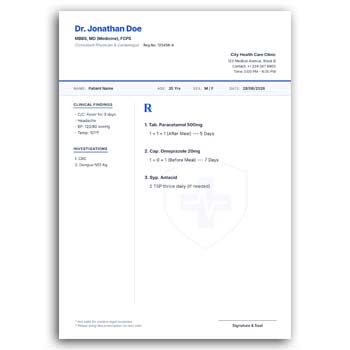
A well-structured prescription pad helps healthcare professionals present treatment information in a clear and organized way. It can include the doctor’s professional identity, clinic details, patient information, prescription area, and essential contact details.
The Doctor Prescription Pad Design Online Generator Free offers a convenient starting point for creating customized prescription stationery without designing every element from scratch. Doctors, clinics, chambers, and healthcare organizations can personalize the layout and prepare a professional design according to their practical requirements.
Why This Format Is Useful
- ✓ Create a professional prescription pad layout
- ✓ Customize doctor and clinic information
- ✓ Add qualifications and medical specialty
- ✓ Upload a clinic or personal logo
- ✓ Edit text directly in editable areas
- ✓ Adjust suitable colors and branding
- ✓ Include patient information fields
- ✓ Keep a dedicated prescription-writing section
- ✓ Add contact and appointment information
- ✓ Prepare the finished design for printing
Understanding a Prescription Pad
A prescription pad is a professional document used by a healthcare provider to record medication or treatment instructions for a patient. It normally contains identifying information about the doctor or healthcare facility along with areas for patient and prescription details.
The layout can vary according to medical specialty and professional requirements. A general prescription format may look different from one used by a dentist, pediatrician, surgeon, or specialist.
Online Design Made Simpler
An online generator can reduce the amount of manual design work required to create basic stationery. Instead of starting with a blank page, users can work with an existing structure and customize the elements available in the design.
This can be useful for doctors who need a professional-looking prescription pad but do not want to spend significant time building a layout from the beginning.
Essential Elements at a Glance
| Design Element | Status |
|---|---|
| Doctor name | ✓ |
| Qualifications | ✓ |
| Specialty/designation | ✓ |
| Clinic details | ✓ |
| Logo | ✓ |
| Patient details | ✓ |
| Prescription section | ✓ |
| Contact information | ✓ |
| Color customization | ✓ |
| Print-ready preparation | ✓ |
Advantages and Limitations
| Advantages | Limitations |
|---|---|
| ✓ Provides a ready design structure | • Available editing options depend on the format |
| ✓ Reduces repetitive design work | • Medical information must be entered manually |
| ✓ Supports professional branding | • A template does not provide clinical decision-making |
| ✓ Can be adapted for different practices | • Local prescription requirements may differ |
| ✓ Useful for print stationery | • Final print quality depends on production settings |
| ✓ Allows basic visual customization | • Secure patient-data handling requires separate systems |
Build Your Professional Header
The header is usually the first section patients notice. It can contain the doctor’s name, professional qualifications, specialty, designation, clinic name, and other appropriate professional information.
A clear hierarchy makes these details easier to identify. Avoid placing too many elements in the header because the main prescription area needs sufficient room.
Include Clinic Information
If the prescription is issued from a clinic or medical chamber, relevant facility information can be included. Address, phone number, email, website, and appointment details may be useful depending on the practice.
Review every contact detail before printing. Incorrect phone numbers or addresses can make the stationery less useful.
Add a Professional Logo
A logo can help establish a visual identity for a doctor, clinic, hospital, or healthcare organization. It can be placed near the doctor’s information without taking excessive space.
For best results, use a high-resolution logo. The logo should remain clear when the prescription pad is printed in its intended size.
Patient Details Area
A useful prescription layout should provide an appropriate place for patient information. Depending on the professional setting, this may include name, age, date, patient ID, or other relevant information.
The required fields should be determined by the healthcare provider and applicable documentation practices. Avoid adding unnecessary personal information simply to fill space.
Prescription Writing Space
The central portion of the page should remain practical for recording treatment instructions. Medicine names, dosage, frequency, duration, and other clinical instructions may require adequate room.
A clean writing area also improves readability. Decorative graphics should not interfere with the space used for important medical information.
Related Letterhead Designs
Medical professionals may also require letterhead for formal communication. The Letterhead Design Editable Download can be useful when preparing customized professional stationery.
Another option is the Letterhead Design Template Editable, which can provide a different layout approach for professional correspondence.
For a ready-to-use stationery layout, you can also explore the Stationery Letterhead Layout.
Specialty-Specific Layouts
Doctors often work in very different clinical environments. A pediatrician may want fields related to a child’s age and weight, while a dentist may require space for dental treatment information.
Specialists may also want their specialty to be more prominent in the header. An editable design makes it easier to adapt the presentation while retaining the core structure.
Make Text Easy to Read
Prescription stationery should prioritize clarity. Doctor information and clinic details should be readable without requiring patients to examine the page closely.
Avoid overly decorative fonts for important information. Consistent typography can also make the prescription pad look more professional.
Select Appropriate Colors
Color can be used to reinforce the visual identity of the medical practice. If the clinic already has established brand colors, the prescription design can follow the same visual direction.
Do not allow background colors or graphics to interfere with handwritten prescription information. Contrast is particularly important for small text.
Print Before Bulk Production
Always review a sample before ordering a large number of prescription pads. Check the page dimensions, margins, logo quality, text alignment, and available writing space.
A physical test can reveal color or sizing issues that may not be obvious on a monitor. Make corrections before producing the final batch.
Choose Suitable Paper
The paper used for a prescription pad affects both its appearance and writing experience. Standard paper may be sufficient for everyday practice, while a clinic may prefer a more premium stock.
Consider how the doctor will write on the pad and how the finished prescription will be stored or handled. The paper and design should work together.
Online vs Traditional Design
An online generator can make basic design customization faster and more accessible. It can be particularly useful when a doctor needs a simple layout without using advanced graphic design software.
Traditional design software may provide more control over complex branding and specialized layouts. The right choice depends on the required level of customization.
Protect Patient Information
Prescription documents can contain sensitive medical information. Completed prescriptions should therefore be handled carefully and stored or shared according to applicable privacy and professional requirements.
An editable template only controls the visual layout. It does not provide encryption, secure storage, or other protections associated with dedicated healthcare information systems.
Prescription Pad vs Letterhead
A prescription pad is designed specifically around medical treatment instructions, while letterhead is generally intended for formal written communication. They may share similar branding elements but serve different purposes.
For example, a doctor may use letterhead for referral letters or official correspondence and a prescription pad for treatment instructions. Keeping their purposes separate can make documentation more organized.
Medical Documentation Background
Prescriptions are part of a broader healthcare documentation process. Their format and requirements may differ depending on the country, medical profession, medicine category, and healthcare institution.
For general information, see Prescription on Wikipedia.
Design Inspiration
A good healthcare stationery design combines professional identity with practical readability. Clean spacing, clear headings, restrained colors, and sufficient writing space are useful characteristics.
For broader medical stationery inspiration, you can explore Medical Letterhead Templates.
Simple Online Customization
Start by entering the doctor’s name, qualifications, specialty, and clinic information. Upload the appropriate logo and modify available colors or text fields to match the practice.
Then review the patient and prescription sections. Make sure the layout provides enough room for the actual writing requirements before preparing the final version.
Maintain a Master Template
After finalizing the prescription design, save an approved master copy. Make duplicate versions when preparing new print orders or minor updates.
This reduces the chance of accidentally changing important professional information. It also keeps the clinic’s stationery visually consistent over time.
Who Can Use This Format?
General physicians, specialists, dentists, consultants, private chambers, clinics, hospitals, and healthcare organizations can adapt a prescription pad design to their professional needs.
The final layout should reflect the actual practice and meet any applicable professional or legal requirements. Medical information should always be completed by the responsible healthcare professional.
Final Thoughts
The Doctor Prescription Pad Design Online Generator Free provides a convenient starting point for creating customized prescription stationery. It can help doctors personalize their professional identity, clinic information, logo, colors, patient fields, and prescription-writing area.
A well-planned design can make routine documentation clearer and more professional. Before using the final version, carefully verify all professional information, layout dimensions, readability, and applicable prescription requirements.
Leave a Reply