Loading Design... please wait.।
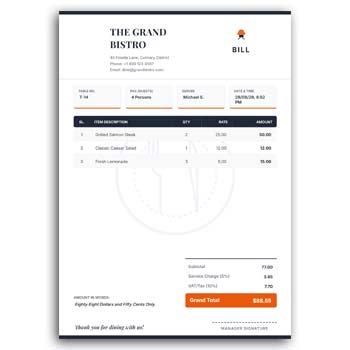
Restaurant Cash Memo Design Editable
A restaurant cash memo is more than a simple payment record. It gives customers a clear summary of the food or beverages they ordered, while helping the restaurant maintain an organized record of each transaction.
The Restaurant Cash Memo Design Editable is a practical option for restaurants, cafés, fast-food shops, food courts, bakeries, and takeaway businesses. The format can be customized with restaurant information, menu items, quantities, prices, discounts, and other details required for everyday sales.
What Makes This Format Useful?
- ✓ Add restaurant name, address, and contact details
- ✓ Insert food and beverage item names
- ✓ Enter quantity and individual prices
- ✓ Display subtotal and final amount
- ✓ Add discounts or service-related charges
- ✓ Upload your restaurant logo
- ✓ Change available text and colors
- ✓ Include order or table information
- ✓ Add payment details
- ✓ Reuse the design for daily transactions
Understanding a Restaurant Cash Memo
A restaurant cash memo is a document that records the items purchased by a customer and the corresponding charges. It can be used for dine-in meals, takeaway orders, food delivery, catering, or counter sales.
The exact information can vary from one business to another. A simple memo may only show food items and prices, while a more detailed version can include table numbers, order numbers, customer details, taxes, discounts, and payment status.
A Better Way to Present Food Orders
Restaurant orders can contain several food items, side dishes, drinks, and additional options. A structured cash memo allows each item to be displayed separately instead of presenting the entire order as one amount.
This makes the bill easier for customers to review. It can also help staff confirm that the correct items and quantities have been recorded.
Benefits and Limitations
| Benefits | Limitations |
|---|---|
| ✓ Makes restaurant transactions easier to organize | • Menu and price information must be updated |
| ✓ Clearly displays multiple food items | • Calculations should be checked |
| ✓ Can be customized for different restaurants | • It does not automatically manage restaurant orders |
| ✓ Supports logo and business branding | • It does not replace POS software |
| ✓ Suitable for printed or digital use | • Complex tax rules may require specialized billing tools |
| ✓ Reusable for everyday sales | • Inventory is not automatically updated |
Add Menu Items
The main part of a restaurant cash memo is the item list. You can add dishes, snacks, beverages, desserts, combos, or other products sold by the restaurant.
For a large menu, only the products included in the current order need to appear on the memo. This keeps the document focused and easy to understand.
Show Quantity and Price
Customers should be able to see how many units of each item they ordered and the applicable price. This is especially important when the same food item is ordered more than once.
A separate amount for each line can make the calculation transparent. The subtotal can then be shown before any discount, tax, or additional charge is applied.
Add Order Information
Restaurants can handle many orders simultaneously, especially during busy periods. Adding an order number can make it easier for staff to connect the cash memo with the corresponding kitchen or delivery order.
For dine-in service, a table number can also be useful. Takeaway and delivery businesses may instead use an order reference or customer contact information.
Customize Your Restaurant Branding
The restaurant logo can be placed in the appropriate area of the design along with the business name and contact information. You can also update available text and colors to match your restaurant’s visual identity.
A consistent design across menus, cash memos, receipts, packaging, and promotional materials can create a stronger brand experience.
Related Design Resources
Restaurant businesses sometimes need other customized paper designs for daily operations. A Notepad Design Template Generator can be useful when creating branded writing materials.
For a more artistic stationery style, you can explore the Creative Art Romantic Writing Pad Design Generator.
Businesses involved in healthcare or clinic services can also explore a Doctor Prescription Pad Design Generator for a different type of professional document.
Add Discounts
Restaurants may offer promotional discounts, membership discounts, combo offers, or special customer pricing. When applicable, the discount can be displayed separately from the original item amount.
Showing the discount clearly helps customers understand why the final amount differs from the standard menu price. It also makes the transaction easier to review later.
Include Additional Charges
Depending on the restaurant and applicable local requirements, a transaction may include service charges, taxes, delivery fees, packaging fees, or other costs.
These charges should be presented clearly rather than hiding them inside an unexplained final amount. The exact charges should follow the restaurant’s actual pricing and applicable rules.
Payment Details
A restaurant cash memo can include the payment method used by the customer. Depending on the business, this may include cash, card, bank transfer, mobile payment, or another payment method.
For delivery or partially paid orders, the payment status can also be noted when necessary. Clear payment information can help staff manage completed and outstanding transactions.
Dine-In and Takeaway Use
The same basic cash memo structure can be adapted for both dine-in and takeaway transactions. Dine-in orders may require table information, while takeaway orders may need an order reference.
Restaurants can maintain a standard master design and adjust the relevant fields according to the type of order. This provides flexibility without requiring a completely different document for every sales channel.
Useful for Cafés and Food Shops
The format is not limited to traditional restaurants. Cafés, bakeries, fast-food outlets, dessert shops, juice bars, food courts, and small takeaway businesses can also adapt the design.
Products can be replaced with coffee, cakes, burgers, pizza, snacks, drinks, desserts, or any other menu items. The editable structure allows the document to match the business’s product range.
Make the Bill Easy to Read
A good restaurant cash memo should allow customers to understand the transaction quickly. The food name, quantity, price, subtotal, discount, and final amount should be visually easy to locate.
Avoid unnecessary design elements that make the bill difficult to read. A clean and balanced layout is generally more useful at a busy restaurant counter.
Printed or Digital Copies
Printed cash memos are useful for customers paying at a restaurant counter or receiving a physical receipt. Digital versions can be shared when the business accepts online orders or communicates through messaging platforms.
Before using the final design, check how it looks both on screen and on paper. Small text that looks acceptable on a computer may become difficult to read when printed.
Keep Prices Updated
Food prices can change because of ingredient costs, supplier prices, seasonal changes, or menu updates. The cash memo should therefore reflect the current prices used by the restaurant.
Review the master design whenever the menu or pricing structure changes. This helps prevent outdated information from appearing on customer documents.
Cash Memo and Restaurant POS
A cash memo design is useful for presenting transaction information, but it does not necessarily provide the automated functions of a restaurant POS system. POS software can handle features such as order processing, sales reporting, inventory, and payment integration.
Small businesses that do not require a complete POS workflow may still find an editable cash memo useful for simple documentation. Larger operations may benefit from combining document templates with dedicated billing software.
Design Inspiration
A professional restaurant document should balance branding with readability. Consistent typography, clear item rows, appropriate spacing, and a recognizable logo can make the cash memo look polished.
For general business stationery inspiration, you can explore Business Document Templates.
Simple Editing Process
Start by replacing the sample restaurant information with your own business name, contact details, address, and logo. Then update the item table with your current menu products.
Enter quantities, prices, discounts, taxes, service charges, and payment information as required. Review the complete amount before issuing the cash memo to the customer.
Maintain a Reusable Master Copy
Restaurants may process many transactions every day, so keeping a master version can save time. Store the original design separately and create a new copy when preparing a transaction.
This protects the main layout from accidental changes. It also allows staff to work with a consistent document format.
Who Can Use This Design?
Restaurants, cafés, bakeries, fast-food outlets, food courts, takeaway shops, dessert stores, juice bars, catering businesses, and small food-service companies can customize this cash memo design.
It can be adjusted for different menus and sales methods. Whether the business handles a few daily orders or a larger number of transactions, a well-organized format can make sales documentation easier.
Final Thoughts
The Restaurant Cash Memo Design Editable provides a flexible foundation for recording food and beverage transactions in a clear format. Restaurants can customize menu items, quantities, prices, discounts, charges, customer information, payment details, and branding according to their needs.
An editable design can reduce repetitive formatting work and help maintain a consistent presentation across daily transactions. Before issuing each memo, check the menu items, quantities, prices, discounts, charges, and final amount carefully.
1 Comment
1 Pingback