Loading Design... please wait.।
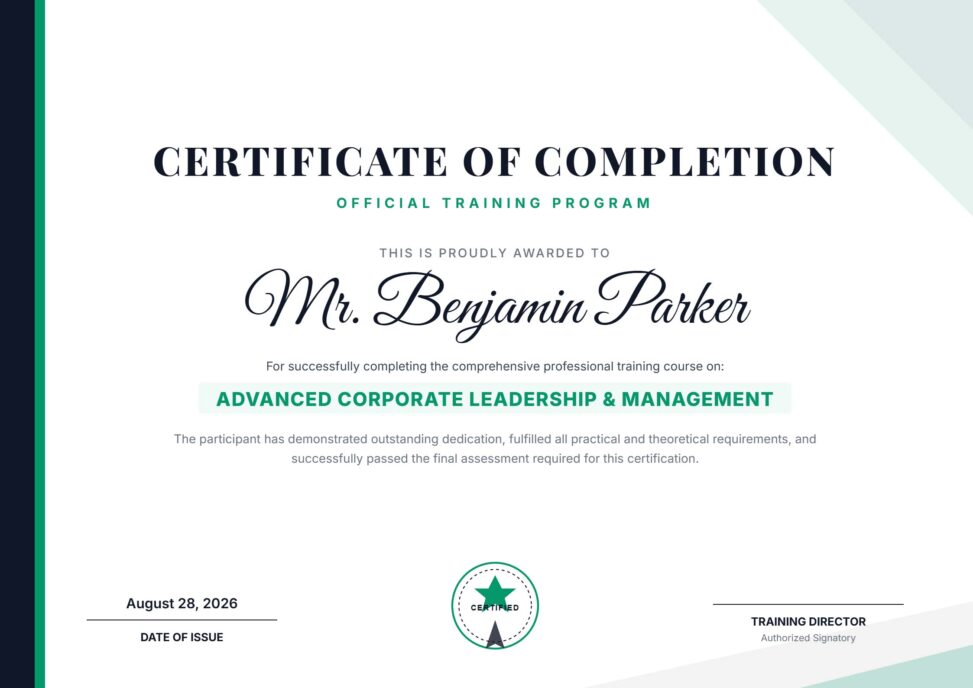
Official Training Program Certificate Format Editable PDF Free Download
A training certificate can provide a formal record that a participant has completed or attended a specific training program. For companies, institutes, professional trainers, and educational organizations, a well-designed certificate can make the training experience feel more complete and professionally documented.
An Official Training Program Certificate Format Editable PDF Free Download offers a practical starting point for preparing these certificates. Instead of creating a complete certificate layout from the beginning, you can customize the available fields with the participant’s name, training title, organization details, dates, instructor information, signatures, and other relevant content.
Key Features
- ✓ Edit participant or trainee name
- ✓ Add official training program title
- ✓ Include training duration or completion details
- ✓ Add institute or company logo
- ✓ Customize available text and colors
- ✓ Include issue date and certificate number
- ✓ Add trainer or authorized signatures
- ✓ Create certificates for multiple participants
- ✓ Reuse the format for future training programs
- ✓ Prepare files for digital sharing or printing
Understanding a Training Certificate
A training certificate is generally issued to document a person’s participation or completion of a particular training program. It can identify the participant, training provider, program title, date, and other information relevant to the training.
The certificate should accurately reflect what the participant completed. Whether it represents attendance, participation, or successful completion should depend on the actual requirements and assessment process of the program.
Why a Ready-Made Format Helps
Training providers may need to prepare certificates for dozens or even hundreds of participants. Designing every certificate individually can consume unnecessary time and create inconsistencies between documents.
An editable format provides a reusable structure. The main design can remain unchanged while participant-specific information is updated for each certificate.
Advantages and Limitations
| Advantages | Limitations |
|---|---|
| ✓ Speeds up certificate preparation | • Participant information must be verified |
| ✓ Easy to customize for different programs | • Some organizations may require a specific official format |
| ✓ Maintains consistent institutional branding | • Template design may need adjustments for special requirements |
| ✓ Reusable for multiple training batches | • Printing quality depends on paper and printer |
| ✓ Can include signatures and certificate numbers | • A template does not prove training completion by itself |
| ✓ Suitable for digital and printed certificates | • Formal verification may require a separate system |
Add the Training Program Name
The training title should clearly identify what the participant attended or completed. You can mention the subject, skill area, workshop name, or professional development program.
A concise title is generally easier to read. If additional information is required, details such as training hours or course duration can be placed in a separate section.
Personalize Participant Information
The participant’s full name is one of the most important fields on the certificate. Enter it exactly as it should appear on the final document.
Depending on the program, you may also include participant ID, registration number, department, organization, or batch information. Only relevant information should be included.
Add Training Dates and Duration
A certificate can include the date the training was completed or the period during which the program was conducted. For longer programs, start and end dates can provide a clearer record.
Training duration may also be included when it is relevant. This can help explain the scope of the program without adding excessive text.
Use Your Official Branding
A training certificate can represent the credibility and identity of the organization that issued it. Add the institute, company, academy, or training provider’s logo and official name.
You can also customize available colors and other visual elements to align the certificate with your organization’s branding. Keeping the design consistent with your other materials can create a stronger professional identity.
Certificate Number and Verification
Organizations that issue many certificates may use a unique certificate number for each participant. This can help maintain an internal record and make future reference easier.
If your organization provides online verification, the certificate number can be connected to a verification page or database. The editable template itself does not automatically create such a verification system.
Add Trainer and Authorized Signatures
A signature can identify the person authorized to issue the certificate. Depending on the training program, this could be a trainer, instructor, program director, manager, principal, or other responsible authority.
The certificate may contain one or more signature areas. Use the signing structure that matches the organization’s official process.
Related Professional Stationery
Training organizations often need official stationery for invitations, notices, correspondence, and other administrative activities. An Instant Download Letterhead Layout can be adapted for formal training-related communication.
For a more creative visual approach, you can explore this Editable Creative Letterhead and customize it with your organization details.
You may also find a Letterhead Template useful when preparing reusable official documents for your training organization.
Suitable for Different Training Programs
An official training certificate can be used for professional development, technical training, corporate workshops, seminars, skill-development courses, employee training, and educational programs.
The same general structure can be adapted to different subjects. Simply update the program title, participant information, dates, and recognition statement.
Make the Certificate Official-Looking
A professional certificate should communicate its purpose immediately. The organization name, certificate title, participant name, and training achievement should have a clear visual hierarchy.
Avoid adding too many decorative elements that compete with the main information. A clean layout can make the document appear more formal and easier to read.
Prepare Certificates for Large Groups
When an entire training batch needs certificates, using a master template can make the process more efficient. Keep one original copy and create individual versions for each participant.
Only the required personal and training information needs to be changed. This can reduce repetitive design work while keeping every certificate visually consistent.
Digital Certificate Distribution
Many training programs provide certificates electronically after completion. An editable certificate can be customized and prepared for digital sharing through email, online learning platforms, websites, or participant portals.
Always inspect the final digital file before distribution. Make sure names, dates, logos, signatures, and other important information are displayed correctly.
Printing the Certificate
For physical ceremonies or official presentations, a printed certificate can provide a more traditional experience. Choosing suitable paper can also improve the overall presentation.
Before printing many copies, create a test print. Check page dimensions, margins, text alignment, image quality, and signature placement.
Accurate Certificate Wording Matters
The certificate should describe the participant’s actual achievement. If someone attended a workshop without completing an assessment, the wording should not incorrectly claim that they passed a qualification.
Clear and accurate wording helps protect the reputation of both the participant and the training provider. It also makes the document more useful when the recipient shares it with employers or other organizations.
Keep Training Records Organized
Certificates should ideally be supported by appropriate training records. Depending on the program, the organization may maintain registration, attendance, assessment, completion, and certificate issuance information.
A certificate number can provide a useful connection between the document and these records. Good record keeping can make future verification easier.
Training Certificates and Professional Development
Training certificates are commonly used to document learning activities and professional development. Their value can vary depending on the training provider, program content, assessment process, and recognition associated with the course.
For general information about professional development and training, you can explore Professional Development on Wikipedia.
Certificate Design Inspiration
A training certificate should look formal while remaining easy to read. Strong typography, balanced spacing, clear borders, organization branding, and a well-positioned signature area can contribute to a polished result.
For more visual ideas, you can explore Training Certificate Templates and compare different certificate layouts.
Easy Editing Workflow
First, add the training provider’s official name and logo. Next, enter the participant’s name, training title, dates, duration, certificate number, and other required information.
Add the authorized signatures and adjust the available text or colors if necessary. Finally, proofread every field before exporting the certificate for digital use or printing.
Who Can Use This Certificate Format?
Corporate training departments, educational institutes, professional trainers, academies, NGOs, workshops, online training providers, and skill-development organizations can adapt this type of certificate.
It is especially useful when certificates need to be prepared regularly for different training batches. A reusable editable format can simplify the process while maintaining a consistent institutional appearance.
Final Thoughts
An Official Training Program Certificate Format Editable PDF Free Download provides a convenient foundation for creating professional training certificates. It allows you to customize participant names, program information, dates, duration, certificate numbers, branding, and authorized signatures.
For organizations that conduct regular training programs, a reusable certificate format can reduce preparation time and maintain consistency. Always verify participant information and make sure the certificate wording accurately represents the training completed before issuing the final document.
2 Comments
2 Pingbacks