Loading Design... please wait.।
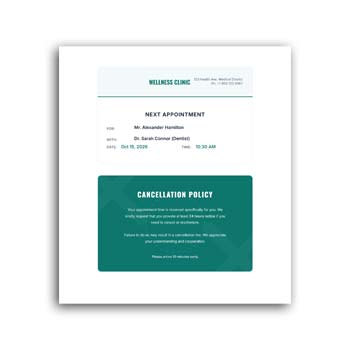
Appointment Card Template Editable Instant Download
An appointment card is a simple way to give clients or customers a clear reminder of an upcoming meeting, consultation, service, or visit. A professionally arranged card can keep essential information in one place while also representing the identity of a business or professional.
With an Appointment Card Template Editable Instant Download, you can start with a prepared design instead of creating the card from scratch. The available text, business information, colors, branding elements, and appointment details can be adjusted to match your requirements.
Key Features at a Glance
- ✓ Ready-made appointment card layout
- ✓ Add client and appointment information
- ✓ Edit date, time, and location details
- ✓ Include phone number and contact information
- ✓ Add business logo and branding
- ✓ Customize available text and design elements
- ✓ Reuse the format for future appointments
- ✓ Suitable for professional and service-based businesses
What Is an Appointment Card?
An appointment card is generally provided to a customer or client as a physical or digital reminder of a scheduled appointment. It can contain information such as the business name, appointment date, time, location, and contact details.
The format can be adapted for many industries. Doctors, dentists, salons, consultants, repair services, tutors, beauty professionals, and other service providers can use appointment cards for their customers.
Why a Simple Reminder Can Be Useful
People often manage multiple appointments during a busy day. A small card containing the important details can give customers something easy to keep and refer to later.
It can also reduce the need for customers to search through old messages or emails for basic appointment information. The exact reminder method will depend on how the business communicates with its clients.
Advantages and Limitations
| Advantages | Limitations |
|---|---|
| ✓ Makes appointment details easy to keep | • Small card size limits the amount of information |
| ✓ Saves time compared with designing from scratch | • Details must be entered carefully |
| ✓ Can be customized for different services | • Some businesses may prefer digital reminders |
| ✓ Supports consistent business branding | • Printing quality depends on the selected material |
| ✓ Can be reused for multiple appointments | • Template fields may require customization |
| ✓ Useful for printed or digital communication | • A card alone does not guarantee appointment attendance |
Add the Important Appointment Details
The most useful information should be easy to identify. Depending on the service, you can include the client’s name, appointment date, time, location, service name, and contact number.
Avoid adding unnecessary information that makes the card difficult to read. The goal is to let the customer understand the appointment details quickly.
Personalize It for Your Business
An editable template can be adjusted to match the visual identity of your business. Add your logo, company name, phone number, website, address, or social media information where appropriate.
You can also modify available colors and other design elements. A consistent appearance can help customers recognize your business more easily.
Suitable for Different Professionals
Appointment cards are useful across many service-based industries. A medical professional may use one for a consultation, while a salon may use it to confirm a customer’s next visit.
Tutors, consultants, repair technicians, fitness professionals, photographers, and other appointment-based businesses can also adapt the same concept to their needs.
Related Business Templates
Business administration often involves several types of documents. For employee reimbursement and expense reporting, an Expense Claim Form can provide a structured way to record approved business expenses.
When an organization needs to request products or services internally, a Purchase Requisition Form can help document those requirements.
For formally ordering products or services from suppliers, you can also explore this Purchase Order Format.
Keep the Design Easy to Read
An appointment card does not need a complicated layout. Clear typography, good spacing, and a logical information hierarchy are usually more useful than excessive decorative elements.
The customer’s attention should naturally move toward the appointment date and time. Contact information and branding can then provide additional context.
Create Cards for Different Services
A business may offer several services with different appointment requirements. The editable format can be adapted to create variations for each service while maintaining the same overall branding.
For example, a beauty business could prepare different cards for hair appointments, skincare sessions, or consultations. This provides flexibility without requiring a completely new design every time.
Make the Appointment Information Stand Out
The date and time are usually the most important details on an appointment card. They should be easy to locate and read without searching through the rest of the content.
If a location or room number is important, it can also receive clear visual emphasis. The final hierarchy should reflect what the customer needs to remember.
Digital and Printed Use
Appointment information can be provided in different ways depending on the business. A printed card can be handed directly to a customer, while a digital version can be sent through email or messaging platforms.
Using an editable template allows the same basic visual concept to work across different communication methods. The final format should be selected according to the business workflow.
Save Time With a Reusable Format
Once you have customized the template with your business information, it can become a reusable master design. Future cards only need the appointment-specific information to be updated.
This is particularly useful for businesses that handle appointments every day. A consistent template can reduce repetitive design work and maintain a professional appearance.
Check the Details Before Printing
A small typing error can make an appointment card confusing. Before producing the final version, carefully check the client’s name, date, time, address, phone number, and other important information.
It is also a good idea to review one test copy before printing a larger quantity. This helps confirm that the text is readable and positioned correctly.
Appointment Cards and Customer Experience
A well-organized appointment card can be a small but useful part of the customer experience. It gives the customer a physical or digital reference and can reinforce the professional image of the service provider.
For businesses where appointments are central to daily operations, clear communication can be just as important as the visual appearance of the card.
Appointment Scheduling in General
Appointment cards are one of many tools used to communicate scheduled meetings and services. Businesses may also use calendars, booking platforms, email confirmations, and messaging reminders.
For general information about scheduling and appointments, you can explore Appointment on Wikipedia.
Design Inspiration for Appointment Cards
The best design is usually one that communicates the necessary information without making the card feel crowded. Typography, spacing, alignment, and branding should work together to support readability.
For additional visual ideas, you can explore Appointment Card Templates and review different approaches to layout and presentation.
A Simple Editing Process
Open the editable template and replace the sample business information with your own details. Then enter the appointment date, time, client information, location, and service details as required.
Adjust the available colors or branding elements if needed. Finally, review the complete card and prepare it for digital sharing or printing.
When This Template Is Most Useful
An editable appointment card template is especially helpful for businesses that schedule customers regularly. It provides a consistent format while allowing each appointment to have its own details.
It is also convenient for newly established businesses that want professional stationery without spending excessive time creating a design from scratch.
Final Thoughts
An Appointment Card Template Editable Instant Download offers a practical way to create clear and professional appointment reminders. You can customize business information, appointment details, branding, and other available design elements while keeping the basic layout ready to use.
Whether you run a clinic, salon, consultancy, tutoring service, repair business, or another appointment-based service, a reusable appointment card can make customer communication more organized. Always check the final details carefully before sharing or printing each card.
1 Comment
1 Pingback