Loading Design... please wait.।
Corporate Office Writing Pad Design Editable Online Free
A professional writing pad is a small but useful part of corporate stationery. It can be used for meetings, office notes, internal communication, client discussions, training sessions, and everyday workplace writing.
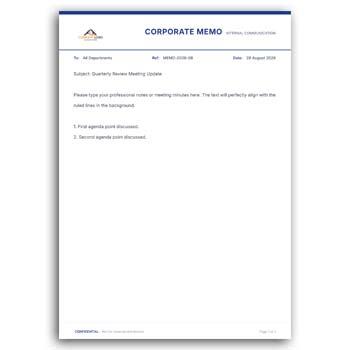
The Corporate Office Writing Pad Design Editable Online Free provides a convenient way to create a customized writing pad without building the entire layout from the beginning. You can personalize the available design with company information, logo, colors, contact details, and other relevant elements to create stationery that represents your business.
Standout Features
- ✓ Customize the company name and contact information
- ✓ Upload your corporate logo
- ✓ Edit available text directly
- ✓ Change suitable colors to match your brand
- ✓ Create a professional corporate stationery layout
- ✓ Use the design for meetings and office notes
- ✓ Adapt the layout for different departments
- ✓ Maintain consistent business branding
- ✓ Reuse the editable design whenever needed
- ✓ Prepare a practical format for digital or print production
What Is a Corporate Writing Pad?
A corporate writing pad is stationery designed for business-related writing and note-taking. It commonly contains the organization’s branding at the top or around the page, leaving a clear area for handwritten or typed notes.
Companies can use writing pads during meetings, presentations, workshops, client appointments, training programs, and internal office activities. The design can be simple or more detailed depending on the company’s branding requirements.
Why Businesses Use Branded Writing Pads
Office stationery communicates more than just information. A consistent logo, color scheme, contact information, and visual identity can make everyday documents look more professional.
A branded writing pad can also provide a subtle reminder of the company whenever it is used during a meeting or shared with a client. This makes it a practical part of a broader corporate identity system.
Benefits and Limitations
| Benefits | Limitations |
|---|---|
| ✓ Creates a consistent corporate appearance | • Design fields may vary depending on the template |
| ✓ Easy to customize business information | • Branding elements should be used carefully |
| ✓ Useful for meetings and office notes | • Printing requires suitable paper and settings |
| ✓ Reusable for different business activities | • It does not replace a full stationery brand guide |
| ✓ Can include company logo and colors | • Some advanced layouts may require professional editing software |
| ✓ Saves time compared with designing from scratch | • Final print quality depends on the source design |
Build a Strong Corporate Identity
A writing pad can follow the same visual language used across your business cards, letterheads, envelopes, presentation materials, and other stationery.
Using similar typography, logo placement, and brand colors can make the entire stationery collection feel connected. This is particularly useful for companies that want a consistent professional image.
Add Your Company Logo
The logo is often one of the most recognizable elements of corporate stationery. An editable design can provide a suitable area where your company logo can be placed.
Use a high-quality logo file whenever possible. A clear logo helps maintain a professional appearance both on screen and in printed stationery.
Customize Company Information
You can include the company name, office address, phone number, email address, website, and other relevant contact details. The information can be positioned according to the design structure.
Only include details that are useful for the intended purpose of the writing pad. Keeping the header clean gives employees more space for writing.
Keep the Writing Area Practical
The main purpose of a writing pad is to provide space for notes. Therefore, the branding section should not occupy unnecessary space.
A balanced header with enough blank area below can make the stationery more practical. The final layout should work for both short notes and longer meeting records.
Related Corporate Resources
Companies often need several types of professional stationery and business documents. For employee recognition activities, you can explore the Best Employee Award Certificate.
For procurement and office purchasing, the Office Supply Quotation Editable Format can be another useful business document.
You can also explore the Quick Editable Quotation Format when preparing quotation-related documents for customers or suppliers.
Useful for Office Meetings
Writing pads are frequently used during meetings where employees need to record decisions, tasks, ideas, and discussion points. A branded pad can make these routine activities feel more organized.
Companies can keep printed pads in meeting rooms, reception areas, training rooms, or individual workspaces. The same design can be used across different departments for a unified appearance.
Suitable for Client Meetings
A professional writing pad can also be placed in front of clients during meetings. It provides a convenient surface for taking notes while subtly displaying the company’s branding.
For client-facing use, keep the design polished but not overly decorative. The goal is to create a professional impression without distracting from the meeting.
Use for Training and Workshops
Corporate training sessions often involve note-taking, exercises, and discussions. A branded writing pad can be prepared specifically for these activities.
You can modify the available text to include a training program name, department, event title, or other relevant information. For repeated training programs, maintaining one editable master design can save preparation time.
Department-Specific Versions
Large organizations may want different writing pads for different departments or business units. The basic design can remain consistent while selected information is changed.
For example, the department name, contact details, or internal reference can be customized. This provides flexibility while preserving the company’s overall visual identity.
Choose Appropriate Colors
Corporate stationery generally works best when its colors are aligned with the organization’s existing brand identity. You can adjust available colors to create a closer connection with your corporate branding.
Avoid using too many colors if the writing area needs to remain clean. Strong contrast between text and background is also important for readability.
Typography Matters
The text on a corporate writing pad should be easy to read. Company names, contact information, website addresses, and other small details should remain legible when the design is printed.
Choose fonts that match your brand while maintaining practical readability. Decorative fonts may work for selected elements but should not make essential information difficult to understand.
Digital and Print Preparation
An editable design can be prepared for printing or digital use depending on the business requirement. Printed writing pads are particularly useful for meetings and office activities.
Before sending the design for professional printing, check the page dimensions, margins, logo quality, and text alignment. A test print can reveal issues that may not be obvious on a computer screen.
Paper Selection
The final appearance of a writing pad depends partly on the paper used for production. Different businesses may choose standard office paper, premium paper, textured stock, or other suitable materials.
Consider how the pad will actually be used before selecting the paper. A meeting notepad may require different paper characteristics from a premium client-facing writing pad.
Keep the Design Consistent
If your company already uses a specific logo position, color palette, or typography style, maintain those elements in the writing pad. Consistency can make different stationery items look like part of the same corporate system.
The same approach can be applied to letterheads, business cards, envelopes, quotation formats, and other office documents.
Professional Design Inspiration
Corporate stationery should combine visual identity with everyday usability. Clear spacing, balanced branding, readable typography, and an uncluttered writing area are often more valuable than excessive decoration.
For additional business document inspiration, you can explore Business Document Templates.
Easy Editing Process
Begin by replacing the sample company name and contact information with your own business details. Upload the logo and adjust the available colors or text to match your corporate identity.
Review the placement of every element before preparing the final design. If the writing pad will be printed, test the layout on the intended paper size before producing a larger quantity.
Maintain a Master Template
Keep one original version of your corporate writing pad as the master copy. When you need a new version, duplicate the file instead of changing the original.
This is particularly useful when multiple departments use the same stationery design. It helps prevent accidental changes to the core branding and layout.
Who Can Use This Design?
Corporate offices, startups, agencies, consulting firms, educational organizations, technology companies, financial businesses, NGOs, and many other professional organizations can use a customized writing pad.
It can be adapted for employees, meetings, training sessions, client interactions, workshops, and internal office activities. The design can be adjusted according to the organization’s branding and practical requirements.
Final Thoughts
The Corporate Office Writing Pad Design Editable Online Free provides a simple foundation for creating branded corporate stationery. Businesses can customize the logo, company information, colors, text, and other available elements while keeping enough space for practical note-taking.
A well-designed writing pad can support everyday office activities while reinforcing a consistent corporate identity. Before finalizing the design, always check readability, branding accuracy, dimensions, margins, and print quality.
2 Comments
2 Pingbacks