Loading Design... please wait.।
Doctor Prescription Format Editable Free Download
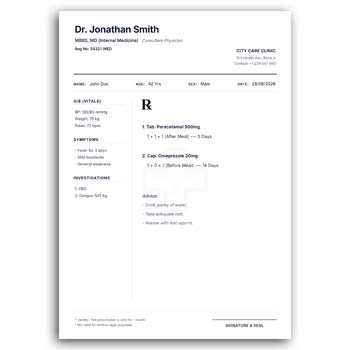
A prescription pad is an important part of a doctor’s everyday professional stationery. It provides a structured space for recording patient information, clinical notes, medicines, dosage instructions, and other relevant details.
The Doctor Prescription Format Editable Free Download offers a ready-made foundation that can be customized for doctors, clinics, medical chambers, hospitals, and healthcare professionals. Instead of creating a prescription layout from the beginning, you can personalize the available design with professional information and prepare it for practical use.
Key Features
- ✓ Add doctor name and professional designation
- ✓ Include clinic or hospital information
- ✓ Upload a professional logo
- ✓ Add patient name and relevant details
- ✓ Edit available text fields
- ✓ Customize suitable colors and branding
- ✓ Provide space for prescription notes
- ✓ Add medicine and dosage information
- ✓ Include appointment or contact details
- ✓ Prepare the design for printing or digital use
What Is a Doctor Prescription Format?
A doctor prescription format is a structured medical document used by healthcare professionals to record a patient’s treatment instructions. It commonly includes the doctor’s identity, healthcare facility information, patient details, date, and prescription-related information.
The exact fields can differ according to the doctor’s specialty and practice. A general practitioner may need a different arrangement from a dentist, dermatologist, pediatrician, or specialist.
Why an Editable Prescription Format Helps
Designing professional medical stationery from scratch can require considerable time. An editable format provides an existing visual structure that can be customized according to the doctor’s requirements.
The doctor or clinic can update the relevant text, branding, contact information, and other editable areas. This makes it easier to maintain a consistent prescription pad design across repeated print orders.
Quick Feature Check
| Requirement | Editable/Usable |
|---|---|
| Doctor name | ✓ |
| Designation | ✓ |
| Clinic information | ✓ |
| Logo | ✓ |
| Patient information | ✓ |
| Prescription area | ✓ |
| Contact details | ✓ |
| Color customization | ✓ |
| Text customization | ✓ |
| Print preparation | ✓ |
Benefits and Limitations
| Benefits | Limitations |
|---|---|
| ✓ Saves prescription design time | • Medical information must be entered carefully |
| ✓ Supports professional branding | • A template does not provide medical guidance |
| ✓ Can be reused for future printing | • Layout fields depend on the selected design |
| ✓ Suitable for clinics and individual doctors | • Digital medical records require appropriate systems |
| ✓ Easy to customize basic information | • Local prescription requirements should be followed |
| ✓ Can be prepared for print production | • Printing quality depends on the final setup |
Doctor and Clinic Details
The top section of a prescription pad commonly identifies the healthcare professional. You may include the doctor’s name, qualifications, designation, specialty, registration information where appropriate, and clinic or hospital name.
Contact information can also be added so patients know where to reach the healthcare provider. Only include professional information that is accurate and appropriate for the practice.
Add Your Medical Logo
A clinic, hospital, diagnostic center, or doctor’s personal logo can be included in the design. The logo helps patients identify the document and can reinforce the healthcare provider’s visual identity.
Use a high-quality logo file for better results during printing. Keep the logo size balanced so it does not reduce the available writing area.
Patient Information Section
Patient details are an important part of a prescription document. Depending on the practice and applicable requirements, fields may include patient name, age, gender, date, contact information, or other relevant identifiers.
The exact information should be determined by the healthcare professional and applicable privacy and documentation requirements. Avoid including unnecessary personal information in a template.
Prescription Writing Area
The central area should provide enough room for the healthcare professional to write or enter treatment instructions. Medicines, dosage, frequency, duration, and other clinical instructions may need sufficient space.
A clean writing area can make the prescription easier to read. Avoid excessive decorative elements around this section.
Related Stationery Resources
Healthcare professionals may need different types of professional stationery for their practice. For example, a Doctor Writing Pad Editable Online can be useful when a doctor needs a customized writing pad.
Other businesses may use sales documents for their daily operations. An Accessories & Tools Cash Memo is designed for product-based transactions.
Restaurants and food businesses can explore the Restaurant Cash Memo Design when they need a customized sales document.
Appointment Information
A prescription pad can also contain appointment-related information when the design allows it. Clinic hours, phone numbers, appointment contact information, or website details may be useful for patients.
Keep these details separate from the clinical writing area. This helps patients distinguish contact information from medical instructions.
Specialty-Based Customization
Different medical specialties may require different prescription layouts. A pediatrician may need space for weight and age, while a dentist may require fields related to dental treatment.
Similarly, specialist doctors may prefer sections for specific observations or follow-up instructions. The editable nature of the design allows the layout to be adjusted to the practical needs of the practice.
Use Appropriate Typography
Medical documents should prioritize readability. Doctor names, qualifications, clinic information, and contact details should be clearly visible without making the page look crowded.
The prescription writing area should remain particularly clean. Avoid overly decorative fonts for important medical information.
Choose Professional Colors
Colors can be used to reinforce the clinic’s existing branding. Soft and balanced color combinations may work well for medical stationery while maintaining a professional appearance.
Strong colors should not interfere with handwritten or printed prescription information. Always check the contrast between the text and background.
Printing Considerations
Prescription pads are often printed in batches, so it is important to review the design before sending it for production. Check page dimensions, margins, logo quality, text alignment, and writing space.
A test print can help identify problems that are not obvious on a computer display. This is especially useful when the design contains small contact information.
Digital Use
Some healthcare practices may use digital prescription workflows instead of traditional printed pads. An editable design can provide a visual starting point, but digital medical documentation should be handled using systems appropriate for the practice.
Patient information should always be protected according to applicable privacy and data-protection requirements. Do not treat a generic design template as a secure medical-record system.
Keep the Information Accurate
Professional information printed on prescription stationery should be reviewed carefully before production. A spelling error in the doctor’s name, qualification, clinic address, or contact number can create unnecessary problems.
Check all permanent information before sending the design to print. Temporary patient information should be added separately according to the practice’s workflow.
Do Not Replace Professional Medical Judgment
A prescription format is a documentation tool, not a source of medical advice. The template should only provide a structured space for a qualified healthcare professional to record appropriate instructions.
Medicine names, dosages, treatment decisions, and clinical recommendations must come from the responsible healthcare professional. A design template should never be used to generate or recommend treatment.
Prescription and Medical Documentation
A prescription is a written or electronic instruction from a healthcare professional concerning medicines or treatment. Requirements for prescriptions can vary by country, profession, medicine type, and healthcare setting.
For general background information, you can read Prescription on Wikipedia.
Design Inspiration
Professional stationery benefits from a clear information hierarchy and restrained visual design. A medical prescription should make the doctor information and clinical writing area easy to identify.
For broader stationery ideas, you can explore Medical Stationery Templates for visual inspiration.
Simple Editing Workflow
Start by replacing the sample doctor and clinic information with accurate professional details. Upload the appropriate logo and adjust available colors, typography, and text according to the practice’s identity.
Next, review the patient-information and prescription areas to ensure they provide enough practical space. Before printing, check the entire layout at actual size.
Keep a Master Design
Once the prescription format has been customized and approved, keep an original master version. Create copies whenever changes or new print batches are required.
This helps preserve the approved design and prevents accidental modification of important branding or professional information.
Suitable for Healthcare Professionals
Individual doctors, private chambers, clinics, hospitals, dental practices, specialist consultants, and other healthcare professionals may adapt a prescription format to their documentation needs.
The design can be modified for different specialties while maintaining a professional and recognizable appearance. Always ensure the final document complies with the relevant professional and legal requirements in the location where it will be used.
Final Thoughts
The Doctor Prescription Format Editable Free Download provides a convenient starting point for creating customized medical stationery. Doctors and healthcare organizations can personalize professional information, clinic details, logos, colors, patient fields, and prescription-writing areas.
A reusable format can reduce repetitive design work and help maintain consistent stationery across a medical practice. Before printing or using the final design, carefully verify all professional information and ensure that the format is appropriate for the applicable medical and documentation requirements.
2 Comments
2 Pingbacks