Loading Design... please wait.।
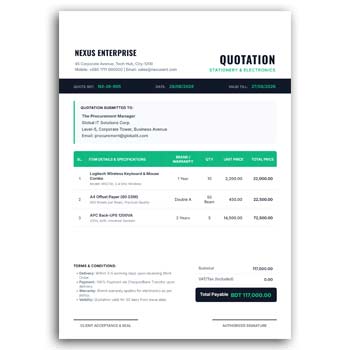
Office Supply Quotation Editable Format Instant Download PDF and JPG
Preparing a quotation for office supplies becomes much easier when the document already has a clean and professional structure. An editable quotation format helps businesses present product names, quantities, prices, and company details in an organized way.
The Office Supply Quotation Editable Format Instant Download PDF and JPG is useful for companies, suppliers, retailers, and service providers that regularly prepare office supply quotations. You can customize the available text, company information, product details, pricing, logo, and other elements to match your business requirements.
Main Features
- ✓ Edit company and supplier information
- ✓ Add office supply product names
- ✓ Update quantities and unit prices
- ✓ Enter quotation number and date
- ✓ Upload your business logo
- ✓ Change available text and colors
- ✓ Add customer or client information
- ✓ Include subtotal, discount, and total amount
- ✓ Reuse the format for future quotations
- ✓ Get a ready design for PDF and JPG use
What Is an Office Supply Quotation?
An office supply quotation is a business document used to present the estimated price of products or supplies requested by a customer or organization. It can include items such as paper, pens, files, printer accessories, folders, office equipment, and other stationery products.
The quotation gives the buyer a clear view of the proposed products and pricing before an order is confirmed. It can also help both parties maintain a written reference for the proposed transaction.
Start With a Ready-Made Layout
Creating a quotation from a blank document can take unnecessary time, particularly when the same type of quotation is prepared repeatedly. A ready editable format provides a structured starting point for entering business and product information.
You can modify the available fields according to the requirements of each quotation. This makes the process more convenient while keeping the document visually consistent.
Advantages and Limitations
| Advantages | Limitations |
|---|---|
| ✓ Saves time when preparing quotations | • Prices must be updated for every quotation |
| ✓ Keeps product information organized | • A quotation is not automatically an invoice |
| ✓ Easy to customize for different clients | • Final totals should be checked manually |
| ✓ Reusable for regular office supply orders | • Some businesses may need additional terms |
| ✓ Supports company branding | • Complex pricing may require a more advanced system |
| ✓ PDF and JPG versions are convenient for sharing | • The template itself does not manage inventory |
Add Supplier and Client Details
A professional quotation normally identifies both the supplier and the customer. You can enter the business name, address, phone number, email address, and other relevant contact information.
Keeping these details clearly separated makes the document easier to understand. It also helps the customer know exactly who prepared the quotation.
List Office Supply Items Clearly
The product section should provide enough information for the customer to understand what is being offered. Depending on the quotation, you may include product name, description, quantity, unit, unit price, and total price.
For example, a quotation may contain printer paper, notebooks, files, staplers, pens, folders, toner, or other office essentials. The exact product list can be changed for every customer.
Add Accurate Pricing
Price accuracy is one of the most important parts of a quotation. Each item’s quantity and unit price should be entered carefully before the document is finalized.
If discounts, delivery charges, taxes, or other costs apply, they can be shown separately where the format supports them. This makes the final amount easier for the customer to understand.
Use Your Company Branding
A quotation is also a representation of your business. Adding your company logo, business name, brand colors, website, and contact information can make the document look more professional.
For businesses that already use branded stationery, the quotation can follow the same visual identity. A consistent appearance across business documents can make communication more recognizable.
Include Quotation Number and Date
A unique quotation number can help businesses organize their records. The quotation date also provides a clear reference for when the prices and terms were presented.
If the quotation is valid for a limited period, you can also include a validity date or terms. This can help prevent confusion when prices change over time.
Useful for Different Office Supply Businesses
Office stationery shops, wholesalers, distributors, corporate suppliers, printing businesses, and general office equipment vendors can use this type of quotation format.
It can also be adapted for bulk supply proposals. Product names, quantities, prices, and customer details can be changed without redesigning the complete document.
Related Business Stationery
A professional quotation often works alongside other business documents. You can explore this Corporate Letterhead Format when you need branded stationery for official company communication.
For businesses operating in fashion, creative, or lifestyle industries, this Fashion Letterhead Design offers another type of branded document layout.
When a quotation is accepted and a transaction needs to be documented, a Quick Invoice Generator can be useful for preparing invoice-related documents.
PDF and JPG for Different Uses
Having the design available in PDF and JPG formats can provide flexibility. PDF is commonly convenient for sharing a structured document, while JPG can be useful when an image version is needed for certain digital platforms.
Before sending the final file, check the text, product details, prices, and contact information. A quick review can prevent mistakes from reaching the customer.
Make Quotations Easy to Read
A quotation should allow the customer to understand the products and prices without unnecessary effort. Clear headings, spacing, alignment, and readable typography can improve the document’s usability.
Avoid adding excessive decorative elements to a business quotation. The product and pricing information should remain the main focus.
Add Terms and Conditions
Some quotations require additional information such as delivery time, payment terms, warranty details, quotation validity, or return conditions. If these are relevant to your business, they can be included in an appropriate section.
The terms should be clear and consistent with your actual business policies. Avoid adding conditions that your business cannot fulfill.
Prepare Bulk Supply Quotations
Businesses often receive requests for large quantities of office supplies. In these situations, a structured quotation can make it easier to present many products in one document.
You can duplicate the master format and update the item list for each customer. This reduces repetitive formatting work and helps maintain a consistent professional appearance.
Review Before Sending
A quotation represents a proposed commercial price, so small errors can create unnecessary problems. Check product names, quantities, prices, totals, client information, quotation numbers, and dates before sending it.
It is also useful to confirm that the correct company logo and contact details are being used. A final review takes little time but can significantly improve accuracy.
Quotation and Business Transactions
A quotation is generally prepared before a customer confirms an order. It communicates proposed prices and conditions rather than automatically proving that a sale has taken place.
For general information about quotations and business offers, you can explore Quotation on Wikipedia.
Office Document Design Inspiration
A good quotation combines practical information with a professional visual structure. Strong alignment, clear pricing columns, balanced spacing, and consistent branding can make a document easier to review.
For additional visual inspiration, you can explore Business Document Templates and compare different document layout ideas.
Simple Editing Process
Start by entering your company information and uploading your logo. Next, add the client’s details and replace the sample product information with the actual office supply items.
Update quantities, prices, discounts, totals, dates, and any applicable terms. Finally, proofread the complete quotation and prepare the appropriate PDF or JPG version for delivery.
Who Can Use This Format?
Office supply retailers, stationery wholesalers, corporate suppliers, distributors, printing businesses, and general office equipment vendors can adapt this quotation format.
It can also be useful for freelancers or small businesses that regularly supply office products to organizations. The reusable design helps them prepare professional quotations without starting from zero every time.
Final Thoughts
The Office Supply Quotation Editable Format Instant Download PDF and JPG provides a convenient foundation for preparing professional product quotations. It allows businesses to customize supplier details, client information, product lists, quantities, prices, branding, and quotation terms.
A reusable editable format can make regular quotation work faster and more organized. Always verify pricing, calculations, customer information, and applicable terms before sending the final quotation.
2 Comments
2 Pingbacks