Loading Design... please wait.।
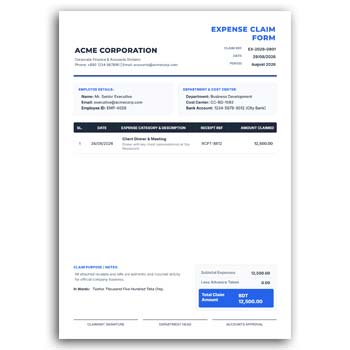
Expense Claim Form Template Editable
Managing business expenses becomes easier when employees have a clear way to report the money they spend for work. An Expense Claim Form Template Editable provides a structured document where travel costs, purchases, service charges, and other approved expenses can be recorded.
Instead of preparing a new form every time, you can use an editable template and update the required information. Employee details, expense descriptions, dates, amounts, approval fields, and company information can be adjusted to suit different organizations and workflows.
Useful Features for Expense Reporting
- ✓ Ready-made expense claim structure
- ✓ Add employee and department information
- ✓ Record different types of business expenses
- ✓ Enter dates, descriptions, and amounts
- ✓ Calculate and show the total claim
- ✓ Include approval and verification sections
- ✓ Customize company information and branding
- ✓ Reuse the format for future claims
- ✓ Suitable for digital or printed records
How an Expense Claim Form Helps
An expense claim form gives employees a consistent way to report money spent on behalf of an organization. Instead of submitting scattered receipts or informal notes, the relevant information can be organized in one place.
The accounts or administration team can then review the claim and determine whether the expenses meet the company’s reimbursement requirements.
Record Different Expenses
Business expenses can come from many situations. An employee might pay for transportation, accommodation, office supplies, meals during an approved trip, or other work-related services.
An editable form can be adapted to include the categories that matter to your organization. This keeps the document relevant without forcing every business to use the same fields.
Add Employee Details
A claim needs to be connected to the person who made the expense. Common details can include the employee’s name, ID, department, designation, and contact information.
Once these details are entered, the employee can list the expenses below. The same format can be reused for different members of the organization.
Enter Expense Information
Each expense should be easy to identify. You can include the date, description, category, amount, and any other information required for verification.
Keeping individual expenses separate makes the final total easier to understand. It also gives reviewers a clearer picture of how the claimed amount was calculated.
Make the Form Match Your Organization
Every organization has its own internal process. Some may require a manager’s approval, while others may need additional verification from an accounts department.
An editable template allows these sections to be customized. You can add company branding, approval fields, payment information, or other elements that fit your workflow.
Calculate the Total Clearly
A good expense claim should make the final amount easy to identify. When multiple expenses are listed, the total can be shown in a separate and clearly labeled section.
This helps both the employee and reviewer understand the amount being requested for reimbursement. It can also make record keeping more straightforward.
Useful for Small and Large Teams
Expense claims are not limited to large corporations. Small businesses, agencies, startups, educational institutions, NGOs, and professional teams may all need a consistent way to handle employee expenses.
A reusable template can work across different departments. The same structure can be maintained while individual employee and expense information changes.
Related Business Documents
Organizations often need several types of professional stationery and identification materials. A Membership Card Format can be useful for clubs, organizations, associations, and other membership-based groups.
For staff identification, an Employee ID Card provides a ready-made option for creating customized workplace identification cards.
Employee recognition can also be supported with a Professional Award Certificate that can be customized for different achievements.
Keep Supporting Information Organized
Some expenses may require additional information or supporting documents. Depending on the organization’s policy, employees may need to attach receipts, invoices, tickets, or other proof of payment.
The claim form can include a section for noting or checking these supporting documents. This can help create a more complete expense record.
Suitable for Repeated Use
One of the strongest benefits of an editable form is that it can be reused. You do not have to redesign the document every time another employee submits a claim.
Save the original template as a master copy and create a new version for each claim. Replace the relevant details and keep the basic structure unchanged.
Useful for Digital Expense Management
Many modern businesses handle expense reporting digitally. Employees can complete the form electronically and send it to the relevant manager or accounts team.
A digital workflow can make submission and review faster. It also makes it easier to store completed forms for future reference.
Printing the Completed Form
Some workplaces still use paper-based reimbursement processes. In those situations, a completed expense claim form can be printed and submitted with the necessary receipts.
Before printing, check that the employee details, expense amounts, total, and approval sections are correct. This simple step can prevent avoidable documentation errors.
Make the Layout Easy to Read
An expense form should focus on clarity rather than decoration. Employees need to know where to enter information, while reviewers should be able to find important details quickly.
Use clearly labeled sections and enough space for descriptions and amounts. A well-organized form can make routine administrative work much easier.
Expense Claims and Business Records
Expense claim forms can become part of an organization’s wider financial documentation. When claims are recorded consistently, businesses can maintain better visibility into employee-related spending.
For general information about expenses and financial records, you can explore Expense Information on Wikipedia.
Design Ideas for Editable Forms
The visual structure of a business document can affect how easy it is to complete. Simple tables, clear headings, logical spacing, and consistent typography can improve usability.
For additional ideas when creating professional editable documents, you can explore Business Document Templates for different layout and design approaches.
A Straightforward Workflow
Using an editable expense claim template is simple. Enter the employee information, add each expense with its date and amount, calculate the total, and complete any required approval fields.
After reviewing the claim, save the completed version and attach the required supporting documents. The final package can then be submitted through the organization’s normal reimbursement process.
Why Use an Editable Expense Claim Template?
A reusable editable template can reduce repetitive administrative work. Employees receive a consistent structure for reporting expenses, while managers and accounts teams receive information in a familiar format.
It also provides flexibility. As your organization’s reimbursement process changes, the template can be updated rather than replaced completely.
Final Thoughts
An Expense Claim Form Template Editable is a practical solution for organizing employee reimbursement requests. It provides a clear structure for recording expenses while allowing businesses to customize employee information, expense categories, approval sections, and branding.
Whether you manage a small team or a larger organization, a reusable expense claim form can help make reporting and reviewing business expenses more organized. With a simple editable structure, employees can prepare claims more efficiently and organizations can maintain clearer records.
2 Comments
2 Pingbacks