Loading Design... please wait.।
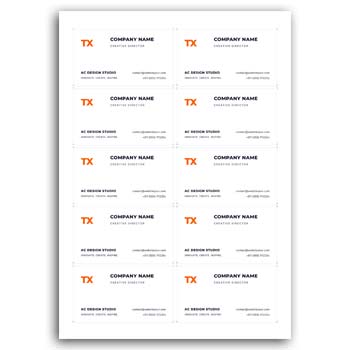
Creating a professional visiting card can be much easier when you start with a ready-made editable visiting card online template. Instead of creating a design from scratch, you can customize an existing layout and prepare your card in a short time. It is a practical solution for business owners, freelancers, professionals, and anyone who prefers designing online.
Key Features at a Glance
- ✓ Edit text with just a few clicks
- ✓ Change colors according to your brand
- ✓ Upload and replace your own logo
- ✓ Customize different design elements
- ✓ Download the final design in JPG
- ✓ Export the design in PDF
- ✓ Update contact information whenever needed
- ✓ Use the design for business or personal branding
What Is an Editable Visiting Card Template?
An editable visiting card template is a pre-designed card layout that can be customized according to your requirements. Instead of arranging every element manually, you can simply replace the sample information with your own details.
You can usually edit names, job titles, phone numbers, email addresses, websites, colors, logos, and other design elements. This makes the entire process faster and more convenient for online users.
For a general understanding of visiting cards and their purpose, you can also explore this Visiting Card Guide on Wikipedia.
Edit Your Information Easily
A visiting card normally contains important information such as your name, profession, company name, phone number, email address, and website. With an editable template, you can replace the existing text without rebuilding the entire layout.
This is especially helpful when you need to prepare cards for different employees, clients, or business locations. Simply update the required information and keep the rest of the design ready.
Change the Design Colors
Color is an important part of a professional business card. Your card can look more consistent and professional when its colors match your brand identity.
With an editable template, you can adjust the colors of backgrounds, text, shapes, icons, and other elements. You can choose a simple combination or use your existing brand colors.
Add Your Own Logo
Your logo helps people recognize your business or personal brand. A ready-made visiting card template can make it easier to add your own logo to the design.
You can replace the sample logo with your own file and adjust its position according to the layout. If a logo is not required, you can also remove or disable the logo element when the template supports this option.
Customize Different Elements
An editable design is not limited to changing text. Depending on the template, you may also be able to modify shapes, icons, images, lines, backgrounds, and other visual elements.
This gives you more control over the final appearance of your card. You can keep the original layout or make changes to create a more personalized design.
Download as JPG or PDF
Once your visiting card is ready, you can export it in a suitable file format. JPG is convenient for digital sharing, social media, websites, and quick communication.
PDF is often useful when you need a high-quality file for professional printing. Having both options makes an editable template useful for different types of projects.
Save Time on Every Design
Creating a visiting card from a blank document can require considerable time. You need to choose fonts, arrange information, select colors, add shapes, and create a balanced layout.
A ready-made template removes much of this initial work. You can focus mainly on editing and personalization instead of building the complete design from zero.
Useful for Business Owners
Small businesses often need professional stationery and promotional materials without spending too much time on design. An editable visiting card provides a simple way to prepare a customized business card.
You can add your company name, contact information, website, social media details, and logo. The same approach can also be used when creating cards for multiple team members.
Helpful for Freelancers and Professionals
Freelancers, consultants, photographers, developers, designers, real estate professionals, and other service providers can use editable visiting card templates for personal branding.
A professional card makes it easier to share contact details during meetings, networking events, conferences, and client discussions. It can also help maintain a consistent visual identity across different platforms.
Suitable for Online Design Lovers
People who enjoy creating designs online often prefer tools and templates that are quick to customize. An editable template gives them a professional starting point without requiring advanced design skills.
You can experiment with different text, colors, logos, and layouts until the design matches your requirements. This makes the process both simple and flexible.
More Editable Stationery Designs
If you are working with business stationery, you may also need other editable designs. For example, this Colourful Cash Memo Design can be useful for businesses that need a customized cash memo format.
You can also explore this Free Cash Memo Template for another practical stationery design option.
For healthcare-related stationery, an Editable Prescription Format can provide a ready-made layout that can be customized according to the required information.
Make Your Card More Professional
A professional visiting card should be clean, readable, and properly organized. Avoid adding too many elements that can make the card difficult to read.
Keep important information clearly visible and use a suitable font size. You can also maintain enough spacing between different sections to create a balanced appearance.
Design Inspiration and Resources
If you want to explore more ideas before customizing your card, you can check professional design resources and business card examples. Looking at different layouts can help you understand how typography, spacing, colors, and branding work together.
For additional design inspiration, you can explore Business Card Design Ideas and see different approaches to creating modern business cards.
Easy Customization Workflow
The basic workflow is simple. Start by selecting an editable template, replace the sample text with your own information, add your logo, and adjust the colors.
After checking the final layout, export the design in JPG or PDF according to your intended use. You can then share the digital version or send the file for professional printing.
Why Use an Editable Visiting Card Template?
The biggest benefit is convenience. You do not have to build every part of the design manually, and you can make changes whenever your information or branding needs to be updated.
This makes editable templates a useful option for people who want professional-looking results while keeping the design process simple. They are particularly helpful when you need a finished card quickly.
Final Thoughts
An Editable Visiting Card Online Template Download is a convenient option for anyone who wants to create a professional business or personal visiting card with less effort. You can edit the text, change colors, upload a logo, customize design elements, and export the finished card in useful formats.
Whether you are a business owner, freelancer, professional, or online design enthusiast, a ready-made editable template can make the entire process faster and easier. Instead of starting from a blank page, you can begin with a professional layout and turn it into your own personalized visiting card.
1 Comment
1 Pingback