Loading Design... please wait.।
Professional Award Certificate Format Template Editable Instant Download
Recognizing someone’s achievement is a meaningful way to show appreciation for their effort, performance, or contribution. A professionally designed award certificate can turn that recognition into a formal document that recipients can keep, display, or share.
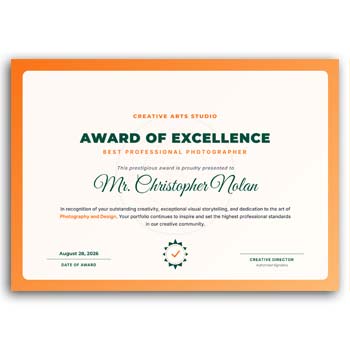
A Professional Award Certificate Format Template Editable Instant Download provides a ready-to-customize starting point for creating certificates without building the entire layout from scratch. You can personalize the recipient’s name, award title, organization information, date, signature details, and other editable elements to suit the occasion.
Standout Features
- ✓ Ready-made professional certificate layout
- ✓ Edit recipient names and award information
- ✓ Add organization or company logo
- ✓ Customize certificate title and description
- ✓ Change available text and colors
- ✓ Add date, signature, and designation
- ✓ Reuse the design for multiple recipients
- ✓ Suitable for corporate and professional recognition
- ✓ Prepare certificates without starting a new design each time
What Makes an Award Certificate Important?
An award certificate provides a formal way to recognize an individual’s achievement. It can be presented for outstanding performance, leadership, service, participation, innovation, attendance, or other accomplishments.
The wording and criteria should reflect the specific achievement being recognized. A clear certificate can make the recognition feel more meaningful and official.
Start With a Ready Design
Creating a certificate from a blank document can take time, particularly when you need an attractive layout with proper spacing and typography. An editable template gives you a prepared structure that can be adjusted to your needs.
You can focus more on the recognition message instead of spending unnecessary time building the basic layout. This can be especially useful when multiple certificates are required.
Advantages and Limitations
| Advantages | Limitations |
|---|---|
| ✓ Saves time during certificate preparation | • Recipient information must be checked carefully |
| ✓ Provides a consistent professional appearance | • Some occasions may require a completely custom design |
| ✓ Easy to personalize for different awards | • Template layouts may need size adjustments |
| ✓ Reusable for multiple recipients | • Printing quality depends on the chosen paper and printer |
| ✓ Supports company and organization branding | • Editable features depend on the template format |
| ✓ Suitable for digital and printed recognition | • Formal certificates may require authorized signatures |
Customize the Recipient Information
The recipient’s name is usually the most important personalized element on an award certificate. It should be entered exactly as it should appear on the final document.
You can also add the award category, achievement description, date, department, or other relevant information. A clear hierarchy helps the recipient’s name and achievement stand out.
Add Your Organization’s Identity
A certificate can represent the organization presenting the award. Adding the company or institution name, logo, website, and other branding elements can give the document a more official appearance.
If your organization already uses a consistent visual identity, try to keep the certificate aligned with it. This can create a stronger connection between the award and the organization.
Create Different Award Categories
One organization may present several types of awards throughout the year. Examples can include Employee of the Month, Best Performance, Leadership Award, Excellence Award, Innovation Award, or Long Service Award.
An editable template can be adapted for each category while keeping the main visual identity consistent. Only the title and relevant award details need to change.
Write a Clear Recognition Message
The description should explain why the recipient is receiving the certificate. A short and meaningful statement is usually more effective than a long paragraph.
The wording can mention the person’s achievement, contribution, performance, or participation. Keep the message aligned with the actual purpose of the award.
Add Date and Signature Details
The date provides a clear record of when the recognition was given. Signature areas can also be included for an authorized manager, director, trainer, principal, or other responsible person.
The number of signatures depends on the organization’s process. If a certificate is intended to be formal, make sure the appropriate person reviews and approves the final version.
Useful for Corporate Recognition
Companies can use professional award certificates to recognize employees for exceptional performance or contribution. They may also be used during annual events, team celebrations, employee appreciation programs, or internal competitions.
A consistent certificate format can make different awards look like part of the same recognition program. This can strengthen the organization’s overall presentation.
Related Corporate Design Resources
Professional certificates often form part of a wider set of branded business materials. A Simple Letterhead Design Generator can help create a basic branded document layout.
For another editable stationery option, explore this Editable Letterhead Design, which can be customized for business correspondence.
You can also check the Letterhead Design Editable Download when you need a reusable corporate document format.
Suitable for Training and Events
Certificates are not limited to employee awards. They can also be adapted for workshops, seminars, training programs, competitions, conferences, and professional events.
The title and recognition statement can be changed to match the specific occasion. This flexibility allows one basic design concept to serve different purposes.
Make the Certificate Visually Balanced
A professional certificate should give enough attention to the recipient’s name, award title, and recognition message. Excessive decoration can sometimes make important information harder to read.
Balanced spacing, readable typography, and appropriate use of branding can create a cleaner result. The final appearance should feel formal without becoming unnecessarily complicated.
Prepare Certificates for Multiple Recipients
When an organization needs certificates for many people, an editable master design can make the process more efficient. Keep the original version unchanged and create copies for individual recipients.
Update each copy with the correct name, award, date, and other required details. This reduces repetitive design work while keeping the certificates visually consistent.
Digital Certificate Preparation
Professional certificates can also be shared electronically. An editable design can be customized and exported into a suitable digital document for email, online platforms, or professional portfolios.
Before sharing a digital certificate, review the text and ensure the final file displays correctly on different devices. If authenticity is important, the organization may also use an appropriate verification system.
Printing the Final Certificate
For physical presentation, paper quality can have a noticeable effect on the final result. A certificate may look more professional when printed on suitable certificate or premium-quality paper.
Always create a test print before producing multiple copies. Check margins, text size, logo placement, alignment, and the appearance of signature areas.
Avoid Common Certificate Errors
Spelling the recipient’s name incorrectly is one of the easiest mistakes to make. Dates, award titles, job titles, organization names, and signatures should also be reviewed before finalizing the document.
It is helpful to have another person proofread the certificate when preparing a large batch. A short review can prevent avoidable errors in an important recognition document.
Professional Recognition and Awards
Awards and certificates are commonly used to acknowledge achievement in workplaces, educational environments, organizations, and professional communities. They can provide a visible record of recognition and accomplishment.
For general information about awards and recognition, you can explore Award on Wikipedia.
Certificate Design Inspiration
A strong certificate design usually combines formal typography, clear hierarchy, balanced spacing, and appropriate decorative elements. The design should support the importance of the achievement rather than distract from it.
For additional visual ideas, you can explore Certificate Templates and compare different professional certificate layouts.
Simple Editing Workflow
Begin by adding the organization name and logo. Replace the sample recipient name, award title, description, date, and other information with the actual details.
Adjust available colors or text elements if necessary. After completing the edits, review the certificate carefully before exporting or printing it.
When This Template Is a Good Choice
An editable professional award certificate is particularly useful when an organization needs to recognize several people using a consistent design. It provides a practical starting point while leaving room for personalization.
It can work for employee recognition, professional awards, competitions, training events, academic activities, and many other occasions where formal recognition is appropriate.
Final Thoughts
A Professional Award Certificate Format Template Editable Instant Download makes it easier to prepare polished recognition documents without designing every certificate from the ground up. You can customize recipient details, award titles, organization branding, dates, signatures, and other available elements.
For businesses, institutions, event organizers, and professional groups, a reusable certificate design can save preparation time while maintaining a consistent presentation. Always proofread the final certificate and confirm that the appropriate person has approved the information before presenting it.
2 Comments
2 Pingbacks