Loading Design... please wait.।
Quick Editable Quotation Format & Instant Download
A quotation is often the first formal document a customer sees before deciding to place an order. When the pricing, product details, business information, and terms are presented clearly, it becomes easier for both sides to understand the proposed transaction.
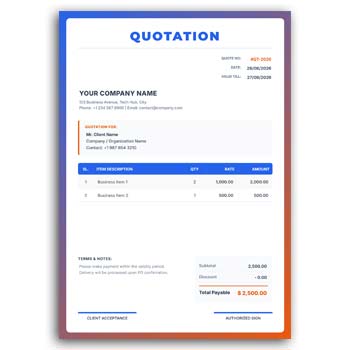
A Quick Editable Quotation Format & Instant Download provides a ready-to-use structure for preparing professional quotations without spending too much time on formatting. You can update customer information, products or services, prices, dates, company details, and other editable sections according to each business requirement.
What You Can Do Quickly
- ✓ Replace sample text with your own information
- ✓ Add products or service descriptions
- ✓ Change quantities and pricing
- ✓ Enter customer and supplier details
- ✓ Add quotation number and issue date
- ✓ Upload your business logo
- ✓ Modify available colors and text
- ✓ Include discounts and additional charges
- ✓ Reuse the same layout for new quotations
- ✓ Prepare a final document for quick sharing
Understanding a Quotation Format
A quotation format is a structured document used to present proposed products, services, prices, and business terms to a potential customer. It gives the buyer an overview of what is being offered before an order or agreement is finalized.
The exact contents can vary depending on the type of business. A product quotation may focus on item quantities and prices, while a service quotation may include project scope, service fees, delivery timelines, and conditions.
Why Quick Editing Matters
Businesses frequently prepare quotations for different customers. Recreating the layout every time can be frustrating, especially when the same company information and design are used repeatedly.
An editable format allows you to keep the main structure ready. You can simply replace the customer-specific information and update the pricing before preparing the final version.
Advantages and Limitations
| Advantages | Limitations |
|---|---|
| ✓ Makes quotation preparation faster | • Prices need to be updated for each customer |
| ✓ Reduces repetitive formatting work | • Calculations should be checked before sending |
| ✓ Easy to customize for different orders | • A quotation does not confirm a completed sale |
| ✓ Reusable for future business proposals | • Complex projects may require additional documentation |
| ✓ Helps maintain a consistent business image | • Template features depend on the editable format |
| ✓ Convenient for quick digital sharing | • It does not replace a complete accounting system |
Add Customer Information
A quotation should clearly identify the customer or organization receiving the offer. Depending on the business, you can include the customer’s name, company name, address, email, phone number, or other relevant details.
Accurate customer information also makes future record keeping easier. Review these fields before sending the quotation, particularly when preparing documents for multiple clients.
Enter Products or Services
The main body of the quotation should explain what you are offering. Product-based businesses can list item names, descriptions, quantities, units, and prices.
For service businesses, the same section can be adapted to describe individual services, project stages, packages, or deliverables. Keep descriptions short enough to remain easy to scan.
Keep Pricing Transparent
Customers generally want to understand how the final amount has been calculated. Showing unit prices, quantities, subtotals, discounts, taxes, or additional charges separately can make the quotation easier to review.
Double-check all calculations before sending the document. Even a small pricing error can create confusion during order confirmation.
Add a Quotation Number
A quotation number can help businesses track different offers. It can be particularly useful when several quotations are prepared for the same customer or during a busy sales period.
You can also include the quotation date and validity period. This provides a clearer reference when prices or terms may change over time.
Customize Your Business Branding
A quotation can carry your company’s visual identity through its logo, name, contact information, website, and available brand colors.
Consistent branding across quotations, invoices, letters, and other documents can make business communication look more organized. It can also help customers quickly recognize documents coming from your company.
Related Invoice Tools
Quotations are often followed by invoices when a customer confirms an order or service. For this reason, businesses may also find a Quick Invoice Generator useful for preparing transaction documents.
If you need a PDF-oriented invoice option, you can explore Create Invoice Online Free PDF for another way to prepare invoice documents.
Another related option is the Free Online Invoice Generator, which can be useful when you need to create invoices for customers after a quotation has been accepted.
Quotation vs Invoice
A quotation and an invoice serve different purposes. A quotation normally communicates a proposed price or offer before the transaction is finalized, while an invoice generally requests payment for goods or services that have been supplied or become payable.
Understanding this difference helps businesses use the correct document at the right stage. A quotation should not be treated as proof that payment has already been made.
Add Business Terms
Depending on your industry, a quotation may include delivery information, payment terms, validity period, warranty details, project timelines, or other conditions.
Only include terms that accurately represent your business agreement. Clear conditions can reduce misunderstandings between the supplier and customer.
Suitable for Products and Services
An editable quotation format is not limited to one industry. Retailers, wholesalers, freelancers, agencies, manufacturers, suppliers, contractors, consultants, and service providers can adapt the structure.
The item or service section can be changed according to the business model. This makes a reusable quotation design practical for many types of commercial communication.
Prepare Multiple Quotations
Sales teams and small businesses may need to send several quotations in one day. A reusable master format can make this process much quicker.
Keep your company information and basic layout ready. Then duplicate the document and update only the customer, product, price, and quotation-specific information.
Make the Document Easy to Scan
Customers should be able to find the important information quickly. Product or service names, quantities, prices, totals, and validity details should have a clear visual hierarchy.
Avoid unnecessary decoration that takes attention away from the commercial information. A clean quotation often feels more professional and easier to understand.
PDF and Digital Sharing
A finalized quotation can be shared through email, messaging platforms, websites, or other digital communication channels. PDF is commonly useful when you want the document structure to remain consistent across devices.
Before sending the final file, open it once and check the layout. Make sure no text, table, logo, or total amount has shifted unexpectedly.
Printing a Quotation
Some businesses still provide printed quotations, particularly for formal proposals, institutional orders, or face-to-face business meetings.
If you plan to print the document, test one copy first. Check the margins, paper size, readability, logo quality, and table alignment before producing multiple copies.
Avoid Common Quotation Mistakes
Incorrect quantities, outdated prices, missing customer details, wrong quotation numbers, and calculation errors are common issues that can affect business communication.
Create a simple review routine before sending every quotation. Checking the final document for accuracy can prevent unnecessary follow-up and corrections.
Quotation in Business Communication
A quotation is an important part of the sales process because it communicates an offer to a potential buyer. It can provide a written reference for proposed prices and conditions before an order is accepted.
For general information about quotations, you can explore Quotation on Wikipedia.
Design Inspiration for Business Documents
A professional quotation usually benefits from a simple structure, readable typography, organized pricing columns, and consistent company branding.
For more layout ideas, you can explore Business Document Templates and compare different approaches to business document design.
A Fast Editing Workflow
Begin with your company name, logo, address, and contact information. Then enter the customer’s details and replace the sample products or services with the actual quotation items.
Update quantities, prices, discounts, totals, dates, and applicable terms. Finally, proofread the document and export or save the completed version for sharing.
Who Can Benefit From This Format?
Small businesses, freelancers, suppliers, retailers, wholesalers, agencies, contractors, consultants, and service providers can use a quick editable quotation format.
It is especially useful for businesses that prepare quotations frequently and want to avoid repetitive design work. A reusable format can keep documents consistent while allowing each quotation to remain personalized.
Final Thoughts
A Quick Editable Quotation Format & Instant Download can simplify the process of preparing professional business offers. Instead of rebuilding a quotation layout each time, you can update the relevant customer, product, service, pricing, and company information within a ready structure.
Used correctly, an editable quotation format can save preparation time and make business communication more organized. Always verify the final prices, calculations, customer information, terms, and quotation validity before sending it to a client.
3 Comments
3 Pingbacks